Very basic question about server settings

Server Version#: 1.19.4.2935
Player Version#:N/A ?
I setup Plex Server a few years ago on my QNAP NAS, but ended up moving house, and not having a good place for my NAS (Plex Server host) for a while, so it wasn’t used for a while. I recently plugged it in, and fully updated everything, and now it’s working again. I’m about to migrate the server to a new host, and the instructions I’m reading refer to settings that I don’t see. For example, a typical instruction I see is:

Sign out of your account under Settings > Server > General in Plex Web App

(that’s just an example of the reference to Settings/Server/…, nothing specific for this post)

I’m logged into the server using 'http://(local ip of server):32400/web on my laptop, on the same local network as my NAS, so I assume this means I’m in the ‘Plex Web App’.

When I click on ‘settings’ icon near the top of the screen (the wrench / screwdriver icon), the main body shows ‘Web Client General’ and tells me the version is 3.108.2. Nothing else of much interest there.

On the left side of the screen, there is a ‘settings’ section. Entries there include ‘General’, ‘Remote Access’, ‘Agent’, ‘Library’, etc … but no ‘Server’.

So when I try to follow the example instruction posted above, which says “Sign out of your account under Settings > Server > General in Plex Web App” , I don’t see any ‘server’ component in the menu structure on the left. Now, If I choose ‘General’ in the settings section on the left, then sure enough, right there, I see (my server name) - ‘General’ and I see a ‘sign out’ button next to the words ‘…signed in as …’. So I guess I’m in the right place. The instructions imply there should be a ‘server’ section on the left.

Also, while asking basic questions, when I visit ‘General’ on the left, in the ‘Web Client’ section, I’m told the web client version is 3.108.2. What defines the version I see here? I assume this ‘web client version’ is embedded in the server package and I get whatever version is appropriate to the server version I am using (perhaps also dependent on which client machine I’m using - because when I access the same server from my Windows 10 / Chrome setup, I see the web client is version 4.30.2 (right now I’m using my Mac laptop with Chrome browser, and that’s revealing the 3.108.2 web client version). I guess I’m not sure why I’m seeing two client versions when both my machines are using Chrome … but maybe it’s because I’m using Mac and Windows.
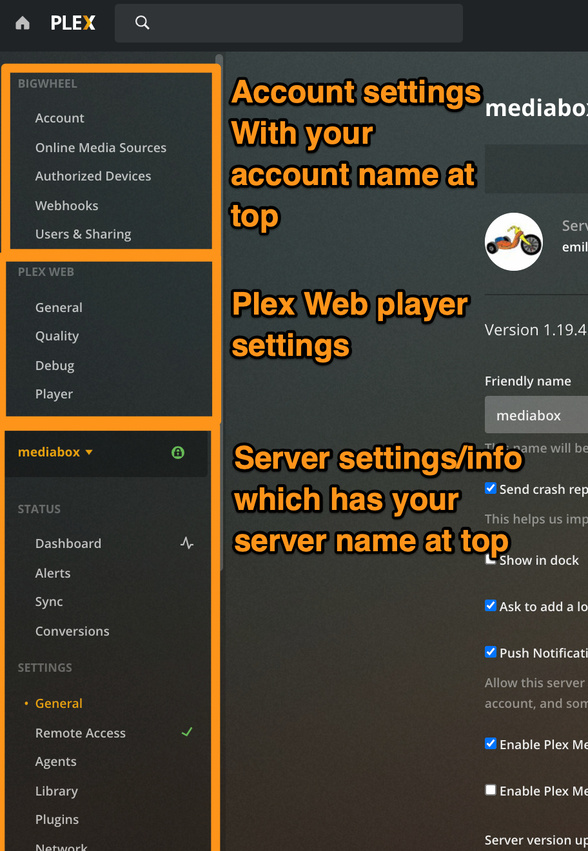

If you don’t see your server name and settings for that server below it then your account is not signed into any server.

Yes, that’s all there so no problem. I was just thrown by the absence of a ‘server’ menu entry on the left side.

Any thoughts about my question about web client versions?

The web client is the actual interface and web player.

when you visit. IPadress:32400/web you are loading the web client which is included with the server. this is often called the “local” web client. The fact that your local web client loads as 3.108 mean you are running an old version of server from that IP

When you visit. app.plex.tv. you are loading the “hosted” the web client. ( it initially loads off of our backend). this version is almost always newer than the one that comes with server. and IMO should almost always be used except for initial access and claiming/signing into a new server

In either case it is being loaded into browser memory. Also important to know that when using the “hosted” version your media is not going out to the internet and back when playing local content.

Well that is very odd then. I’m sitting here at home (where the PMS / NAS is) and I’m logged into the server on both my windows 10 laptop and my macbook air laptop. Both show the same URL in the address bar ( (local IP):32400/web ). Both show the same server version under Settings / General - 1.19.4.2935. But when I scroll up to the Plex Web / General menu entry, I see ‘4.30.2’ on my windows laptop but 3.108.2 on my Mac!

I assumed this was because the server package would include multiple web client versions, and deliver different versions to different client environments … so one version for a Mac, another for Windows perhaps, or, perhaps dependent on the Chrome browser version. I’m using Chrome on both machines. My windows machine has Chrome Version 83.0.4103.97 (Official Build) (64-bit). My Mac has Chrome Version 81.0.4044.138 (Official Build) (64-bit). Let’s see if I can’t update the Chrome version on the Mac (Mac Catalina 10.15.4)

EDIT TO ADD - updating Chrome on my Mac caused the Plex Web Client version to go to 4.30.2! So it does seem like the local server can deliver multiple client versions depending on browser version.

there is not multiple web clients stored on the server.

if you are using chrome on the mac, it might be using an old cached version, try clearing the chrome cache or force refreshing of the web page.

alternatively simply use Plex Web for access everywhere.

Is the url 127.0.0.1

This topic was automatically closed 90 days after the last reply. New replies are no longer allowed.