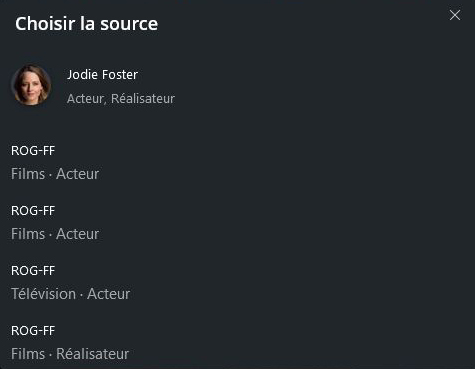
The more I get movies, the more I have a “+1” or “+2” information when I’m searching for an actor. By example, searching for “Jodie Foster” for whom I have 6 movies, I get that answer :
1 as a movie-director on PC-1
1 as a television-actor on PC-1
3 as a movie-actor on PC-1
1 as a movie-actor on PC-1
… and, if I perfectly understand why I have a “+3” to show actor/director or tv/movie specifications, I really don’t know why there is ONE SINGLE movie apart ? It’s stored in the same driver, same bank, same everything.
Why ?
And, even more, how can I change that to associate every movies in the same “answer”.
Hope my english isn’t too poor, and my explanations clear enough.
The +1 refers to the libraries where Plex found that result. The search results usually list on what server this result was found; if there’s results in different libraries of that server Plex will indicate that with the +x button and clicking on the item will bring up an option to select which library to show.
Thank you for your quick answer tom80H but, as you can see on the screenshot, I only have 1 library (named ROG-FF). The first two lines are strictly identical, aren’t they?
If you have 1 TV library & 1 for movie library then you should see both in the results, that’s normal as plex doesn’t share cast listings across libraries.
However, your seeing multiple in the same library. This is most likely caused by a change plex made a while ago related the interval ids they use to store cast members. To fix you’ll need to force refresh the metadata on your libraries which will update the ids.
Also optimise the db afterwards to rebuild the search index.
Thank you very much dokuro. It’s worked perfectly well.
To secure all this, and because you seem to know well this application, could you tell me what I have to do to be sure that, because I’ll soon to move to a new computer, I don’t lose all my work on my libraries (french titles, sorting, etc.)?
Thank you again.
I’ve done what you are intending to do many times and it works well. Keep your mount points where your media is stored exactly the same between source and target systems and if you follow the steps above you should not run into any major problems.