What to enter in location for address on terramaster nas

Server Version#:latest
Player Version#:latest

ok so i have been running my plex server on my PC this getts annoying keeping it on all night
I also have a wd mycloudultra

I have tried using this but as library is very big it slows down and not good with the amount of files I also invested in a terramaster nas to test ,
when running from my PC I just enter \TNAS\usbshare7 to add folder to find folders on the terra nas or

on my PC I enter \TNAS\usbshare2 to enter to get files from nas or
\MYCLOUDEX2ULTRA\My Book Duo\tv11 to get files from wdcloud

the problem arises when trying to turn my terramaster as the server it can find the files on the nas and attached to nas via USB but I can seem to get the server to see the wdcloud to get the files from there

all 3 are connected on the same network and as mentioned pc can see them all as can the wdclud

I have tried entering /shares/Volume_1/4k films/tv 4k
also IP address \192.168..\tv11
and nfs://192.168../nfs/tv11

I have also tried another software emby and loaded it up on the tnas
now when I click folder to browse on this one it comes up connect to internet which then shows me my wd cloud also my PC and also my wdcload and works to allow connection the the folders so for this reason I cant see it being the terramaster I just need to know how to enter the location
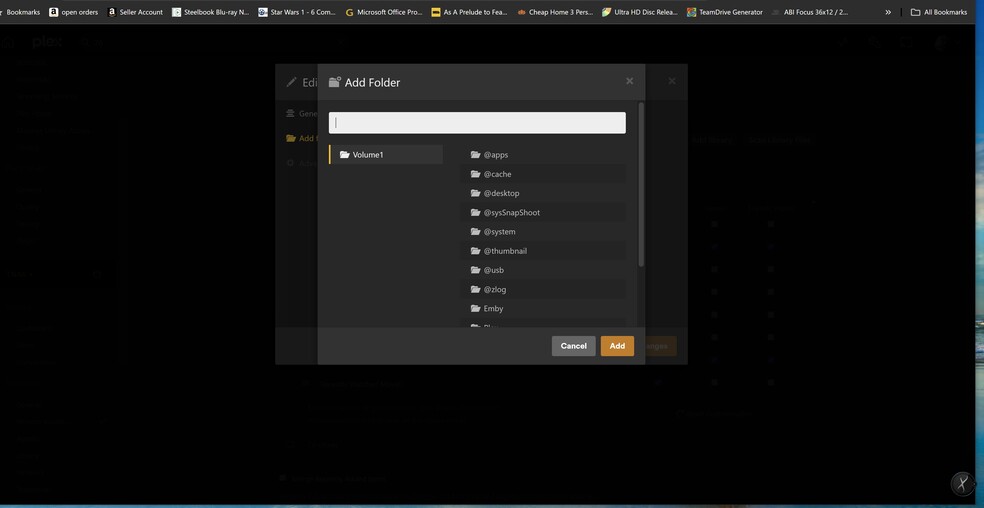
Add folders to your library

seems weird I also remember plex used to have a add cloud account like google drive but that seems to have disappeared as well unsure why would think that was a helpful thing

You tagged the post as “server-synology” but do not mention a Synology NAS in the post.

It is unclear what you are trying to accomplish.

Can you provide some additional details?

  • Where is Plex Media Server running?

  • What version of Plex Media Server is installed?

  • If running Plex on a NAS, what is the make/model?

  • If running Plex on a PC, what operating system (Linux/Mac/Win)?

  • Where are the media files you are trying to access?

  • Anything else to clarify what is happening


EDIT: Also, please do not open multiple posts for the same problem. I closed your two other posts with a reference to this thread.

its a TERRAMASTER T6-423 6Bay NAS Storage i am trying to get my nas to see my files on the wdcloud ext2 so I can add the folders in the terra the terra can only see the volume 1 on it and USB on it

they are all running on the same network
PC and wdcloud and nas i want to get rid of PC server and wd cloud
the wd cloud can see terramaster as can PC

the servers are running on each of these 3 in total whilst i was testing i know no i am going to stick with terramaster but need to be able to connect it to the wdcloud

also as mentioned i was able to install emby on the terra nas and that software found it as it had a drop down to connect internet connections which worked but i rather stick with plex

PC its running win 10 pro

on the terramaster i have tried adding folder by entering these 3 places but they not worked
/shares/Volume_1/4k films/tv 4k
also IP address \192.168.. \tv11
and nfs://192.168.. /nfs/tv11

files are on wdcloud ext2 that i need to get to on the terramaster which as said is same network

here is wdcloud setting and works to connect to terramaster

here is setting for terramaster none these allow me to connect to wdcloud

yes because u mentioned posted under syology which was wrong place so tried moving it

Goal: Run Plex Media Server on the Terramaster T6-423 NAS and access media files stored on a WD My Cloud EX2, correct?

At a high level…

On the WD: Share/export the desired directories via NFS (if supported) or SMB/CIFS. This is done by the WD, not by Plex. Since you can access the WD from the PC, the directories are already shared by SMB.

On the Terramaster:

  • Mount the directories shared by the WD. This happens with the Terramaster, not with Plex.
  • Add the paths to the appropriate Plex libraries. The Terramaster runs Linux, so the path will look like a Linux path. Ex: /mnt/WD/movies/ ← example, may be different depending on how Terramaster works.

If possible, use NFS instead of SMB. NFS is native to Linux (The OS on the Terramaster) and has less overhead than SMB.

You will also need to pay attention to file permissions, to make sure the Terramaster can see the files on the WD.

I cannot help with specifics, as I’m unfamiliar with both platforms (I have a Synology NAS). Hopefully others can help fill in the blanks. You might also contact WD & Terramaster support.

No worries. I retagged this post to server-terramaster. That will make it easier for people with Terramaster NAS to see the thread.

ok the folders are all ready shared on the wd

file permission should be ok as mentioned tried emby server as a trail on the termaster and worked fine it could see the wd folers just by clicking add folder then internet connection and there it was wd files and folders

I am unsure what you mean when you say mount (Mount the directories shared by the WD. This happens with the Terramaster)

no idea how to mount directories

It is the Linux version of “Add a network location” in Windows.

ok so how do I do it ?? i have very little knowledge of linux

You’ll need to look at the Terramaster docs or support forums for “mount remote folder,” “mount remote share,” or similar terms.

How Terramaster does it is different from Synology, QNAP, WD, etc.

See Automated folder sync between TM and Synology ? - TerraMaster Official Forum

It discusses accessing data on a Synology NAS.

You can ignore the stuff about synchronization & backups, as that does not apply to your situation.

The post of interest is: “To mount remote folder from Synology, you can go to “control panel > remote folder”.”

In your case the Synology would be your WD.

Hopefully that gets you pointed in the right direction.

ok brilliant thanks for your help just one other little bit i have now mounted the drive

what do i enter in the add folder to now scan the folder is it 192.168.1.*
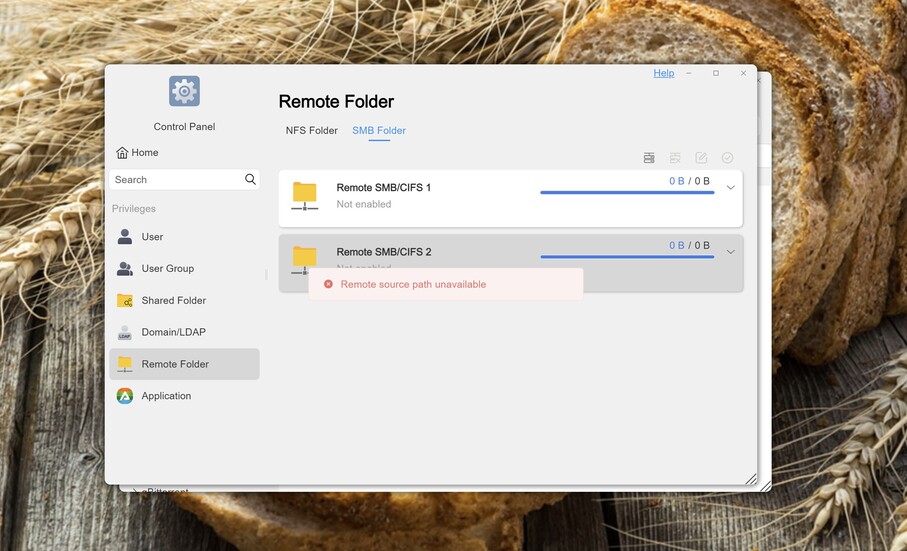
or /volume1/public or something else ?? as i have tried both and nothing i also noticed it says not enabled pic 1 when I click to enable it then comes up remote path unavailable even though it seems to be available when adding

any idea how i enable it ???

i also now it works on emby server as a test i installed on the terramaster and can find the folder with no problems by clicking add folded then scroll down to network and its there and adds as smb://192.168.0.*/4k films so i know the folder can be excesses on the network

The Remote Folder screenshot shows the folder is mounted to /Volume1/public.

See if you can navigate there with the Terramaster File Manager, and look for the folder mounted from the WD. Make sure you can drill down and see the media files.

If you can see it in File Manager, then you should be able to add it to a Plex library.

no if i go to Volume1/public its just a empty folder
for some reason if you look at the screenshot of the remote folder it says not enabled underneath remote smb/cifs 1

when I click to enable it I just get a message remote source path unavailable so its not mounting it
even though it allows me to create it as a mount path

A couple things to check:

On the Terramaster, does /Volume1/public exist, before mounting the WD directory? If not, you’ll need to create it.

When you mounted the remote folder from the WD, the username & password must have permission on the WD to login and read the media files.

yes volume1/public folder is there it was created when adding the mount

when it was also added I had to put in the user name and password to the wd for it to be added

so the permissions are there as is the folder so I cant work out why it wont enable so I can mount it

I have tried adding a different mount and folder and its the same problem see pic below just wont enable

and as said it works in emby without mounting or setting any permissions to show you what i mean see pic below 21 and 22 this is emby i just click on network and select the path and that’s it just scans and adds the wd folders


I’m not sure how to make the mount work. Suggest you contact Terramaster support or look in their support forum. They should be able to help you. Not blowing you off, I just don’t know how else to proceed. Someone familiar with Terramaster NAS can probably provide an answer in a couple of minutes.

How Emby handles things does not matter. Plex Media Server looks at the file system. If you want Plex on the Terramaster to access files on the WD, you’ll have to get the file mounts working.

thanks for your help its been a great help

ok you may be able to help with this next bit or perhaps not lol

I am being told by terramaster that they think its because the wdcloud is not mounted and it has to be mounted as well it but I am unsure if this is correct or not as there’s a lot of people on the forum at terramaster all saying they got the same problem that they cant enable the smb folder and getting the same error path not available

anyway they are telling to get in touch with wd cloud to ask how to mount a folder on the wdcloud do you have any ideas long shot I know lol

someone point me to Reddit - Dive into anything
but as a newbie I really don’t understand it what is being said
something along the lines install sudo xbps-install but no idea where to get this from

anyway apparently some others have sorted it by using nfs folder mount no idea if that will work or not as it wont let me enter the folder path

going back to the nfs folder option
it tells me on the wd cloud for nfs
Mount Point: nfs://192.168.0.*/nfs/4k films but terramaster says remote path unavailable and example is 192.168.1.1:/volume1/folder
any ideas of how to enter the mount point of wd ??

think I am getting out my depth lol

The Terramaster needs to access the files on the WD. It is same way your PC accesses files on the WD, just using Linux terms instead of Windows terms.

In Windows, you can “map a network drive” so that the WD appears as a Windows drive, E:, F:, etc. You can also use UNC paths like \server-name\path-to-files\

Linux refers to it as “mounting” a drive. Also, Linux does not use drive letters like Windows, just path names, like /home/media/movies/.

To throw another kink in things, Windows and Linux have traditionally used different protocols (kinda like languages) to talk over networks. Windows has traditionally used SMB (Server Message Block). Linux has traditionally used NFS (Network File System). The Terramaster should be able to speak both SMB & NFS. The WD uses SMB. I’m not sure about its NFS capabilities.

So, where does all this go?

The Terramaster needs to mount directories that are shared (or “exported”) by the WD. The WD does not need to mount any directories shared by the Terramaster.

  1. Find out if the WD can share directories using the NFS protocol. WD Support should be able to help. You might login to the WD and look in the areas for sharing directories. There might be info about NFS there as well.

    You already know the WD can share using SMB, since that is how your PC talks to it.

  2. Once you know if the WD can share using NFS you can get back in touch with Terramaster. They should be able to help with mounting (mapping) the shared WD folders to the Terramaster NAS using either SMB or NFS (if supported by WD).

Note : You will also need to ask Terramaster for assistance with file permissions, to make sure Plex Media Server has permission to see the files. On other Linux systems, Plex Media Server runs using the “plex” username, so pretty sure it is the same on Terramaster. plex will need at least read-only permission to the files stored on the WD (the same as it need for files stored on the Terramaster itself).

When the WD shares are mounted on the Terramaster, you can add them to a Plex library. You will follow a Linux file path. It will look something like /public/WD/movies (that form, the actual path may be very different).


Regarding the Reddit post for /etc/fstab, do not worry about that. The Terramaster should handle all of that for you automatically. You should not need to edit that file.

Additional Details: /etc/fstab is a Linux config file. It has the details of how to access local and network drives. If you were running Linux on a PC, you would have to edit that file to access a NAS on the network. However, the user interface of the Terramaster hides all that. You use the Terramaster web interface to tell it to mount a shared folder. It then makes the appropriate entries in /etc/fstab “under the covers” so you do not have to deal with Linux command syntax.


Hope this helps.

ok thats a great help i really appreciate the time you taken out to respond

ok the wd can handle nfs as well as smb in fact it tells me the path is

Mount Point: nfs://192.168.0.*/nfs/4k films
Unfortunately I don’t know how to enter it correctly as the terramaster says its incorrect if I stick in
nfs://192.168.0./nfs/4k films the annoying thing is I am sure synolgy work pretty much the same but terramaster support is not to good there is quite a few people with the exact same problem and cant enable the mount and all teramaster has replied is well we have tested in laboratory conditions and can mount to a wd and others
which is of no help at all as you can guess

ok getting back to nfs do you know what to put into the mount path hopefully its the same as you would enter it on synolgy
it just says remote path is unavailable and gives a example as
192.168.1.1:/volume1/folder

so I have tried entering in the nfs path
nfs://192.168.0.0/nfs/4k films
192.168.0.0/nfs/4k films
192.168.0:0/nfs/4k films
192.168.0:0/nfs/
all are saying remote path unavailable

terramaster have also just responded again and added about smb I have not added “//” and need to add the correct path
I have put //192.168.0.0/4k films which it accepted as a valid path for me to apply but made no difference adding // at the beginning

//192.168.2.12/mnt. is how they say it should look