h1ren
June 5, 2019, 5:52pm
1
Server Version#:latest
For over a month I have been dealing with this issue. I have tried every trick I could find in the forums. I did a clean un-install (using Revo Uninstaller) and then a clean install. I have turned off VPN and try to run it. It’s still the same issue.
There’s got to be a better way than going through these many steps and that too without any resolution.
Please advise!
EDIT: I never had this problem before a month. It worked seamlessly (except for remote connection–that’s a problem in itself).
Now that you have described how you’ve attempted to fix your problem…
e.g. what platform are you running your server on, did it already work for you or are you stuck in installation/setup…
h1ren
June 5, 2019, 5:57pm
3
LOL.
It’s on Windows 10 home.
Anything more?
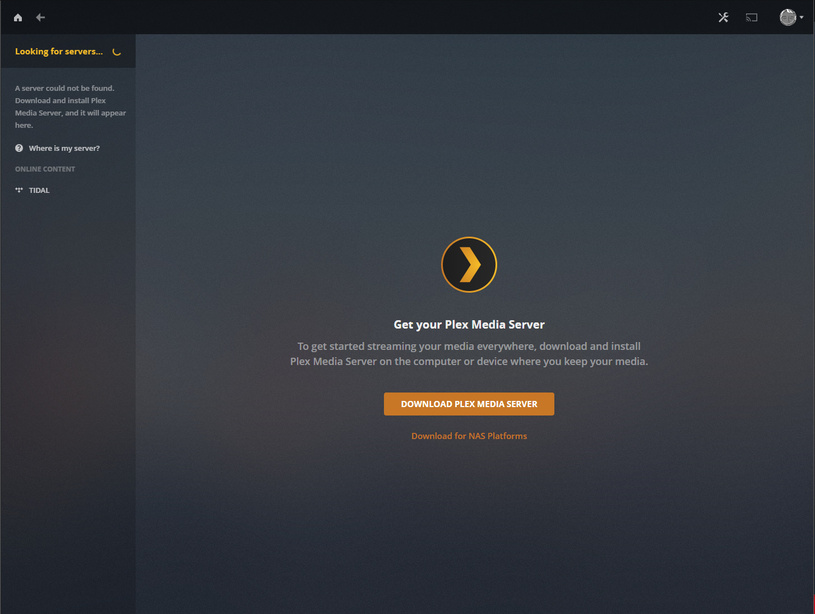
so… how exactly does your server not show?https://127.0.0.1:32400/web )
h1ren
June 5, 2019, 5:59pm
5
This is what I keep seeing!
For a new setup, you cannot use https http://127.0.0.1:32400/web instead, in an ‘incognito’ browser window.
h1ren
June 5, 2019, 6:14pm
7
Nope–same screen shows up!
I have tried on Chrome/Firefox/Edge/Opera/Brave: private and regular.
Is plex server running at all? (take a look into the Task Manager [CTRL+Shift+Esc] )manually from the default location.https://support.plex.tv/articles/200250417-plex-media-server-log-files/
h1ren
June 5, 2019, 6:32pm
9
It’s running per Task Manager.
I don’t see an option to “Settings > Manage > Troubleshooting” in Settings. It’s not under “Debug” either.
I wrote: fetch log files manually
No. Please follow the link have set above. It details how to fetch log files manually from the server. You just need to scroll a little bit downwards.
What is the “IKEv2-Surfshark Connection” network connection?
h1ren
June 5, 2019, 6:51pm
15
That’s my VPN. I turned that off and run the server without it. Still same issue. Let me try again.
Ok. Now I am seeing a remote server that I once connected to but not the server on my computer. It’s running, I checked.
You are not using an incognito browser window.
Please export the Plex registry branchHKEY_CURRENT_USER\Software\Plex, Inc.
(unless it is totally empty)
h1ren
June 5, 2019, 7:04pm
18
Not working in InCognito as well.
h1ren
June 5, 2019, 7:06pm
19
Sent the zip for Plex Registry.
Yes, the registry is almost completely empty, as one would expect after a total uninstallation. So, no surprises there.
I think I need to put up the bat signal for @sa2000 because I am out of my depth here.
h1ren
June 5, 2019, 7:11pm
21
Ok. Sounds good.
Wish there was a reset button, as it was working great!