I’ve been having this issue intermittently for over a year, as apparently many others have as well. The only solution prior to today has been for me to completely reboot my PC with the Plex server. Then, the mobile app on my Android device would function normally, rather than showing as Offline. Based on the few recent posts about signing out of the app, I tried that. It worked. All I did was sign out then sign back in again. I don’t have the automatic login checked. As soon as I logged back in again with the same admin account, it refreshed and appears to be working properly. So, as someone else mentioned, maybe someone is on to something. Hopefully this long-standing issue will be solved in the near future. I will see what happens as time goes on and whether this solved the problem when it reoccurs. I can at least live with this as a fix rather than the whole system reboot process.
Hey, Plex… any update on this?
I’m having the same issue as multiple users. Any of my Android devices are having intermittent (happens most of the time) issues with displaying the home hub.
Related Logs:
Resuming HomeActivity.
06-21 09:03:06.382  i: [RefreshHomeHubsTask] Refreshing home hubs
06-21 09:03:08.686  i: [HomeHubViewModel] Refreshing home hubs is value null (no data): (false), force refresh requested: (true)
06-21 09:03:08.693  i: [HomeHubViewModel] Fetching home hubs (fetchFromAllSources: false)
06-21 09:03:08.693  i: [RefreshHomeHubsTask] Refreshing home hubs
06-21 09:03:08.693  i: [FetchHomeHubsTask] Fetching home hubs (adding PMS hubs: false)
06-21 09:03:08.693  i: [RestoreItemsTask] No items found to restore
06-21 09:03:08.693  i: [PromotedHubsProvider] No media providers discovered, waiting...
06-21 09:03:08.783  i: [PromotedHubsProvider] Stop waiting for promoted hubs from persistence
The only thing that works is changing to a different server… and then back to my local server.
Or I can Manage Home Screen -> Reset to Defaults
Edit -
While watching the server side logs and clicking through on the Android client, I’m noticing that when I select any of my libraries the logs light up. When I select/refresh home, nothing happens in the server side logs. Something is happening with the request on the client side.
I originally thought it might be my internet connection or perhaps my ISP because I would lose connection to all 4 of my Plex servers out on the road.
But I installed Emby on the same machine as one of my Plex servers, and when I would not be able to connect with Plex I would use another phone and connect with Emby just fine - while the Plex servers remained offline, even the one on the same machine that Emby was running from.
They eventually come back online but not very quickly.
Very frustrating.
Fix Found! Not sure if anyone found a fix for this but I was having the same problem and went into Settings>Remote Access and unchecked the ‘Manually specify public port’ option, hit ‘Apply’ and ‘Enable Remote Access’ and now everything works fine.
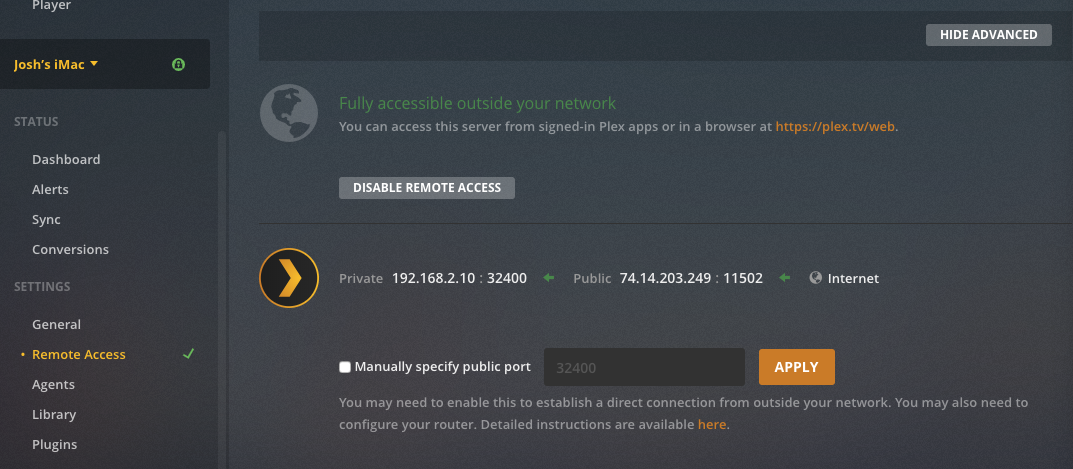
Nope, it happened when I had it automatically assign a port and when I manually assign a port.
I also disabled vpn while doing all that and then turned it back on afterward, not sure if that helps
I do not use a VPN.
I had the same issue. Clear app cache and data. Worked for me on Android.
Hi, same issue here, only solution is switching user, please fix it. I’ll share server and client logs soon
I came to the forums to open a topic saying I was having this EXACT problem. At first I thought it was an issue with my server but when I’m on web it appears online just fine. With that said the current work around (for me at least) is to go to the home screen and “reset to default”.
The kicker is I am NOT on iOS. I use a Galaxy Note 9 so this seems to just be an issue with the new app collectively not just on any one platform.
Don’t worry. Despite all the Android users being requested several times to make a thread in the Android mobile section almost all posts over the last few months are also from Android only users.
Personally if I was on the iOS team I would ignore the thread too.
It gets ignored because they do not know how to fix it.
Just like with many, many bugs, maybe they try for a bit then once they decide that they have no clue how to fix the bug they stop engaging. Its par for the course with Plex.
Yeah it must be so frustrating when 4 or 5 users have an issue, that otherwise can’t be reproduced.
Their life “Ruined by Plex” (™)

over 18K views, 114 users, 193 replies, over a year without a fix. I would say it affects more then 5 users,
Maybe go troll another thread.
Views?
Even making allowances… lets say that 70% weren’t actually reporting their Android mobile issue in an iOS thread (even though they are).
4-5 sets of logs provided, so 4 or 5 people have an issue.
Always easy to tell the ones who are far too lazy to supply logs. They whine the loudest.
Not that I’m naming names.
“Trolling” over (as well as common sense) unless you feel the urge to continue.
#Plex Ruined my Life.
I think this has something to do too.
To “fix it” signing out an in again was enough. Not clearing cache or anything else.
I’m getting this on my android now. It will show my server and all my media, but there won’t be any thumbnails and it shows each section as OFFLINE. The server is reachable by any other device. If I use the search, however, on my Android, I can still find and play media.
I uninstalled and reinstalled, used device cleaners, nothing.
Why is this issue still going on after nearly 2 years? How is Plex doing nothing about this?
YES! This has been very aggravating. I have an Android phone and have been experiencing the same thing.
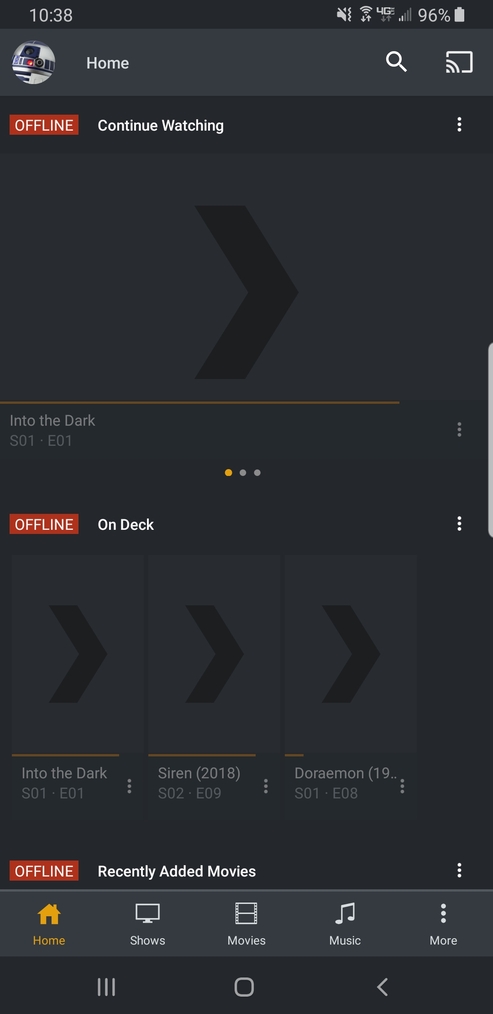
Please make this issue a priority!
I get this issue and so do people that I share with.
I’m running on Android, some users with iOS. Using Plex docker for the server.
This is not the same thing. I’ve been using plex for…god I don’t even remember how long. I know it was back when I had a 360 and Plex was super young.
Anyway the point is the current issue is with the NEW app that was just released. Plex went through a redesign, the issue with servers being offline has been happening since then. Just to verify that you are seeing the same issue that I’m reporting, if you move over to the “TV” or “Movies” tab and see your server as being online but it’s offline when you go to the home tab. this is the issue I’m talking about
