I had this same issue. I have a Note 8. I went into app setting force stopped the app. Cleared the cache and restarted the app then it worked. Not sure if fix for all, but it fixed mine.
Same issue here. Android. Newest version 7.11.2
Smh
This discussion is in the Apple section. If there are issues with Android, it’s probably best to create a new post in the Android section so that the Android team have better visibility of it, and don’t need to try and filter what’s Apple and what’s Android 
They also, don’t provide and answer to the original problem, but instead create another issue altogether, in order to distract from the fact that Plex Admins can’t problem solve for sh.it!
Good luck with that, I’ve been learning that Plex is a joke, a bad and rather unlucky joke.
I was able to fix this on my Android by Clearing the Cache & Data (poor man’s uninstall) within the Application Manager. (Clearing Cache alone didn’t work).
We’ll see how long it lasts.
2 Likes
Ive been having this issue recently and none of the above fixes are working. Ios app is showing offline on home screen. If i move over to movies, i can stream and play everything as normal. Only when im on “home” it shows offline and everything is greyed out seems a bit odd. Ive tried closing app, reinstalling app, ofline mode! Any clue??
Same here, Clearing Cache & Data fixed the issue. It’s frustrating that Plex keep adding features that no one wants, fixing the UI when it wasn’t broken, and ignoring problems and features that it’s PAYING members want. I realize not everyone is paying for Plex Pass, but they should at least listen to those that are/have been for years.
I personally strongly dislike the new UI, it’s really bad, and the largest complaint from my users.
I don’t know if anyone suggested this but my work around on my iPhone
is to swipe up disable Wifi for a second than re enable Wifi and i am able to
access my shows and movies again. I don’t have to do this every time but when
i am not using the app for a few hours i have to do it again.
Basically i am just disabling my Wifi then reconnecting it and that seems to work.
I wish i understood why this works i am still trying to figure it out.
Since i have been having this issues for over a year and Plex has not fixed
it i am at least glad it found a work around that worked for me. I just figured i would
pass it along.
Hi All,
I have figured out a solution on my end. It might work on your network as well.
I had the iOS app open on my phone and I was clicking between the media tabs.
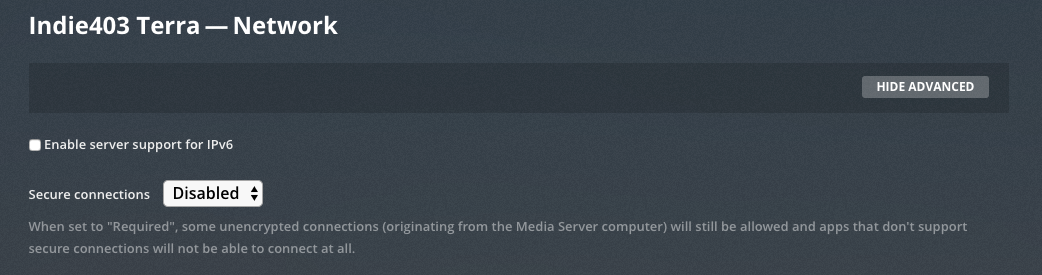
With the web application open, go to your server settings and enable IPv6 and choose “Preferred” from the secure connections options.
After clicking Save, I changed between media tabs on my phone and within seconds, the iOS app began reading my server.
If that doesn’t work, you may need to log in to your router administrator portal and check your port forwarding settings and/or enable IPv6 on the router side of things.

1 Like
Doubt this is solved… I have the same exact issue. Everything on Home page is OFFLINE on my iPad. I just updated to iOS 5.14. If I click on Shows or Movies, it does take me into those sections and I can view things.
Very discouraging that so many of us paid a ton of $$$ for Plex Pass and months and months later, this issue is still out there for people.
1 Like
Hi @jerrodshook,
The issue isn’t with your iOS version, it is on the server side. Take a look at my solution above and let us know if it works for you.
The key seems to be a combination of Enabling/Disabling server support for IPv6 and the Secure Connections setting in the Network section of the server settings.
The app responds almost immediately, so you can toggle through the combinations and refresh the iOS app a few seconds after saving the settings.
@K9Damien
Thanks, but this did not work for me. Home screen still says Offline, but everything else in the iPad app works. I can go into TV shows or Movies and watch anything, sync to my iPad, etc. A nuisance for sure, but at least the rest of the app works.
I have not changed a thing with my NAS or home network in months. Only thing I’ve done is upgrade Plex versions as they come out. IPV6 is disabled on my router and always has been. I honestly don’t know what’s involved turned that on or setting it up. Again, it’s always been off so I can’t see how that would suddenly be the issue.
Hi, i’ve an issue after the last update.
I can browse but playback doesn’t work, it says that there is not connection.
I’m trying from an Android Nokia 8 device.
If i try from my PC connected in tethering it’s all ok
Hi, first time posting here. I ran into this sudden issue after downgrading from Plex Plass to the one-time 4.99 activation that removes playback restrictions. I figured the Pass was just an excess thing for me which I didn’t really need to simply stream music through the app on my phone. My server is definitely running well as others have used it in the meantime (as of today when I made the account switch). My phone uses iOS 10.3.3.
This issue seems to only occurs when I have “sign in automatically” enabled on my Android device.
I think are you onto something. I switched users and switched back and the problem went away.
Android Beta 7.17.0.10776
Having this issue on Android as well. I found that resetting the home screen fixes it until you relaunch app. Bottom of home screen > Manage Home Screen > Reset to Defaults
Having same issues as everyone else! I can’t log I. From ANY of my devices.
OKAY my dudes. For the last three or four Plex Android app updates, the home page is showing offline until I switch to another home user and back to my admin user.
What is the status on fixing this?
3 Likes
