It’s because that hub row is specifically “episodes”. It can’t mix and match “shows” and “episodes” and that’s why there are two different rows. It’s just a search parameter basically.
If you want a row that functions the same as “Recently Added in TV Shows” but for “Recently Released” then you might just try turning off that Recently Released episodes and do a “Recently Released in TV Shows”.
I don’t have that “recently released episodes” enabled myself because it doesn’t serve any purpose for me but works well for many others.
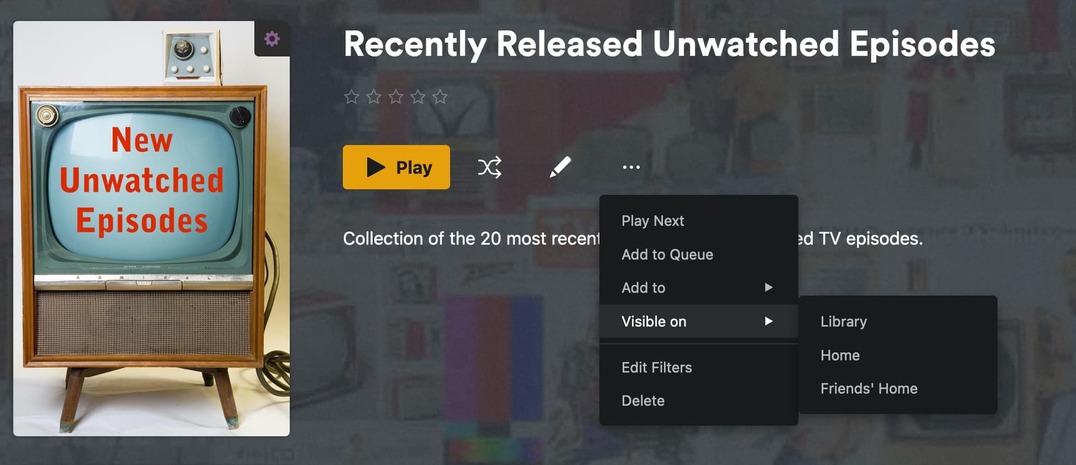
Here’s an example filter I created that would probably work for you if you want something similar but grouped by show instead of episode:
I sorted it by Release Date and to “episode unplayed” so it won’t include episodes already watched because that’s how I customized a few of my own rows to make them a bit more useful as well. I also limited the size a bit (no need to load EVERY show); I did it by count but you could use a filter results to limit like ‘past year’ or something.
Then once you create the filter the way you like save it as a Smart Collection and then you can set the Collection to live in your Home hub or Library hub or whatever (here’s one of mine):
In the server settings, under “Manage->Library” you can manage your rows there to turn off that “released episodes” one if you don’t want it showing up anymore.
Edit: Here’s a link to the docs about using the Manage Recommendations
So that should work to solve your problem using the tools Plex provided to customize your experience.
And maybe next time you want some help on something Plex related from the community, you could be less antagonistic?
I’d love to turn off [Recently Released Episodes] but it is NOT listed in the Manage>Library area of my installation, any other ideas on how to remove this useless listing?
You need to go to the server settings page (click the wrench icon in the top right corner).
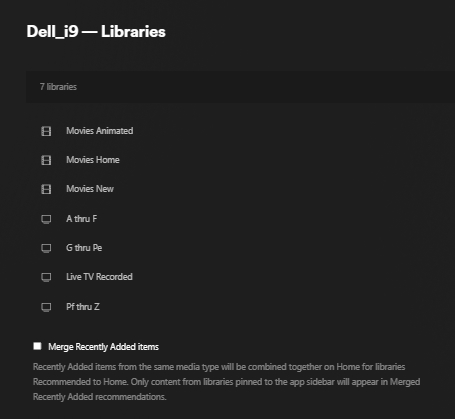
From that page, in the left panel, go to the “Manage” section and then click on “Libraries” to open the options for that.
In the right panel, click your TV Shows library (whatever you have it/them called) and you will get a list of all the sources you can modify which is where you can turn off the “Recently Released Episodes” recommendation.
Slight correction, you hover over and click on “Manage Recommendations” to expand the recommendations. If you click the library, it just loads the library.
FYI, “Library Recommended” is what shows up when you select your library itself.
Home will show what appears in your “Home” menu option, in the same order as whatever libraries you pin to your sidebar. And Friend’s Home is what appears when your any of your invited friends pin this library to their sidebar.
Gotcha, that worked, thanks. Too bad they couldn’t make the thing a single entry, like one would want it for one library but not another? Guess I need to be satisfied with what I have.
Ah, it depends on the library. I have some libraries that I want various kinds of recommendations for, but some smaller libraries that I don’t. It is a pain to have to set every library, but I like the ability to set each uniquely.
this workaround is actually suffering from a bug, the good order of this smart collection for tv shows is working only for admin user, this smart collection is out of order for all others users.