Server Version#: 1.24.5.5160 (Mac Mini)
Player Version#: Version 4.68.0 (web)
Tuner Make/Model: xTeve
Guide/Lineup name:
Using XMLTV?: no
Hi all,
I have xTeve setup with Plex but am running into issues with the stream stopping after about 3-4 minutes resulting in a “This live TV session has ended”.
I don’t see much in the Plex logs when the error pops up about the live tv session ending but the xTeve logs show:
2021/10/23 17:04:18 [xTeVe] Streaming Status:       Buffering data from FFMPEG
2021/10/23 17:07:18 [xTeVe] Streaming Status:       Client has terminated the connection
It seems whenever xTeve buffers Plex thinks the connection stops on all clients (web and android.) I have tested the same steam in VLC which does not drop out and can watch 3-4 hours without any issues so it strictly seems related to Plex.
I’ve tried all the options in xTeve to help with using ffmpeg/vlc/direct stream/etc and trying --repeat flags among others to help facilitate a reconnect but they all have the same result.
The odd thing is if I dvr a show via Plex it records the entire show without an issue. The issue only seems to occur when it’s a live tv session.
I have the same issue using HDhomerun. Live TV plays for 3 or 4 mins the get the This live TV session has ended error using version 1.24.5.5173. DVR works great just can not watch live TV.
I’ve had luck with changing the Xteve FFMpeg options to stream a container that does a direct play from Xteve and doesn’t need to transcode in Plex. I am on a Mac using the h264_videotoolbox video encoder options.
Your milage will vary based upon your set up. Took a lot of experimenting and reading up on FFMpeg statements. The only issue is some of the streams have the EXT-X-DISCONTINUITY statement which aren’t supported in FFMPEG.
Ah you are referring to Plex? I initially meant xteve. You can do those amendments under the ffmpeg options section.
As for Plex, I usually open the Console (Server Configuration → Manage) and keep it open while doing my troubleshooting. Make sure to keep that page open so that it captures all messages.
I have been testing extensively over the past 24 hours.. There is one setting which seems to be yielding good results for me.
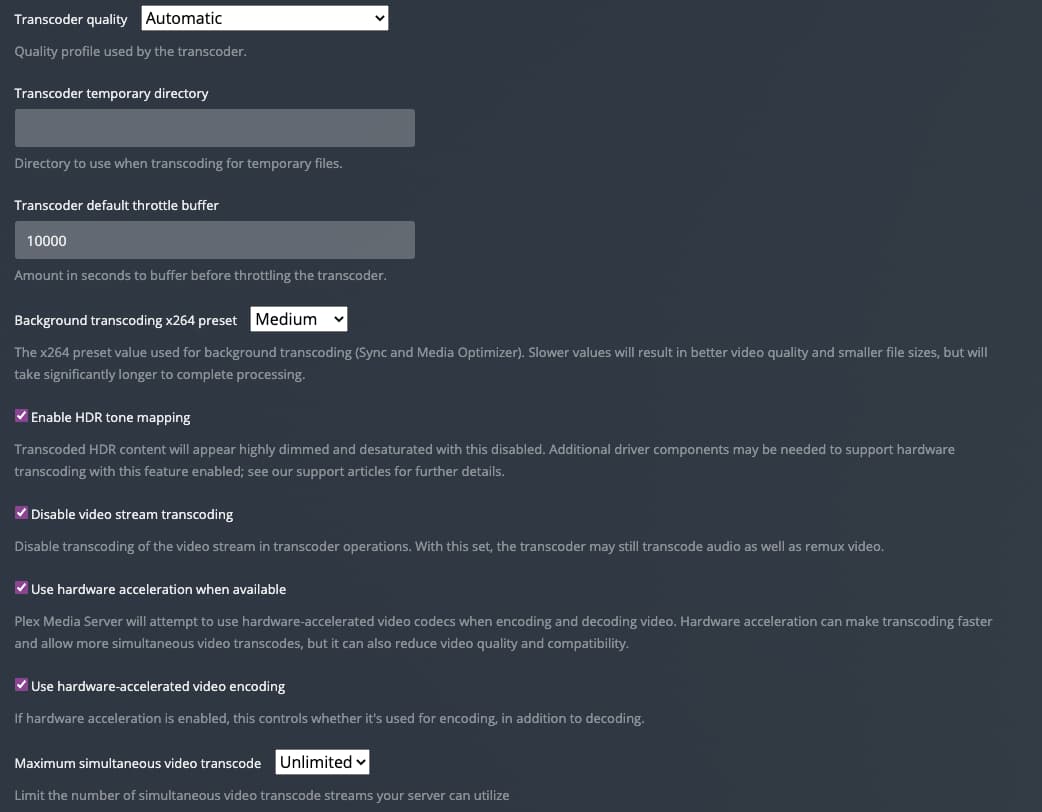
I changed the “Transcoder default throttle buffer” from 60 seconds to 10000 seconds. My 4k live tv stream has been running for about 30 minutes now on my Sony A80J (Google TV), without any disconnections.
I am running the alturismo/xteve docker, with latest Plex version installed as an spk directly on my Synology DS918+ NAS. The docker container is consuming a lot of memory, but it is working fine so far:
Same problem here
Server Windows. v1.24.5.5173
xTeve 2.2.0
Everything was working fine before Plex update.
Now get stream has ended if watching via browser directly on server PC
If watching via Plex app on server PC image stutters
If watching on Nvidia Shield or other device, all OK
Having the same issue. Playing on chrome browser on windows 10 machine with HDHR Prime box. Plays fine on firestick with the most recent upgrades but the web viewing is now broken
In case it helps (haven’t seen this written anywhere before - I’m a first time user to xTeVe and have found that it works fine on my Apple TV, but not on my Mac desktop client.
I’ve had several goes at setting it up, and accidentally discovered this last night.
So, that to me says there’s something off with at least the MAC desktop client, possibly others.
This is 100% reproducible, every time on both Apple TV’s I have. And on the Mac client I just get 'This live TV session has ended every time.
Just now I just tested it on my iPhone and that works perfectly too.