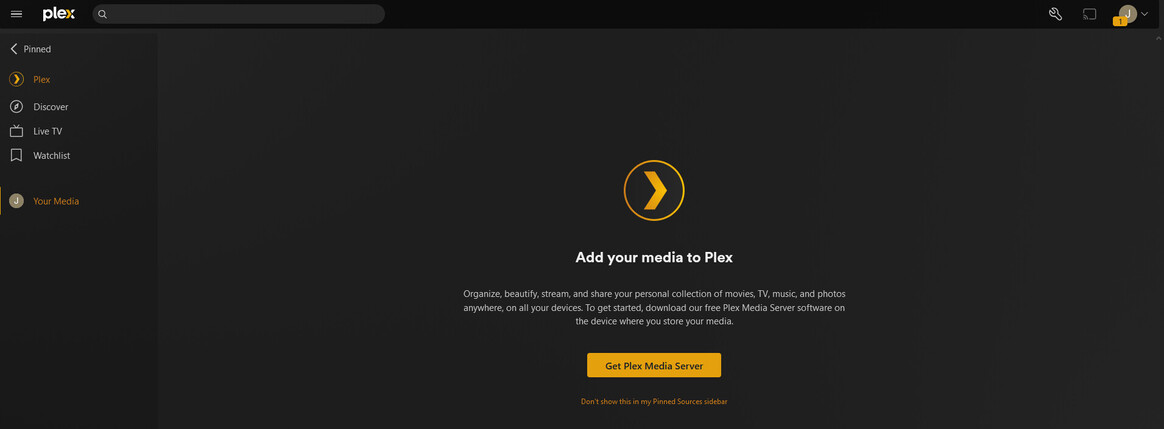
I have been running my Plex server for over 4 years and am a lifetime Plex pass subscriber.
Three days ago this message appeared when I logged into my server. It doesn’t show any of my media and none of my friends or family can access any of my media. Also I cannot access any of the sharing settings or other advanced settings that you can access once your server is configured. It is as if I am starting over. I thought I had fixed it once already by uninstalling, deleting the registry entries for Plex and then re-installing, but after a day of it working seemingly normally, it happened again. I am at a loss of what to do.
Windows 10 19045
Intel Core i7-6700K @ 4GHz
32GB Ram @ 2133MHz
Samsung EVO 980 Pro 1TB - Running the plex server from this drive
WD Purple 12TB - Media is stored on this drive
NVidia GeForce GTX 950
Do you use any 3rd-party anti virus software?
Or other tools which claim to enhance your security, privacy, or degunk your Windows installation?
Is there a VPN software involved?
Does the server machine have more than one network connection?
This machine just has the one windows user, an administrator user, which is always logged in. I do access it via remote desktop occasionally but still using the one admin user.
That’s definitely a problem.
“Public” means the Windows firewall has closed all open ports, causing your server not to be reachable from anywhere outside of it.
Windows will reset the status if it senses that the machine has been connected to a different network.
A swap of router (or update of its firmware) are known to cause this.
I went ahead and changed it to Private, and it did not change the “Your home screen is empty” message I am getting when logging into plex on the server machine. I even went ahead and exited the plex server and restarted it with the same result
OK I followed those instructions and ran the registry script, but it did not allow me to reclaim the server. It just goes back to the “Your home screen is empty” message
So I went ahead and followed what it says in
under the What if the “Open Plex” button doesn’t claim the server or I can’t get to the UI to click it? heading and now it is just sitting on “Initializing plex server” and it is just spinning away not doing anything in particular.
I’ll try that next but I have to leave for work now, thank you for troubleshooting with me, I’ll report back once I get home and give it a shot. Thanks again for your time I really do appreciate it.