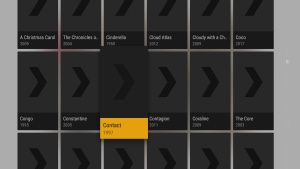
We do clear out some cache info when you start playback to make sure we don’t run out of memory. I have not seen this happen. What device do you have and what version OS it running?
Something is odd. I’m not able to reproduce this. Not sure what’s going on. Have you tried clearing the app cache or even uninstall the app (not PMS) and reinstalling?
Your client is asking to update that screen so it looks right. I have seen other instances where something like this can be caused by a slow PMS response. How many movies do you have in that library? Do you have another movie library with fewer items to check if the library size is the issue?
That’s smaller than my library so it’s not a count issue. The only thing I can think is that your cache folder on PMS is corrupted and there is 1 poster messing it up. You could try clearing your PMS cache folder, which will cause the app to re-download all the images and may clear your issue.
Do you have access to another server to test if it’s only with your server?
Recreating a library does not necessarily clear out the old cache.
I am looking at that spot in the log, and there isn’t any info there.
The only other thing I can think to try creating a new library with just 1 movie, see if it causes the issue. If so, then share that library with me and I’ll see if my Shield can reproduce. It does seem like something with your server.
I have seen this as well after playing a movie. It won’t load the movie posters on the screen in the Shield when you exit the movie pre play screen. Scrolling up or down resolves the matter.
Sure, that would work to clear the cache. I meant just deleting a library and creating it again. So do the posters still go missing after starting over from scratch?