I updated to the latest version yesterday. Everything has been fine with continuing to rip my DVD collection.
Today, I added a new DVD into my Stand Up Comedy library, but the titles I added into my “Ignore” folder started to show up for that DVD. Then all the titles in all my Ignore folders stareted showing up, but just for that library.
I “danced”, deleted the library and then readded it. Same thing happened. I also noticed that the library language had reset back to Amercian English from English English. So I reset that but the titles kept showing up. My exclusion method hasn’t changed since I started my collection.
I thought I’d try and troubleshoot and went into my Movies library, circa 300 films in there, and checked the library language. It was back tro Amercian English. The second I put that back to English English, all ignore titles started to added into my library.
I now have HUNDREDS of extra titles in my library that I can’t get rid of.
Plex, there is an issue with the latest update. Please look into this.
How do I rollback my server version to the last one?
It’s still scanning and adding in all of the titles that it’s been ignoring for a couple of weeks (I only started with all this a few weeks ago).
I guess I’ll have to turn off scanning and any scheduled maintenance until this is fixed.
My only question is, where I had thjumbnails being created for new items, will thumbnails have been created for the items that were initially added (I managed to go into settings and turn Thumbnail generation onto a scheduled task), and once this is fixed, will all those thumbnails be taking up space on my server, or will the fixed exclusion/ignore system delete them?
Ok, so I’ve been doing testing today and something is seriously wrong with this latest update.
I can move my .plexignore file into specific film/title folders and it will ignore the next subfolder down that I’ve stipulated in my .plexignore file - it doesn’t appear to work in the root folder anymore.
So, all I’ve had to do is copy and paste my .plexignore file into every single film folder and subfolder and also remove my movies library (because Plex didn’t want to clean the library once I “Danced” all the files out of there).
So, apart from having to go through all that copy and pasting, I’ve also lost all of my Thumbnails for all of my films. So that’s good.
And now I’ve got to re-match all of the films that didn’t match. I did that as I was ripping the films the first time, which wasn’t too bad. I didn’t have any other plans for my Saturday after a hard week at work anyway…
So, after a couple of weeks of ripping movies in their native formats using MakeMKV, my process has always been to rip the movies into my Ignored folder along with all the special features and other crap, wait for the rip to finish, and then move the actual film out of the ignored folder into the film folder for Plex to add thumbnails etc to that newly added fiulm as per my Plex settings.
After all of this crap yesterday/today, I obviously now have a .plexignore file in every single folder and sub folder of my collection, which has worked when making a whole new library and copying in all my films into this newly created library; all the special features etc have been ignored as per my folder structure.
But, as I am still not finished ripping my enormous DVD collection, I am continuing to do this using my tried and tested method above, it appears that, even though I have .plexignore files in every single folder and sub folder, Plex is adding the film - as it is being ripped - to the library even though it is being ripped directly into the ignored folder. When the rip has finished, Plex will show the movie poster and then the number of items in that IGNORED folder in the top left of the poster, until I MANUALLY scan the database (even though both options for automatic scan are enabled in Plex settings), then the poster disappears until I move the movie back out of the IGNORED folder and Plex then adds the movie into the library as normal.
What the hell is going on??? Is it just me who is experiencing this??? Can anyone confirm??? This is just a nightmare…
Note:
Plex Library Folders - required, by the way - are meant to ONLY contain media. There is nothing in them that must be ignored. Move that crap OUT of the library folder.
Like I said, I’ve only been doing this for a few weeks so I’m a total noob, although I’ve spent countless hours researching, testing, researching some more etc etc etc, you can only know what you can know.
Before I wade into the articles you’ve linked, what do you mean by “Plex Library Folders”. I thought I had “Plex Library Folders” and what is the purpose of the .plexignore file if not to mark things for ignorance?
What you’ve linked above is exactly how my library is sorted and has been sorted from the beginning.
I have folders for every single film (although I haven’t added the year in the folder name, but I fix this via the ‘fix match’ function - isn’t that what it’s for?).
From what you’ve said, ‘all’ I need to do is remove all of the special features etc that I have in the ignored folders.
BUT, what is the purpose of the .plexignore file, which seemed to be working perfectly up until this latest update?
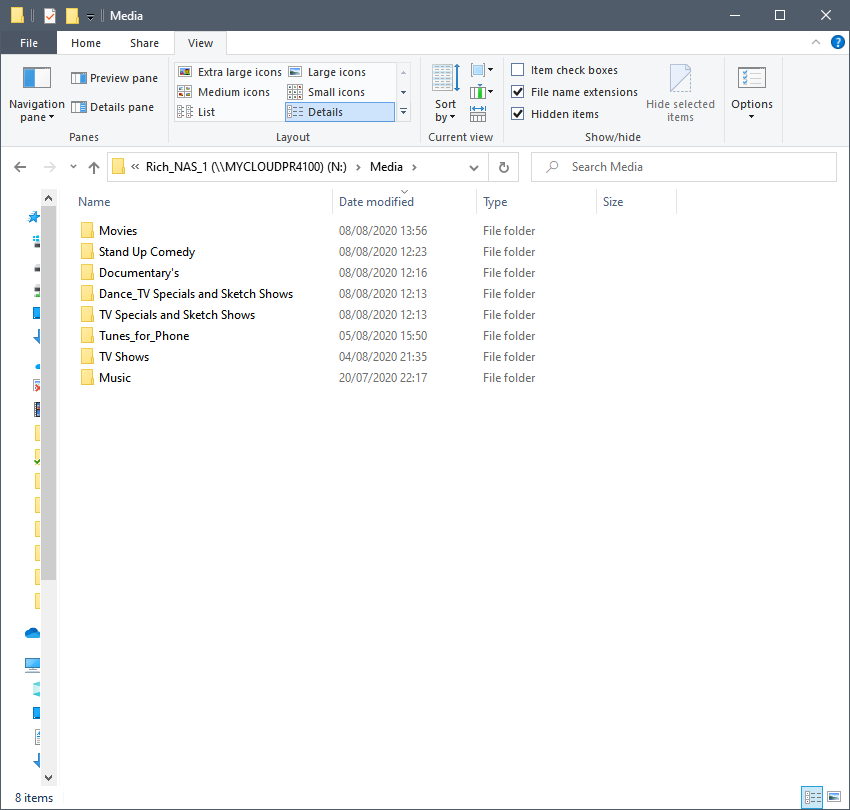
It looks like your file/folder naming structure is correct, although you do have movies, stand up comedies and TV shows, etc. as separate folders. So I just want to be clear, each one of these folders is a separate library in Plex right? Because Plex won’t like it if everything under your Media folder is one single library.
Also, you can have anything you want to show up as “extras” in Plex. You just have to name them properly. So if that’s what’s in your ignore folder because you’re afraid those files would mess up Plex recognizing proper video files, you could actually rename them so that they show up in Plex.
And lastly, the .ignore thing has been iffy before-- Plex sometimes does scan and try to match-- aka “scrub”-- content you have set to ignore. It doesn’t mean that you set up “ignore” incorrectly. The safest and easiest solution is to move anything you don’t want showing up in Plex out of your Plex media directories.
Every main folder, e.g. Documentary’s, Movies, Stand Up, are ALL separate libraries, yes.
Your assumption about my ignore folder method is exactly correct: I wanted to copy every single one of my DVDs in their entirety including (special features), onto my server so I can get rid of all of my DVD’s - that was my main objective, I didn’t want to go through the hassle of compressing all of my rips through Handbrake, so bought a 40tb server and just wanted to copy everything, whilst retaining all of the quality of my films. Sorry for the rant…
Just read your last paragraph. Yes, in my search for details on .plexignore, I found other posts about it. Anyway, I’ll create a whole new folder structure away from my Plex libraries and move the special features etc into them - probably better this way than to rely on a sometimes “iffy” function.
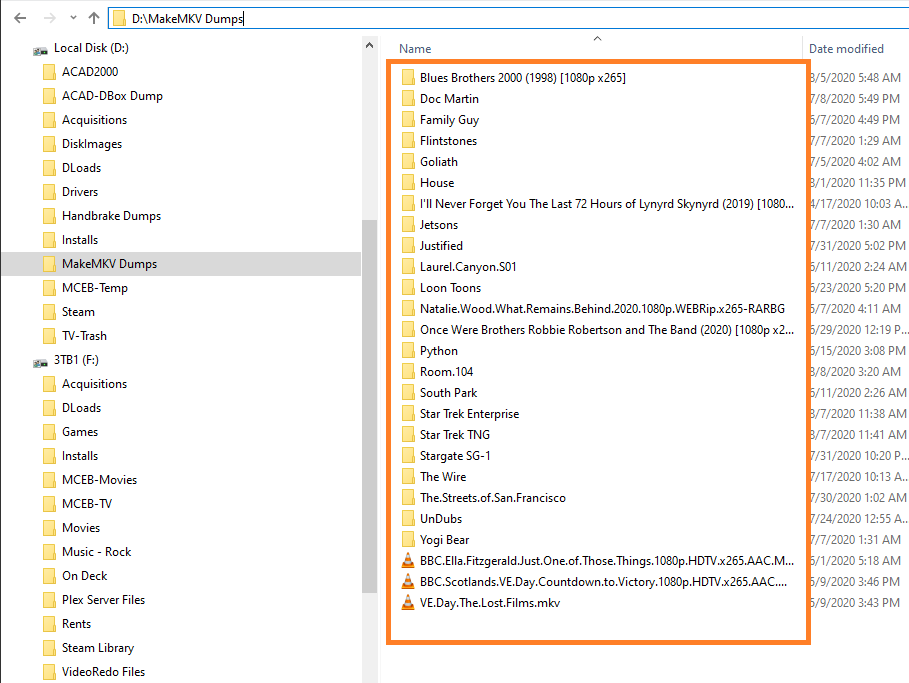
See all that crap in the orange box?
That’s the kind of crap I don’t want in my media Libraries… YET!
It’ll get there eventually, just not right now!
On every drive in my Plexiverse there’s an ‘On Deck’ folder that is there simply to hold items that haven’t gotten to the media libraries yet, or a place to instantly remove items from the media libraries for a Plex Dance - or something.
Every folder on a drive doesn’t want to be in a media library.
Folders holding media for libraries ONLY contain active media files.
Files/Folders that are NOT ACTIVE - are NOT in the media library structure.
Glad I can help. And to be fair, it’s not that Plex is iffy, it’s the fact that NAS devices are constantly running data operations behind the scenes. I don’t know exactly what kind of device you’re running Plex on, but I assume it’s some kind of server? In that case, it must be running some data backup scheme on its own, or at the very least, has parity drives?
Now the ways these things work, when the NAS is trying to backup/replicate your data-- it’s coping and moving data all over the place, even though you the end user cannot see.
Since Plex is set to “watch” your media folders for any changes happening, and it has no awareness of any of the data operation your NAS might be running. Oftentimes that creates a conflict and Plex ends up scrubbing the content in the ignore folder, because for a brief moment those files are no longer in the ignore folder, or are in two places at the same time…
Sorry, I did mark a solution but it isn’t really the solution to the probalem I was having: .plexignore is still acting strange, whichever way you cut it.
It might be down to my specific server, but we’ve ascertained that it isn’t down to my library structure - it was working perfectly fine before I updated.