This is turning into a rubbish service and something definitely not worth paying for, I won’t be renewing my subscription at this rate, we are just being used as beta testers and not even given a link to something that works, that being a 3.3.4 download link.
1 Like
Server Version#:3.77.4
Player Version#:3.84.2
Plex Media Server Logs_2019-02-16_13-29-30.zip (1.3 MB)
Unfortunately the PLEX Mediaplayer for Samsung TV is still not working correctly.
I still have buffering issues and total drops when playing 4K media with DTS.
My lokal network is able to handle 1Gbit/s.
Settings are direct stream and I had testet DTS (DCA) and subtitles on and off. But nothing helped. The movies are playable the first minutes but then stuttering and buffering follows.
I am playing on a Samsung MU80009 with Tizen 3.0.
Also tested the issue on my Xbox One X which does not support DTS. In this case it will buffer and then media ALSO video will be converted and HDR is gone.
I think also other guys have this problem.
Looking forward to your comments.
Version 3.84.3 has become available in the TV shop (KU6670U). I installed it, I did not seem to notice any glitches
Just checked but still no hint for update - 3.84.2 still newest in store 
Not sure if this is the same issue as others. But for some reason we now have issues where if the player is paused and then goes to sleep or screensaver. When we resume the video, the player starts to dim and go into screensaver mode while the video is playing
1 Like
And yet another bug (maybe this was posted, there are many points posted here that never got any acknowledgement from plex team).
I watched some GoT last night and reached S3 E5 which would not play no matter what i did. J tried other random episodes and things work fine. Ofc everything works in browser on the PC. After 10 minutes of waiting this is all i get
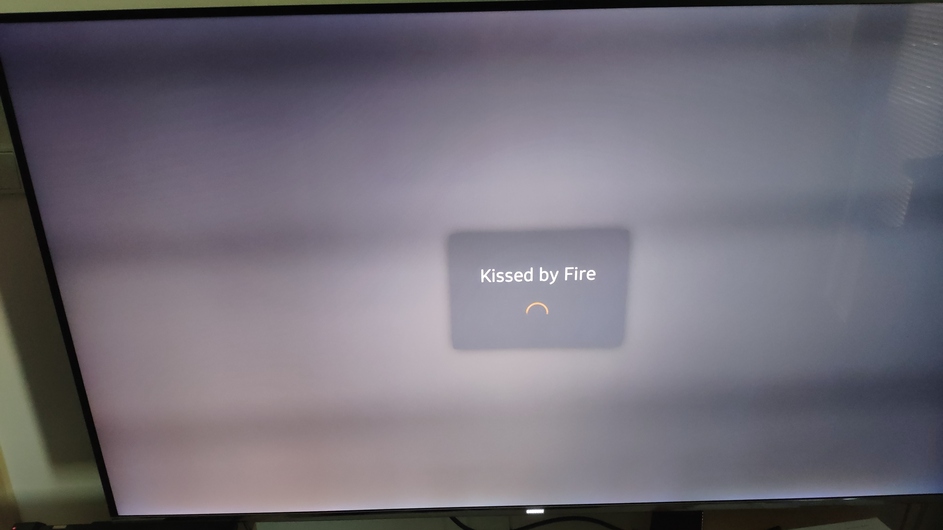
One more observation is the screensaver. Before we had Plex logo gliding gracefully on the screen which was nice display. Now the logo jumps randomly and all the finese is gone. All the aesthetics of if gone.
I get that, i am not plex pass customer so priority for me is lower that’s perfectly understandable. What’s worrying is that many plex pass guys here have troubles and noone seems to care. Sad times…
EDIT : Basically any TV show episode does this endless loading randomly. Some play normally, some skip subtitles, some are stuck here.
Have the same problem with Samsung ue43ku6649
tizen 2.4.0
Player v. 3.84.3
Server 1.14.1.5488
1 Like
Still no colors in subtitles.
Thanks.
The latest release still has audio issues… It won’t direct stream TRUE HD 7.1, instead it tries to decode to ACC which causes audio lag and buffering. Please fix this. Just give us the option to side load the old version already… I don’t care about the new UI
1 Like
And by the way, subtitles stops at random times. You need to stop the movie e resume to get the subtitles working again.
1 Like
That’s because the TV doesn’t support TrueHD audio, it has to be transcoded. Earlier versions of Plex made it look like it actually worked, but it never did. It just grabbed another audio stream if available and used that while still saying it used the TrueHD audio stream. @sLumpy has mentioned this a few times (not in this thread though)
1 Like
OK, but even if I manually select the ACC 5.1 stream in the video file I am still getting audio drop out even 10seconds or so… how do I fix this? It worked fine with the previous version.
Update:
Figured this out finally: in video options, select Direct Play, disable direct stream. Once you have done this, select the 5.1 ACC audio track in the movie and everything works like it should. I have a KS8000. Thanks for the tip about the True HD audio.
1 Like
I have a KS8000 as well and finally got it working like it used to. In the Samsung player video options , select Direct Play, deselect Direct stream. Before you play the movie ensure you select an audio track that is support by your tv, 5.1 ACC for example. Once I did this, I have no more buffering issues.
3 Likes
I am currently experiencing two issues related to Srt subtitles for film series: 1. Circa 40 minutes after the beginning of each episode, subtitles are no longer displayed. User needs to return to the episode and replay in order to view subtitles. 2. When the next episode of the series is played automatically (being in queue), the srt subtitles are not displayed, even though they had been for the previous episode. The srt subtitles option is not memorized.
I have a EU40MU6405, Plex don´t load with the last update. I uninstall it. Now I can not Install Plex Again. Tizen Smart Hub show me Plex v3.84.2 date: 14/02/19. But when I try to install the application I get an error 118. I couldn’t solve error 118, neither resetting the smart hub, nor resetting the TV to factory.
Could you help me?
Thank you.
Fernando.
This is not working for me. Is there anything else you did besides deselecting direct stream?
Model: UN60KU6300
The new software is horribly slow… When starting a stream the TV just sits there for 10-20 seconds sometimes and then finally switches to the buffering screen where it waits another 5-10 seconds before it starts playing. Also two serious complications for me:
-
The TV is logged in as my room mate but when the dashboard loads it’s my dashboard.
-
I only get PCM 2.0 now while I used to have surround sound working perfectly before.
I first had to deal with Roku issues when you released the software there and it broke everything until you finally released the retro version and now I have to deal with stuff not working again in my living room.
I use a KU6092 TV with tizen 2.4.0 and plex 3.84.3.
When I play with subtitles on, then I have the following problems:
- Stuttering: randomly the image freezes for a few seconds (the sound works ok) and after that the movie resumes… but this happened multiple times during a 2 h movie -> very annoying
- Dark screen: just randomly and not all the time the movie stops and the screen goes dark -> I have to exit to the main screen (and sometimes shut down the TV) and resume video to have it working again for a while until it happens all over again…
when the subtitles are off, then I have none of the issues mentioned above.
Is there a fix for this, please?
Hi, first time posting.
My Samsung TV is model UE55KS7000UXXU
Plex version 3.84.3
Tizen version 2.4.0

When I select an item, it returns “unexpected error”.
Tried reinstalling, signing out and back in. Deleting and downloading.
Tried playing with settings checking direct play and direct stream and all the other possible solutions.
I noticed that if instead of selecting item, I press “play” button instead of trying to select it with enter I get a glimpse of content.
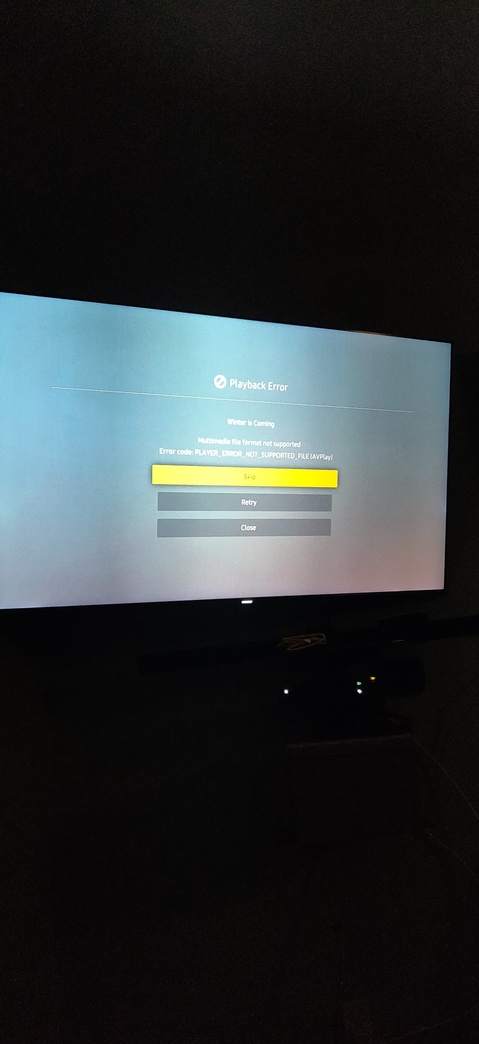
Next error returns “player_error_not_supported_file (avplay)”
I can retry and have access to content’s menu function ( ie. Play, forward, chapters) but same error returns with any selection.
Also Plex works fine on my phone, so it is just my Samsung TV.
Any help would be greatly appreciated! Thank you.
1 Like
Sent you PM with all info, any news? This is getting out of hand.
I’m thinking seriously to buy another TV, maybe LG? I see all new versions are linked to that TV updates.
Really bad experience with PLEX since 2016 when I bought the TV. On other devices it’s running smooth.
