Same here, Hover does not work. The regedit thing that you said to try did not work either. Thanks
EDIT: I have already tried uninstalling, reinstalling probably more times than I can count and rebooting too.
Edit2: Also, the plex app is missing a lot of tabs, i cant add more things like “movies”
Firefox. I will make a video and show u, seems you don’t get our problem.
- Install Plex server> when finished it goes to the task bar, No popups of any kind, NO setup.
- open all the apps and webpages, its all whacked.
Juice, I’m using Chrome.
Oh, no…
Elevated Support Required.
(I wasn’t even basement support)
Did either of you go here?
Just saw that - seems like a good place to start to me…
Heres a video i just stuck on Youtube.
ALSO, notice how the desktop app doesnt even have Movies tab. I can’t add tabs, or add drives, or name my server …
he said the reg edit thing did not work so assuming that is what he was talking about.
Just for info. Signing into the web app is not the same as signing into the server. The reason is it showing that message is because the app cannot see an unclaimed server is installed at all. that is why it is saying to download server. One of the reasons it might not see the server is if the server is claimed by another account. Due to the first post @comicscon saying it was a reinstall is why I suggested doing the regedit thing as those steps will remove the login info that the server might already be claimed with.
at this point it would be helpful if one of you could show me your server logs after restarting the server. ( feel free to message them to me if you don’t want to post them publicly in this topic. But I will still respond in topic)
Watch the video again, Settings takes me to account.
- Your media tells me to download the plex server
Please point me to finding server logs thanks!
And I already said that the settings menu looks NOTHING like what the screencaps u show me.

just copy in %LOCALAPPDATA%\Plex Media Server\Logs and it should take you right there

that is the logs for the Plex desktop app, not the server
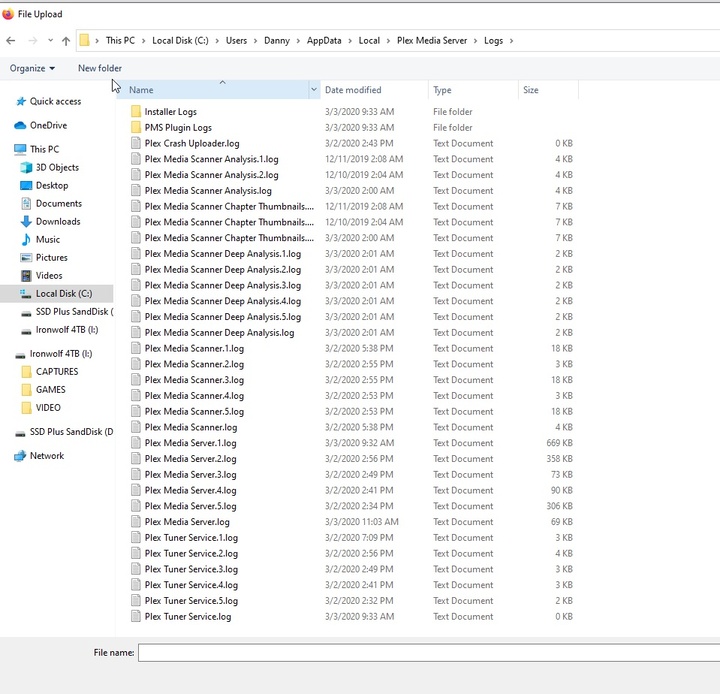
the Plex Media Server.log
[Logs removed] (86.6 KB)
Hope this is it.
is your computer plugged directly into your modem or do you have any sort of special networking going on. ( did you manually change the subnet schema in your router, have a VPN, or running server in a Docker for example) for some reason I don’t see it recognizing even whatever the Local IP is on the computer. The address I do see is not a standard private network address.
Very odd. I do not have VPN on and my modem cable is directly attached.
So you don’t have a separate router? your modem is just a modem and not a modem/router combo device? What ISP do you have? what model modem? (still odd that 127.0.0.1 is not working)
I have my own router, but I only plugged my ps4 into it. The cable modem and phone modem are separate, which are quite annoying. but I double triple checked, my PC is plugged directly into the cable modem, because I wanted full speeds.
Is it not possible my Internet provider has some sort of IP shenanigans like rotating ip etc?
