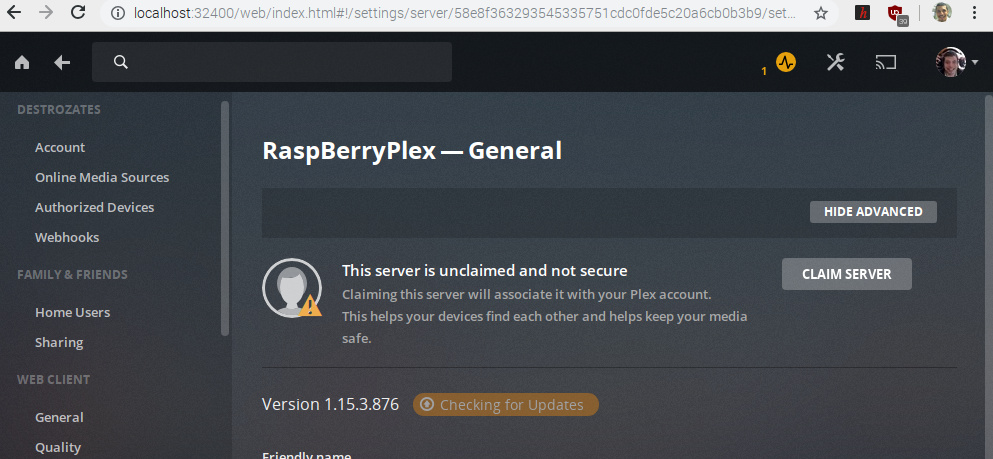
Server Version#: 1.15.3.876
Player Version#: Web PLayer
I had my Plex Server running on my RaspBerry Pi with no issues. But today I was trying to install a new external drive and move all my media to that new drive. After updating the Raspberry Pi I uninstalled the Plex Server because I saw the following message:
##### ATTENTION #####
THIS IS THE LAST UPDATE OF THE dev2day.de PACKAGE!!! UPDATE TO THE OFFICIAL
PACKAGE NOW!!!
Finally, official ARMv7 and ARMv8 Plex packages are available:
https://www.plex.tv/media-server-downloads/
The migration is simple and your Plex library will be preserved.
First, remove the dev2day.de package:
sudo apt-get remove plexmediaserver-installer
Then, remove the dev2day.de repo, e.g. with:
sudo rm /etc/apt/sources.list.d/pms.list
Now, download the appropriate package from https://www.plex.tv/media-server-downloads/ and put it on
your device, e.g.:
wget https://downloads.plex.tv/plex-media-server-new/1.15.3.876-
ad6e39743/debian/plexmediaserver_1.15.3.876-ad6e39743_armhf.deb
Finally, install the package, e.g.:
sudo dpkg -i plexmediaserver_1.15.3.876-ad6e39743_armhf.deb
Also, the official Plex repository is now available:

https://support.plex.tv/articles/235974187-enable-repository-updating-for-supported-linux-server-
distributions/

The following thread has more information: https://forums.plex.tv/t/read-me-first-about-server-armv7-
and-armv8-ubuntu-debian/226567/
Post your questions here: https://forums.plex.tv/tags/server-linux-arm
####################
Setting up libavdevice57:armhf (7:3.2.12-1~deb9u1+rpt1) ...
Setting up ssh (1:7.4p1-10+deb9u6) ...
Setting up ffmpeg (7:3.2.12-1~deb9u1+rpt1) ...
Setting up libav-tools (7:3.2.12-1~deb9u1+rpt1) ...
Processing triggers for libc-bin (2.24-11+deb9u4) ...
Processing triggers for initramfs-tools (0.130) ...
But then I noticed that there are no Raspberry PI versions to download from https://www.plex.tv/media-server-downloads/
And that is why I decided to reinstall PMS from the dev2day repository. Nevertheless after reinstalling I get the following message:
Ok, I was wrong when I said that there were no versions for the raspberry Pi at: https://www.plex.tv/media-server-downloads/
I read carefully again, downloaded the correct version and installed it following the instructions. Nevertheless after installing the correct version I still am getting the Claim server error:
I decided to perform the setup again as completely new,
stop plex
sudo rm -rf /var/lib/plexmediaserver/Library
start plex
wait a moment (20 seconds) for the directories to be created and initial database to be created.
I did all this and even gave my server a new name this time. but I am still getting the same “Claim Server” message. After hitting the Claim button it begins processing but still cannot claim the server. Right now I am out of options.
I think plex.tv and www.plex.tv are different, you may find that if you try to ping plex.tv you may not get a response (But I am not sure if they have disabled ping on plex.tv, so that does not really help)
Assuming you have curl on your pi, You could try this from your pi and see what happens:
Looking at the script it appears to be getting all the info it needs from plex.tv but failing when it tries to send the info it has collected to your server to complete the claim (if i read the script correctly) as it makes a call here:
Where I think that $1 is replaced with the ip address of your server.
But this call is returning a 401 Unauthorized error
But what I don’t get is the script has to talk to your server in order to get the PMS Server Identifier
I guess so, but tbh not really sure. I might have expected the script to fail earlier, as it looks like it is getting the required data from both your server and plex.tv
Are both routers in router mode or is your isp router in bridge mode?
Each server has a unique ID, and by fetching that, we make sure PMS is up and running, as well as we can access it, since we need that later for claiming. As a side note, we also use the identifier as a param towards plex.tv, since such a param is req. by their API