I have a plex app on my android device. It will take me to Plex and all the associated apps. My movies are on a usb3 block on my “downstairs” computer. The Firestick cannot see this, no access allowed. My computer can see the attached disk but I cannot get the Plex menu etc to show on the screen for scanning etc. The TSR program is in place.
I’m not quite sure I can follow your use case quite right.
- you have a Plex Media Server running on your “downstairs computer” with the movie files on your USB3 drive connected to it via USB
- you have a Plex client installed on your Android and it’s working
- not quite sure about the “it will take you to Plex and all the associated apps”
- you added Plex to your Firestick to access your Plex Media Server from there
- this client fails to see your Plex Media Server?!
- no idea what the “TSR program” is
In your post it’s not clear to me if your Plex Media Server is actually working as expected or not (re “My computer can see the attached disk but I cannot get the Plex menu etc. to show on the screen for scanning etc.”)
The Firestick has other apps on it like amazon and netflix. The firestick will allow me access to these and others. TSR Terminate, Stay Resident.
About a week ago I lost my WDTV so started up firestick. When I first opened it I had Plex on my computer screen and all the menus associated with that. Now for whatever reason I can’t get the plex menu on my screen and, the firestick cannot access downstairs I get the plex support link showing on my tv. I have no new programs installed, have downloaded the 64-bit plex and have a shortcut on my rail. Firewalls are covered in and out for PLEX Really stuck on what else to do. Plex in my startup menu so not surprised it does nothing when I tweak the shortcut.
Will start fresh. I have windows 10 32GB of ram. I’m using Drive H for storage of video which I want Plex to access. I deleted my Plex from my computer and installed a new version PlexMediaServer1.20.03.2181 (I think) The Drive H is plugged into a USB3 board that is wired to the computer. I can access this drive from the computer with no problem. However I cannot open PLEX on my computer! Have tried Admin and regular double tap. Neither produces the menu for PLEX. My account is paid up. I’m out of ideas. This is a new, fresh instalation and PLEX shows up in my devices.
Do I read this correct that you had not yet gotten your server to run properly in the first place?
In that case… the Plex Media Server itself has no user interface.
To complete the installation and access your server you need to open it in your browser:
- If you’re on the same computer… open http://127.0.0.1:32400/web in Chrome/Firefox/…
- This should bring you to Plex Web where you’ll be asked to complete the installation – e.g. by assigning a name to your server, creating your first libraries (linking Plex to your media folder(s) and to link it to your Plex account)
- Once this is done you should be able to access that Plex Media Server through your other Plex apps
i deleted all my plex using the plex app. Then I installed Plex-1.16.0.1364-da192ff7-x86_64 (1).ex and have Plex up on my screen and in communication with my account and the roster. However, when I try to hook into my drive with all my media on it drive H, it doesn’t exist. Digging deeper I’m told my computer is not available. Then I get a one-line message (link) get media player. The media player it takes me to is for Windows 7. Do I load the 64-bit program and the plex server program onto the computer to see my drive H? Do they integrate?
ok. so…
- you have that Server up and running.
- you can create a new library (or edit an existing one)
- but when you click on
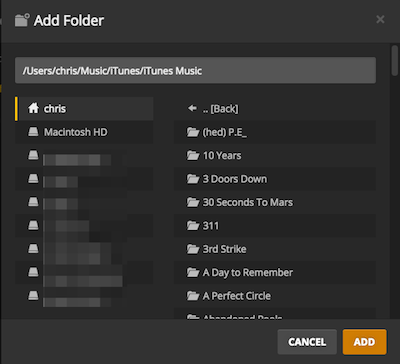
Add Foldersfor that library, you can only selectH:\on the left side but it’s not showing you the content ofH:to select the subfolder you want to add to that library?
Is that correct?
I’m not quite sure at what step you get the error message… if there’s a message that Plex cannot find the server and it offers to you re-download the server app – try accessing it through the local URL (http://127.0.0.1:32400/web if you’re on the same machine as the server – http://[Plex Media Server IP address]:32400/web otherwise).
This can happen if you did not link the Plex Media Server to your Plex account and try to access it through another Plex app (e.g. the Plex for Windows desktop player -> 1.16.0.xxx or http://app.plex.tv/desktop)
From the support articles describing how to Creating Libraries or Editing Libraries:

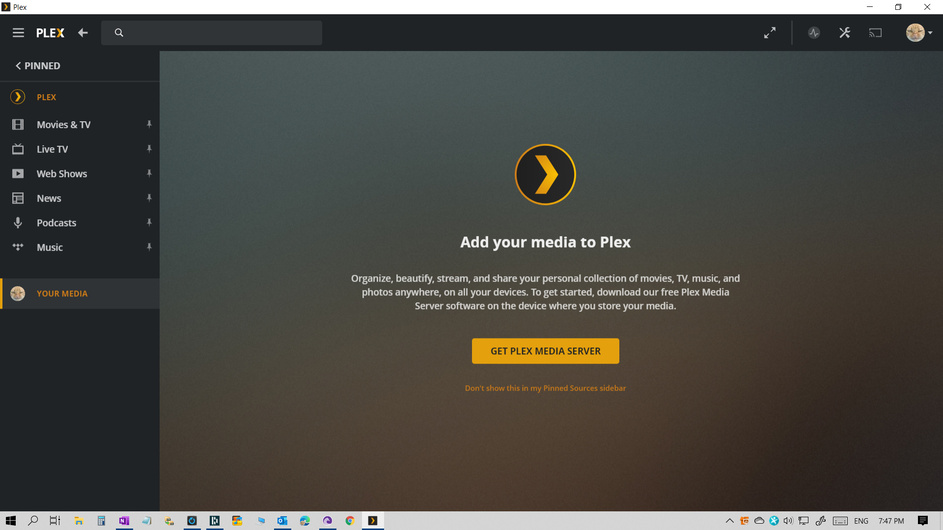
SThis is where I get my message from and when I push the get plex media server it takes me to the windows 7 package on your site. PlexMediaServer-1.20.0.3181-0800642ec-x86.exe I cannot see any disks from the Plex screen on my machine. All are within 4 inches of each other. The internal drives are not showing either. I see no add folders choice nor do i see a browse for media folder.
Note the tab Your Media is where I would expect to find the disks but nothing shows up not even the stuff on my “C” drive which is the same drive PLEX is mounted on
At the risk of sounding a bit like a broken record… please try opening Plex through your browser in order to complete the installation. Use Chrome or Firefox… not necessarily Internet Explorer
After you completed the setup and linked the server to your Plex account, you can also open it from the plex app you’re trying at the moment.
Rejected Google returns 127.0.0.1 won’t accept

a .dll apparently was missing so followed the reinstall instruction At which time a push came through, an update is available to which, i said yes. This is the results.
never had any luck with the hooking account up. Everything on my end shows the account and everything is good.
What is missing from the last working version is the “Downstairs” option at the bottom of the left hand side. There is nothing anywhere to reach into my computer from PLEX.

Hope this helps some. here are the variations I tried in google to reach Plex on my computer. And, nothing.
http://Plex
http://[Plex
192.168.11.125:32400/web
Reading over stuff and what I see needs a little work.
There is no drive H: or any other drive C, D that shows up. In earlier efforts 6 month ago, Plex looked at the drive I had installed on and it seen all my photos and the two internal drives besides with some .jpgs on them. This latest effort however I get zero on anything but the pictures I sent you. nada!
After the last post I got the .dll missing - reinstall error again so I did. Back to the more verbose version that doesn’t work. The update is all gone.
Are you still saying that on your PC in the basement you were never able to connect to the web interface from Windows with Google Chrome or Firefox? If so then there’s still something wrong with your server installation.
Did you try version 1.19.5.3112-b23ab3896
I opened up my desktop this AM and it was a long time trying to start up.
Plex is in my Start Menu. The nefarious error showed up on my screen. Can’t find dll 1_1 etc reinstalling may fix this. The error showed up 5 times. And, No, I didn’t try that version at least I don’t have a record of it.
I have 2 versions downloaded PlexMediaServer-1.20.0.3181-0800642ec-x86.exe,
Plex-1.16.0.1364-da192ff7-x86_64.exe Perhaps you could give me a link to the one you reference if you feel it will make a difference?
I suppose we’re slowly progressing (or at least moving)…
You did not mention any DLL errors before. What exactly does that error message say? Is that new or did you get that all the time?
Do I read your post correct that you get that error from the Plex Media Server and it’s therefore not loading at all? Hence you were not able to open it in your browser anyway?!
As for the different versions…
-
Plex Media Server 1.20.0.3181is your server, the source cataloging all your media and making it available to Plex clients -
Plex 1.16.0.1364is a Plex client… this one has nothing to do with making your media available… it’s just a “receiver”/player.
Let’s try to work through this step by step without jumping through further hoops.
the code execution cannot proceed because libssl-1_1.dll was not found. reinstalling the program may fix this problem.
I reinstalled and got the program onto my screen. I closed my screen then, tried to open the program and get the above error. It seems to repeat itself 4 times as it tries to execute something then, sends me the error message.
Did a fresh reinstall. Moved my H: drive from the USB3 bar to the regular USB2 on my computer. I did the reinstall after which a poke came though about an update available so, I did that update too.
After I did the reinstall Plex was opened and took me to your site with the movies etc all looking great. Nothing at all showed up about my computer and the associated media.
I tried to re-open Plex and got the .dll 1_1 error again. Now, dead in the water. program is installed but can’t open it on my screen.
Critical in my mind, Plex does not see my computer nor any of the drives which it is essential I get to.
I closed the program then, tried to re-open
