In your log I only see it trying to tune to these IPTV channels. If you are having trouble tuning actual over the air channels please reproduce that and get me new logs.
The channels are over the air (and could be also IPTV. I wouldn’t know because I purchased an officially supported DVR and just installed it as instructed).
If you tracked an issue with it, I kindly ask you to fix it ASAP with the VBox team and let us know when this was fixed.
I don’t know what the issue is. The original issue was that the device could not be set up due to the setup flow stopping after picking the zip code. That should be fixed now.
As far as tuning to IPTV channels, that won’t work, as that is not supported. I’m not sure how you are getting IPTV channels on the device. If that is a feature the device has, that’s fine, but Plex doesn’t work that way. The device needs to be setup to use over the air channels.
This is an officially supported DVR by plex (advertised on the plex website). If your conclusion is that it does not up to Plex standards, I kindly ask you again to get this sorted with the VBox team.
It is a supported device when used with their over the air feature. It is not supported when used for other things.
IMO you answered your own question. If the only channel working is the one without spaces then perhaps you should do something to get rid of the spaces in the other channels. How? I have no idea…
If it is truly IPTV then you are on your own here.
I’m using its over the air feature. I have no idea what else do you expect me to do. Please sort this out with VBox team.
I paid for plex pass and purchased officially supported DVR advertised by plex. I shouldn’t do a guess work to solve their bugs. Their technical teams need to sort this. It is not a free service/product.
From the information you provided, you set it up to receive IPTV channels, not over the air.
Here is the setup instructions I found for your device. Are these the steps you followed?
Edit - If you did something else other than the above, please provide details on exactly what you did to setup your device.
I followed a guide specifically for plex:
Which shares steps from the PDF you included.
That all looks fine up until the very last Figure (3). That is setting up IPTV streaming, which is not related to Plex. I do not know why that is there. If VBox says this should work, you will need to contact them for help as this is not something Plex supports.
In Figure 2 at the bottom it shows where you specify the source. What did you choose for that, it should be terrestrial as shown in that figure. The rest should follow the guide I linked above.
My setup is terrestrial, as in figure (2).
Figure (3) is showing where is the checkbox for enabling plex and guide to check it. It isn’t guiding to setup IPTV channels or something in that manner.
I contacted VBox but since the DVR is working and tuning channels correctly they suggested to sort this out from Plex side.
By reading other forum threads there are clearly some major unsolved issues between Plex and VBox. Given that this is an officially supported hardware, it doean’t make sense that I, as an end-consumer, we’ll need to come to VBox with a set of requirements by Plex on how they should fix their product to work with Plex. This is something that your both technical teams should sort. And I believe you both have some kind of communication channel if you both declared this setup is officially supported?
Thanks.
Ah I didn’t see that check box. The other 2 sections “Channel List” and “EPG” are for IPTV and not related to Plex.
If you have both terrestrial channels and IPTV, Plex will only tune the terrestrial channels. The list you provided earlier showing the M3U content are only IPTV channels. When you did the channel scan in Figure 2, did it detect channels? It would not have detected those 8 in that list.
The scan step did find the 8 over the air channels. And Plex also did show them correspondingly in the Live TV setup stage.
I’m not sure what’s going on. Can you provide the screenshots from Plex? The list you showed definitely are IPTV streams. I’m wondering if those are overriding the over the air channels.
These are the channels on Plex (The marked one is the only one that works):
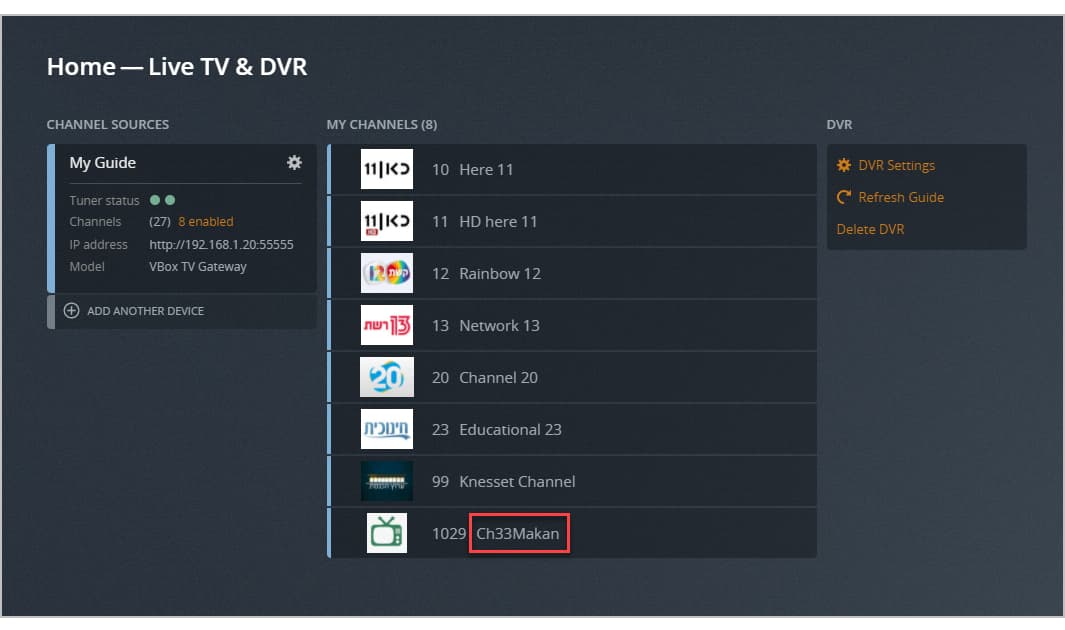
This is the error I’m getting on all the other channels when trying to watch them:

Once again, all the channels are tuned over the air and work fine when viewed directly from the VBox DVR interface.
Here is another person with the same issue in a fairly large thread. The OP needs to join this thread and tag @sa2000 (which I already did here) he seems to be the go to guy for Live TV.
IPTV or NOT Plex should be able to parse encoded URL’s.
1 Like
Hello,
I am raised a ticket with VBOX support on this matter. But apparently PLEX compatibility still kind of beta with them for couple of years. Also this particular VBOX XTI gateway models are quite old and out of company focus in favor of new (android-based) models. So considering an integration was working quite well with earlier version of PLEX, I see no reason for VBOXcomm to fix it in feasible perspective. Of cause there still a workaround with xTeVe, but it’s would affect complexity and stability anyway.
Regards,
Michael Elin
hi, i have tried to do setup DVR throu plex web, at start it goes well but i cannot find ISRAEL as Country, Please check it!
@ofir_css Plex does not offer guide data for Israel. You will need to provide your own guide data using XMLTV data.
