Server Version#: 1.41.5.9522
Player Version#:
<If providing server logs please do NOT turn on verbose logging, only debug logging should be enabled>
Up front - I know there are a lot of similar entries and solutions out there - but none of them have worked for me. I just can’t get Plex to claim my server.
Plex runs on my Synology nas and worked fine until the other day. i’ve already changed the dns settings (on both the router and my nas) to 8.8.8.8 and 8.8.4.4, checked the time settings on my nas, checked that i’m not connected to a vpn, tried manually entering the claim token in the preferences.xml file, reinstalled plex completely - nothing worked. I’m running out of ideas. Hopefully someone can help me out or at least have a new idea. I’m at the point where I wouldn’t mind rebuilding plex from scratch.
Thank you. I followed your instruction. I deleted the claim token from preferences.xml and tried to reinstall. Unfortunately the installation process to very long and didn’t seem to work. I just received this error message:
Do not use the Open button in Package Center, a domain name, Synology Quick Connect, etc.
Point a private/incognito browser window at the IP address of the NAS. For example, if the IP address is 10.1.2.3, use http://10.1.2.3:32400/web.
Then see if you can login and claim the NAS. If successful, you will need to re-do some PMS settings such as enabling hardware accelerated transcoding, etc.
You may see a “not hosted at Plex” message. That is OK. It just means your accessing Plex directly.
If prompted to set up libraries, like initial setup, skip ahead.
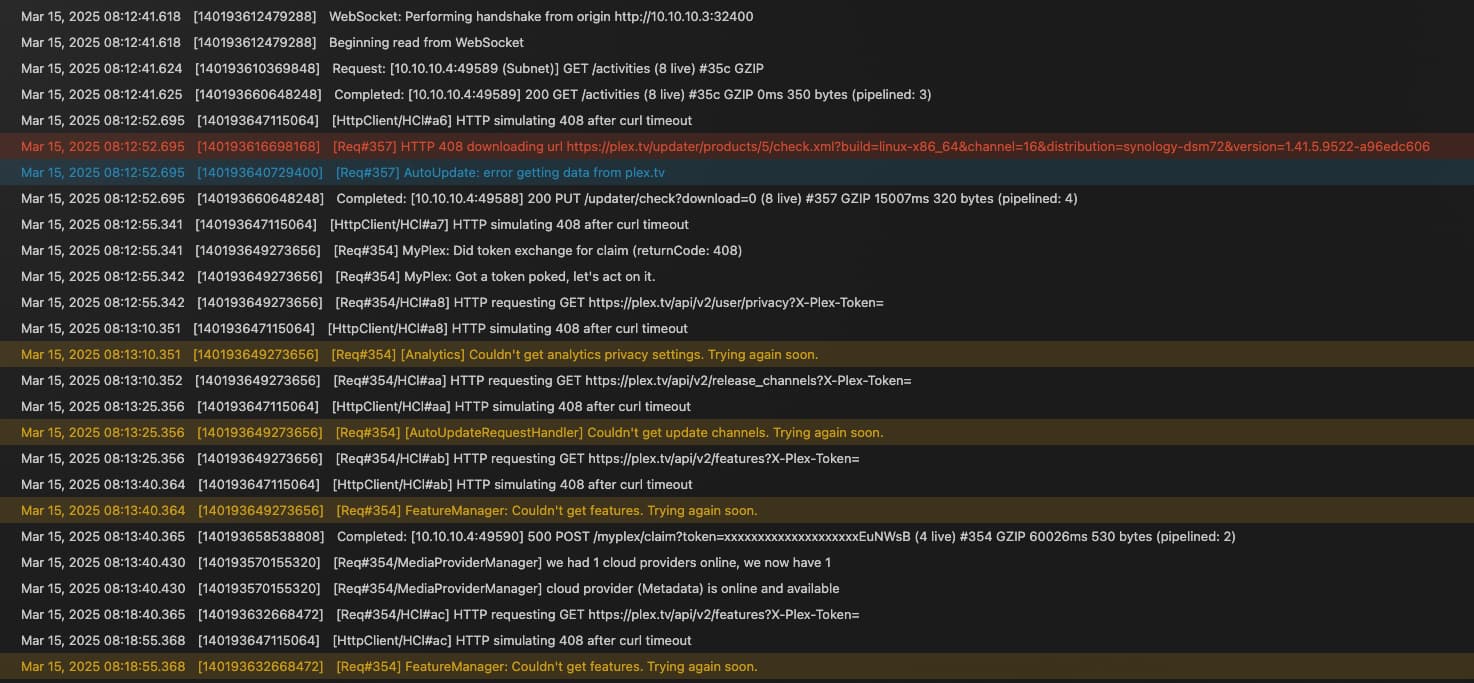
Plex Media Server cannot communicate with plex.tv. That is why you cannot claim your server.
The log files show timeouts when PMS is trying to obtain a public IP address (part of claiming) and download codecs from plex.tv.
Any VPNs running on the NAS or on your router? If so, disable them.
Verify that the NAS gateway is set correctly (Control Panel → Network, then edit the network interface). It usually the IP address of your Internet router.
Also verify the IP subnet mask is set correctly (usually 255.255.255.0) and matches other devices on the network.
From a PC/Mac/etc. on the same network as the NAS, verify you can lookup v4.plex.tv (if you’re familiar with SSH, login to the NAS and issue the nslookup from the NAS itself).
Thanks again. The network was correctly set up. But I finally found the reason inside my router. It was some firewall setting. I temporarily paused it and was finally able to claim my server again. Once again, thank you all very much for your efforts.