Thanks for that, can confirm that IP device caused the failures today which also makes sense yesterday.
-
If Plex can’t tune on the first network TV device’s tuner, my suggestion would be to go through the other tuners (if more than one) on that device before checking other devices’ individual tuners setup in Plex with the same channel. This is to see if they can tune the channel when trying to record/live tv.
-
If no individual tuners on any devices work but it’s a recording with partial recording enabled, wait a few minutes and try tune again on each individual tuner per device again.
-
If partial recording is disabled, try reschedule. Copy
minutes before start&minutes after endsettings from original recording. -
Repeat until the end of the recording block (with end extension time added by user). If there’s no success tuning on any device for a partial recording, try reschedule.
-
If partial recording is enabled, and Plex establishes a working tuner to start a partial recording; try find a suitable reschedule airing now to try get a full recording. Rather than trying to reschedule after the partial has ended as it’ll miss the beginning on a +1 channel. Copy
minutes before start&minutes after endsettings from original recording. -
If no devices work and it’s for Live TV viewing, throw an error to try again.
Maybe all this is already a feature, and just failed on this occasion. 
Also, some mobile app notifications for DVR for when:
- a recording fails to start/tune
- a recording has recovered and started a partial
- a recording has been scheduled due to a partial being started
- an episode is rescheduled (when partial is disabled or failed to tune through whole time block)
- a recording missed the time block and isn’t available to be rescheduled
^ Goes handy with the error detection written above.
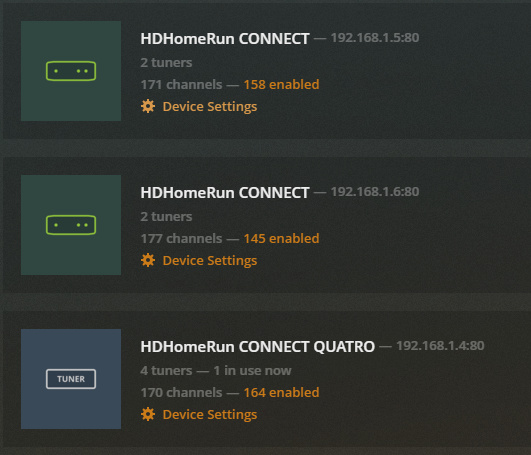
This also might have been what caused the infinite recording yesterday, but only started showing as recording after I tried to watch live tv on the affected recording channel. Either way, it is still showing now as recording 
For the above page, can Plex see if other software/devices are using tuners on those devices? So maybe show 1 in use by Plex, 2 in use by other devices if possible.
What I’ve also noticed is if a partial recording happens on a recording with minutes after end added - if the show is on another channel like +1 straight after the initial partial recording, it records another partial on the other channel as it starts the 2nd recording after the airing block has started. Maybe when it starts a partial, try reschedule at that stage to avoid another partial and get a full recording regardless of whether it has an end delay? My settings for minutes before start & minutes after end are both 1 minute.
Also reschedules for failed/partial recordings don’t seem to copy minutes before start & minutes after end settings for me 
Just noticed something else:
- Airing couldn’t tune throughout time block yesterday
- Was rescheduled for today
- Delete previous episodes from library via a file manager (not the episode scheduled)
- When Plex detects they’re gone, the rescheduled airing is then gone from my schedule when still in recording priority.
Just some feedback for the team 
EDIT: Bit more clarity in feedback.
