Piling on to keep the topic open…
1 Like
I was the original poster. Is PLEX going to even acknowledge the issue is is the is expected silence that occurs from PLEX?
1 Like
It doesn’t appear that they care. They look as if their mission now is to destroy Plex as it was originally built for.
Still waiting: is Plex fixing this or do we have to wait until eternity?
1 Like
Same issue. No amount of reinstalling, file deleting, and rebooting helped. Had to roll back.
1 Like
Another thread with the same issue.
Why is no one looking into this to fix it? Least they can do is to downgrade the update that caused this issue.
@deactivated tagging you so you can at least confirm if this is being looked at or not.
1 Like
Hi, the only option that has worked for me is to download an older version and install it over the current version. I found it at: Plex Media Server old versions - Windows
Of course, make sure you then keep declining the automatic offer to update.
Hey, this version is the only solution until now. Thank you for this hint.
It’s not very funny how long it takes for Plex until they serve a solution.
The 3.0 surface format was added to address an error we discovered playing HDR content on Open GL 2.0 surfaces. There’s a way out.
First please ensure your graphics card drivers and Direct X are fully updated. If that didn’t help you can try forcing an earlier surface format using the directions below:
- Exit the app
- Edit:
%LOCALAPPDATA%\Plex\plex.ini - Create a
[general]section header if one does not exist - Below the
[general]section header addopenGLSurfaceFormat=2.0 - Save
plex.iniand restart app
[general]
openGLSurfaceFormat=2.0
Likewise, trying 2.1 may be better. This is a difficult area for us to test as it’s an issue that affects certain hardware configurations.
Any improvement?
Windows 10 Pro 20H2 Build 19042.985
Display adapter NVIDIA Quadro FX 1800
DirectX 12
Updating the plex.ini file worked. I was able to use the latest version without the error.
Thank you
1 Like
Adding the line to the ini file worked for me as well. I just wish it hadn’t taken a month before Plex acknowledged the issue and responded with a workaround. . I suspect this issue will have affected anyone on a windows 10 pc with older graphic chip set for which there are no newer drivers. Probably a relatively large number of users and something that should have been taken into account on the release regression testing.
As I mentioned before this is a difficult area for us to regression test. We need feedback to understand exactly which hardware is involved.
The plex.ini workaround will only necessary temporarily. We’ll include detection to fallback to older surface formats.
What we really need is affected users in this thread to submit diagnostic information to us. Using this information we can source graphics cards and better understand runtime limitations on these systems.
Some people make fun of this help me help you vibe,  . In truth that’s what I’m asking for, I need your help to understand the issue.
First run dxdiag and export DXDiag.txt to your Desktop.


Then download GPU Caps Viewer v1.51.0 or later. In my employee voice: discretion is advised when installing third-party software. Plex is not liable for the potential risks involved. In my personal voice: The executable isn’t signed but it has a clean bill of health from VirusTotal.
Switch to the Tools tab, click Export GPU data, click *.TXT export, and finally save the text file to your desktop.

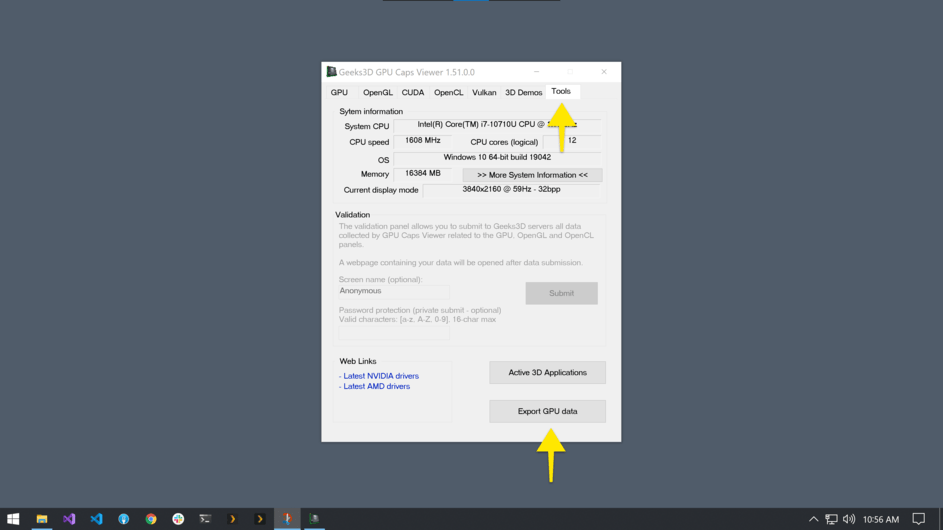


Finally, please review the document contents then upload both documents to this thread. I’ve uploaded my own documents for your review: DxDiag.txt (79.6 KB) & gpu_caps_viewer_report.txt (39.3 KB).

Thanks for reading this far down. 
Hi. I’ll apologize to the Plex Support Employees now. I didn’t see / find this Forum before creating my own issue. This is exactly what is happening to me. I was just about to look for the previous Plex for Windows version/exe in my downloads but will attempt the suggested ini file fix. Thank you.
DxDiag.txt (85.1 KB)
gpu_caps_viewer_report.txt (29.1 KB)
Matt - AS the former director if IT support for a major corporation I understand all too well the issues involved in supporting an application for a wide scope of users and hardware, and I realize all fixes cannot happen overnight, and often, more information is indeed required from the users. However, mu observation (and personal experience) is that PLEX users reporting issues in these forums often go weeks or longer before the report is acknowledged , never mind under investigation.
Part of the problem (I believe) is the somewhat unstructured method in which problems are reported. I apologize if a more formal and structured method exists here, and I have not seen it, but what I have found works best is a structured help ticket submission system, with defined minimum submission information requirements, numbered help ticket confirmations returned to users via email acknowledging the report, follow up automatic emails to submitting user when the ticket is assigned, and at all other changes in status as the investigation continues to resolution.
Surely PLEX has reached a large enough user base to warrant the implementation of such a help desk support system. There are many Help Desk system out there that will do the trick, ranging from FREE (everyone’s favorite price) to the HELL NO, I CANT’T AFFORD THAT variety.
Users will feel less disenfranchised and neglected as long as they can see acknowledgement and progress.
1 Like
I was the original poster about six weeks ago.
mattseeley has been open in discussing the testing and fix implementation process. Note that he is a Plex Employee, not Plex management. I am sure he has his frustrations with the budget process, conflicting priorities, myriad of issues and most likely lack of resources.
That said, there are many possible improvements in the support process that could be made. What I sense is that management is not committed/interested in that topic or it would not have taken a month to acknowledge the issue existed.
Plex is a good product but my notion is that the support topic is low on the priority list versus new markets, new product, new revenue streams, etc. Until a more formal process is implemented this will most likely continue.
1 Like
@johnnysocko thank you!!
@rmhochman, @digitalpurchase999_gmail_com thank you for your constructive critical feedback.
The forums are a system that requires employees rendezvous with users in need. This system can work well but has a very human factor that too easily leads to situations like this. I understand how frustrating it can be to feel unheard as a customer. I’ve forwarded your messages onto my colleagues, and personally, trying to remain more vigilant and accessible in the forums.
1 Like
Hi everyone, we’ve got an alpha build of our 1.32 release that, we’re hoping, eliminates the need to set openGLSurfaceFormat.
- When
openGLSurfaceFormatis set then we will not attempt to detect a format. - When
openGLSurfaceFormatis not set we will try several versions then select the first one that works.
I’m hoping at least one of you all will try this build:
- Install 1.32.0.2356 over top of your existing Plex for Windows
- Remove
openGLSurfaceFormatfromplex.ini - Run Plex for Windows
Success?
1 Like
I installed your alfa version 1.32.0.2356-d1a12f8d over the latest working version (1.30.1.2115-81e1fc3f-x86_64)without changing anything to the plex.ini file. It works like a charm!
Thanks!
As an extra I’ll post the two files you wanted:
DxDiag.txt (79.2 KB)
gpu_caps_viewer_report.txt (28.9 KB)
Hope it helps your support!
1 Like
I havent Tried updating the plex.ini file Just yet. But updating my drivers & Windows + upgrading Plex for Windows to Alpha made things worse. I have to reinstall Windows because it became totally unusable. After login I basically have about 10-15 seconds to uninstall Plex or the pc Will totally loose power.
