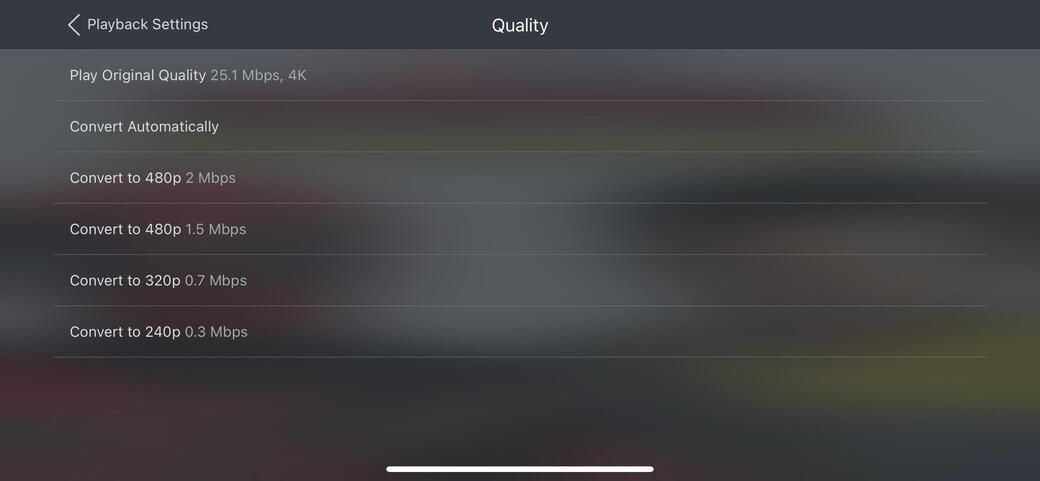
Server Version#: 1.41.0.8994
Player Version#: 8.40
Hi all!
There is a bug where you cannot transcode media past 480p when on cellular on an iOS device. It will show correct transcode playback settings in every other situation other then when I’m on cellular data.
This bug seems to now have existed for 3 years and has not been fixed. I’m a new user so it’s quite frustrating trying to troubleshoot the solution only to realise that it is a bug.
Good luck. Sadly I’ve given up on getting any response/acknowledgment on this by the devs. In the mean time I’ve found a workaround. Using Tailscale Plex thinks it’s on the same LAN when on mobile data. It’s enough to get proper transcoding to work.
To supplement two identical reports. A temporary workaround you can use is to set the highest quality for remote playback in your app to your desired resolution, such as 720P or 1080P. This will force the video to be transcoded to your specified resolution during remote playback, bypassing the need to select a resolution from the transcoding options and overcoming the 480P limitation.
No it’s free. It’s a vpn service built on the WireGuard protocol. You install it on the server and on your phone and set up your server as end point. Any time you want to access your home network you enable Tailscale on your phone. And as mentioned, it also makes Plex think it’s streaming locally on your lan even when your away from home, sidestepping the transcode above 4mbit/720p bug.