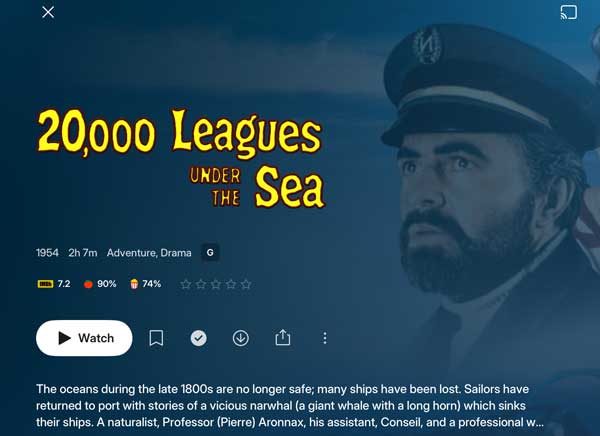
…and the idea was that we could keep it civilized and in a constructive tone but today, checking the Experience app in my iPad, I must admit, I was shocked and infuriated about how Plex handles the background art.
So here it goes (for the sake of screen space, I have resized the pictures).
Here, not only Kirk Douglas and the Nautilus are gone - which in itself is really bad - but who on earth thought it would be a great idea to put a tint overlay on an otherwise sharp and beautiful graphic art.
I mean, this is carefully curated artwork which shouldn’t be desecrated in this way and if I wanted a tint overlay I would have fired up Photoshop and put it there myself.
This also happens in the PlexPhotos app, where the backgrounds are obscured by, yes, you guessed it, a tint overlay. That beautiful, sharp photo of a sparkling Aegean sea you chose as a background?
Dimmed and blurred by that ever present overlay.
I don’t know if this was part of the thought process, but as someone with a visual handicap I can assure you that the blurred artwork in most cases (no, not always) helps to make it easier to read the white text. So, blur away!
Blurring and obscuring the original artwork is not the solution.
For what you want or need, a solid background with contrast behind text is what is normally used. And you can do it so it looks good. A bit of transparency or fading here or there, etc.
I watch a lot of movies with subs and believe me, nobody in the industry has come with the idea of putting a tint overlay over the movie, so the subs would be more readable.
Oh, I don’t necessarily disagree with you. One of the issues is probably the cropping and resizing is different on various clients (phone and tablet in both landscape and portait mode, tv, web), which would also make it harder (I guess) to put a solid background behind the text somewhere.
I would actually much rather see the actual movie poster on these pages, instead of a background header, but that’s another story.
Here we were already talking about the backdrop cropping issue six months ago.
It has been very productive as you can see today.
Edit: just noticed you were already on that thread, sorry, I don’t really pay attention to the nicknames here.
About the tint thing, for once I understand where it comes from and I don’t see it as an issue. Or let’s say…
Well I mean that because on landscape mode the backdrop is now set to full screen behind the content, its opacity has to be reduced to ensure that the content is readable.
I don’t think there is an actual tint applied to the picture, it’s just the colours (coming from the picture indeed) of the background that you can see through it. But result is the same, I know and I’m just nitpicking here.
Now I would indeed prefer if the backdrop could be reduced in size while being aligned with the top right corner (no cropping!) as it is done with the current TV app but that’s probably, again, too much asking as they seem to hold on to their bad design practices.
So from that point of view, I agree that it is bad. It’s just that it is consistent with their design choice.
I’m noticing a fun behavior where the background pictures are tinted on the movie (or show/season/episode) and then when I go back to the library, and click on the same item - the tint is gone!
I like it better without the tint, I’m just sure the differing behavior is probably a bug.