Missing Transponder "NetCologne" [Cable] and channel assignment

No, disabling Radio Channels is not possible for the User. (sure… you can do it manually after auto-assignment)
They usually have to be disabled by the Channel Search.
So for example we need a Checkbox for [HD], [SD] and [Radio]

In the Example with the m3u playlist, you can see Radio and TV is on the same Channel (418MHz), just different pids.
Das Erste (TV)
1Live (Radio)
WDR2 (Radio)
WDR3 (Radio)
Usually on every TV-Tuner you can choose to search for Radio or not.

I mean there should be also a tagging for Radio/Audio like every TV-Tuner has.
(Any DVB-S Tuner should have the same problem, isn’t it?)
Then the channel search can hide them for Gracenote.

Also encrypted channels can be hidden. (they are already tagged)

Today i noticed another problem..
Plex Web: 4.68.0
PMS: 1.24.5.5160
EPG: NetCologne (400 channels)


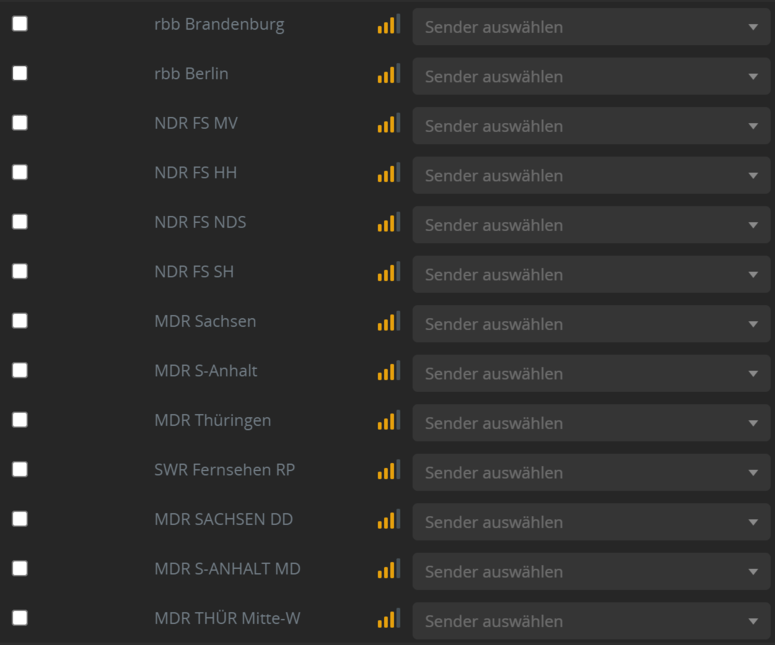
You can see in the EPG list are (nearly) all TV an Radio channels, some are wrong assigned, but the GUI will not allow me to change to the right one.
Correct assigned Channels just immediately switch allways to the first number when click on the drop down menu.
In the screenshot, Channel 032 always switch back to MDRJUMP if you select Tele5

Otherwise i change this channel to MDR JUMP, after saving and reopen it changes back to TELE5.

If any channel is double assigned the Dialog will not close and also do not show the error or tell why.

I extracted this information from the library.DB-File.
tablemedia_provider_resources
I don’t know where the HD tag in the channel list comes from but type=radio and origin="Radio" is set on radio channels.


See example for HD, SD and Radio:

<Channel channelIdentifier="triplet://1:1019:10301" 
			name="Das Erste HD" 
			origin="DEUTSCH" 
			param="&lt;?xml version=&quot;1.0&quot; encoding=&quot;UTF-8&quot;?&gt;&#10;
			&lt;tunedata&gt;
				&lt;tt&gt;2&lt;/tt&gt;
				&lt;dq&gt;0&lt;/dq&gt;
				&lt;dr/&gt;
				&lt;fr&gt;346000&lt;/fr&gt;
				&lt;md&gt;0&lt;/md&gt;
				&lt;sr&gt;6900000&lt;/sr&gt;
				&lt;pl&gt;0&lt;/pl&gt;
				&lt;lf&gt;7&lt;/lf&gt;
				&lt;l1&gt;0&lt;/l1&gt;
				&lt;l2&gt;0&lt;/l2&gt;
				&lt;ls&gt;0&lt;/ls&gt;
				&lt;pp&gt;0&lt;/pp&gt;
				&lt;hz&gt;0&lt;/hz&gt;
				&lt;in&gt;0&lt;/in&gt;
				&lt;fc&gt;0&lt;/fc&gt;
				&lt;t&gt;1019&lt;/t&gt;
				&lt;n&gt;1&lt;/n&gt;
				&lt;s&gt;10301&lt;/s&gt;
				&lt;en&gt;0&lt;/en&gt;
			&lt;/tunedata&gt;&#10;"
			drm="0" 
			type="tv" 
			signalStrength="56" 
			signalQuality="0"/>


<Channel channelIdentifier="triplet://41985:1101:28106"
			name="Das Erste" 
			origin="DEUTSCH" 
			param="&lt;?xml version=&quot;1.0&quot; encoding=&quot;UTF-8&quot;?&gt;&#10;
			&lt;tunedata&gt;
				&lt;tt&gt;2&lt;/tt&gt;
				&lt;dq&gt;0&lt;/dq&gt;
				&lt;dr/&gt;
				&lt;fr&gt;418000&lt;/fr&gt;
				&lt;md&gt;0&lt;/md&gt;
				&lt;sr&gt;6900000&lt;/sr&gt;
				&lt;pl&gt;0&lt;/pl&gt;
				&lt;lf&gt;7&lt;/lf&gt;
				&lt;l1&gt;0&lt;/l1&gt;
				&lt;l2&gt;0&lt;/l2&gt;
				&lt;ls&gt;0&lt;/ls&gt;
				&lt;pp&gt;0&lt;/pp&gt;
				&lt;hz&gt;0&lt;/hz&gt;
				&lt;in&gt;0&lt;/in&gt;
				&lt;fc&gt;0&lt;/fc&gt;
				&lt;t&gt;1101&lt;/t&gt;
				&lt;n&gt;41985&lt;/n&gt;
				&lt;s&gt;28106&lt;/s&gt;
				&lt;en&gt;0&lt;/en&gt;
			&lt;/tunedata&gt;&#10;" 
			number="1" 
			drm="0" 
			type="tv" 
			signalStrength="53" 
			signalQuality="0"/>


<Channel channelIdentifier="triplet://41985:1101:28475" 
			name="1LIVE" 
			origin="Radio" 
			param="&lt;?xml version=&quot;1.0&quot; encoding=&quot;UTF-8&quot;?&gt;&#10;
			&lt;tunedata&gt;
				&lt;tt&gt;2&lt;/tt&gt;
				&lt;dq&gt;0&lt;/dq&gt;
				&lt;dr/&gt;
				&lt;fr&gt;418000&lt;/fr&gt;
				&lt;md&gt;0&lt;/md&gt;
				&lt;sr&gt;6900000&lt;/sr&gt;
				&lt;pl&gt;0&lt;/pl&gt;
				&lt;lf&gt;7&lt;/lf&gt;
				&lt;l1&gt;0&lt;/l1&gt;
				&lt;l2&gt;0&lt;/l2&gt;
				&lt;ls&gt;0&lt;/ls&gt;
				&lt;pp&gt;0&lt;/pp&gt;
				&lt;hz&gt;0&lt;/hz&gt;
				&lt;in&gt;0&lt;/in&gt;
				&lt;fc&gt;0&lt;/fc&gt;
				&lt;t&gt;1101&lt;/t&gt;
				&lt;n&gt;41985&lt;/n&gt;
				&lt;s&gt;28475&lt;/s&gt;
				&lt;en&gt;0&lt;/en&gt;
			&lt;/tunedata&gt;&#10;" 
			number="1" 
			drm="0" 
			type="radio" 
			signalStrength="53" 
			signalQuality="0"/>

PS: i think drm="1" marks secured/encrypted channels…!? about 208 non usable channels (for me)

I can see the problem - so Gracenote have added radio channels to the lineup but as per the pdf from NetCologne Programmbelegung und Senderlisten (netcologne.de)

I will discuss with our development teams

could you send me copy of your database privately or export of the media_provider+resources table

Transponderlist still broken…!?


I am waiting for a Plex Web fix that will allow you to match the right lineup entry for the tuner channel where the lineup has the channel number appearing more than once

I don’t get it, why it’s not easyer for Gracenote to just switch the Radio Channel-ID to 1001-1080?
Else the List is getting messed up with double numbers…

Channel 033/133 is still switched.

If you give me a link to a NetCologne provider pdf that shows the channels as 1001 - 1080 then I can provide Gracenote with the link and ask them to do that

It’s just optical for Customers in the PDF - Radio Channel from 1-80.

See a list from other Cable Provider:

that’s just how it’s done… my opinion.
also it’s the way a normal TV do it.

@sa2000
There are still no Improvements since nealy 2 month (or 1 Year).

  • no Transponderlist for NetCologne
  • broken EPG-Lineup “NetCologne(400)”
    • double channel-numbers (Radio/TV)
    • channel 033/133 ist still switched

This is an open issue - it is a low priority considering the number of users affected and the fact that you have a working ini file to use

This is being fixed in Plex Web where you will be able to manually match the right tuner channel. I know that is not the solution you are expecting.

I do want to follow up the auto-matching aspects here to see how duplicate channels are matched when the callsigns are different - I will see if you have sent me logs during lineup dvr setup and auto matching - if you have - please run with debug logging and go through setup and select the NetCologne lineup and let it auto match channels and get me screenshots and server logs

I have asked Gracenote for an update

OK, something hast changed.
NetCologne(400) assigned 122 Channels now automatically assigned…

…it is possible to set both channels now.
…but automatic is not correct.


I will save the default an give you the result.

So, here’s the log

  • Setup new DVR
  • EPG Scan

Plex Media Server Logs_2021-12-11_16-35-11.zip (288.3 KB)

Unfortunately the radio-channels are now between the TV Channels (001-080) on top of the list.

Because of the wrong assignment in my previous post, EPG and channel is switched.
So first 001 ist actually TV, and the second 001 is radio.

These are still not automatically assigned: (about 80 missing)

I will do it manually and provide you the json-files

OK, the Automatic setting works as two channels can have the same number.
But it’s not possible to manually set the second entry to a channel.

It always switch back to the first entry of the same number.

Thanks - yes that is the problem that will get fixed - ability to manually set the second entry

Yes - unfortunately in this case it is the channel number that gets used for auto matching and where there are duplicates - which we end up with could be the wrong one. We do not have the triplet information in the lineups which is what the tuner is returning as well as the channel number - so we cannot refine further

On the server - could you run this curl command - it should return the list of channels the Plex Tuner Service is seeing for your tuner

curl -o tuner-channels.xml http://127.0.0.1:32600/devices/dvb%23sat2ip%230%23uuid%3a663d5d6c-f9f8-4bb4-84d4-E0286D49BBE0/channels

I will discuss with the development team if we can improve on the matching

Here it is…
tuner-channels.zip (11.5 KB)

Thank you very much - I have raised this as feature request. I am not even sure we can get the triplets information from Gracenote for allowing better auto matching

Thanks

Maybe gracenote can remove the radio stations for now or Plex can filter them out using
type = "tv"
type = "radio"
or
origin="xxxx"

Finally in the EPG the Radio should be at the bottom of the list, like order by type, then channelnumber.