Multiple problems after server update

Server Version#: 4.100.1
Player Version#: 8.16(5285)

Hello Guys,

I using Plex Media Server on an iMac with Venturta 13.2.1 The media folders are on a QNAP NAS TVS-672XT and mounted as Network drives using AFP protocol. The player is on my Apple TV.

Since the latest server update none of my files can be played. In Safari,Firefox and Chrome Playback Error says 'Please check the permissions for this file"

The Apple TV does not recognise the server and it says no internet connection, but there is Internet.

Could you please somebody help me to solve this?

Please explain like you would explain a 10 year old :slight_smile:

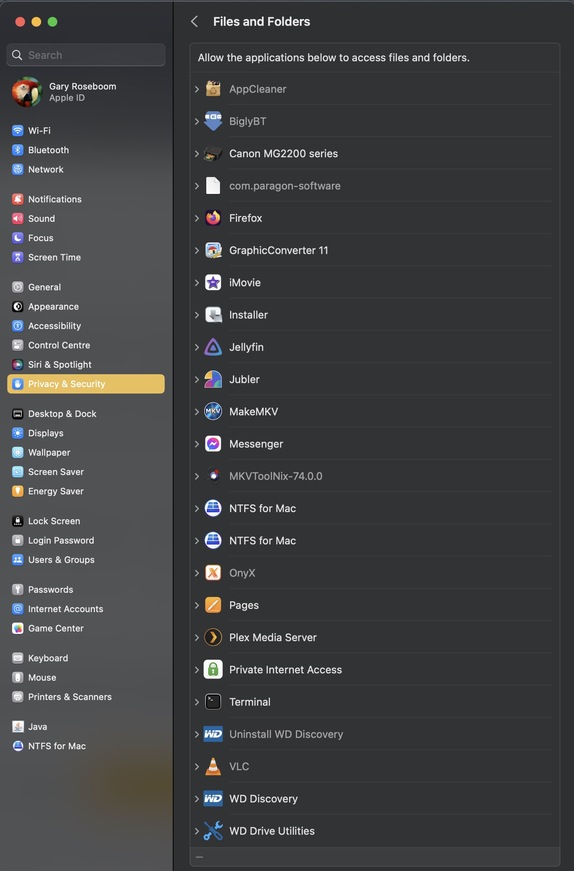
You need allow permissions by going to System settings/ Privacy & Security

Look at right column, Files and Folders/Plex Media server/ Removable Volumes is enabled.

Restart..

Thank you Sir the fast response.

If I go to System Settings/Privacy & Security/Files and Folders I got a blank screen. I cannot see any of my apps

However the idea was perfect. I used Full Disc Access instead and it seams all works fine.

Ok, it’s treating the NAS as a OS Disc. Makes sense, for my setup Full disk allows software access Macintoch HD…

Glad it worked out. Cheers

This topic was automatically closed 90 days after the last reply. New replies are no longer allowed.