No access to Plex server and or Interface

Server Version#:1.32.5.7349-8f4248874
Player Version#: 1.77.3.3966-a5ddb215
<If providing server logs please do NOT turn on verbose logging, only debug logging should be enabled>
Hello

I have recently the following problem
I can no longer access my Plex server although the port is set to listen and nothing else really happened.

but I always get the message No secure connection possible neither via the Mac app nor via plex.tv nor via the server IP itself I get access to the plex interface

i need help to fix this.

unfortunately i could not find any errors in the log files.

PLex Server Logs.zip (3.5 MB)

If the server is remote, you’ll need to SSH tunnel to get to it.

Plex.tv shows the Remote Access as not reachable: (Result: 0)

Sep 07, 2023 04:58:41.989 [140342673660728] DEBUG - [EventSourceClient/pubsub/172.105.245.178:443] PubSub: Got notified of reachability for async identifier a5433e76-778b-4e62-b732-0acdf3202fb1: 0 for :0 (responded in 39 ms)

ok thanks for the info i had overlooked can you tell me what i need to do once i have built the SSH tunnel to fix the error ?

The general SSH tunnel steps are:

  1. ssh -L 8888:127.0.0.1:32400 ip.addr.of.server
  2. Sign in that ssh session and allow it to sit there until done
  3. Open http://127.0.0.1:8888/web in the local browser (private window)

The tunnel redirects local port 8888 → 32400 on the remote
When it loads, you’ll know you’re “On” the machine.

So

i logged in via ssh tunnel and re-enabled remote access and it works although plex shows remote access as unreachable from outside

Recheck the remote access ports and the path through the modem/router & firewall.

So I have checked everything again I have enabled port 32400 in the firewall as well as both IP addresses of plex according to HAT article enable in firewall as well as fail2ban I don’t understand why this is spinning lately until the last update this was no problem.

I run plex on a dedicated storage server in the datacenter without nat or anything like that

unfortunately the remote access is still spinning it sometimes works for a while but then it doesn’t work anymore.

Translated with DeepL

@nxmy7y6w7s_privaterelay_appleid_com

I am looking at your account now.

  1. Your certificate is OK
  2. I am looking at your published IP.
  3. Attempting to connect to that listed IP times out.
  4. Does Amsterdam sound familiar ?

yes my server ist hosted in Amsterdam

I checked once if a port is open for plex and listens according to output plex uses port 32600.

I have disabled the firewall once as a test and in fail2ban I have enabled the IP addresses that are specified in the Plex remote connection article.

Otherwise I don’t use a hardware firewall or anything else that blocks.

Playback is currently possible via an indirect connection, but not directly.

I have also tried other ports but they only seem to work for a short time as plex reports no connection after 10-20 seconds.

lsof -i -P -n | grep LISTEN
systemd 1 root 75u IPv4 17427 0t0 TCP *:111 (LISTEN)
systemd 1 root 77u IPv6 17430 0t0 TCP *:111 (LISTEN)
rpcbind 884 _rpc 4u IPv4 17427 0t0 TCP *:111 (LISTEN)
rpcbind 884 _rpc 6u IPv6 17430 0t0 TCP *:111 (LISTEN)
rpc.mount 932 root 9u IPv4 24998 0t0 TCP *:39227 (LISTEN)
rpc.mount 932 root 11u IPv6 25002 0t0 TCP *:37471 (LISTEN)
rpc.mount 932 root 13u IPv4 25006 0t0 TCP *:47247 (LISTEN)
rpc.mount 932 root 15u IPv6 25010 0t0 TCP *:56825 (LISTEN)
rpc.mount 932 root 17u IPv4 25014 0t0 TCP *:48235 (LISTEN)
rpc.mount 932 root 19u IPv6 25018 0t0 TCP *:40521 (LISTEN)
dovecot 986 root 15u IPv4 41071 0t0 TCP *:4190 (LISTEN)
dovecot 986 root 16u IPv6 41072 0t0 TCP *:4190 (LISTEN)
dovecot 986 root 25u IPv4 41088 0t0 TCP *:110 (LISTEN)
dovecot 986 root 26u IPv6 41089 0t0 TCP *:110 (LISTEN)
dovecot 986 root 27u IPv4 41090 0t0 TCP *:995 (LISTEN)
dovecot 986 root 28u IPv6 41091 0t0 TCP *:995 (LISTEN)
dovecot 986 root 42u IPv4 41116 0t0 TCP *:143 (LISTEN)
dovecot 986 root 43u IPv6 41117 0t0 TCP *:143 (LISTEN)
dovecot 986 root 44u IPv4 41118 0t0 TCP *:993 (LISTEN)
dovecot 986 root 45u IPv6 41119 0t0 TCP *:993 (LISTEN)
psa-pc-re 990 postfix 3u IPv4 37556 0t0 TCP 127.0.0.1:12768 (LISTEN)
named 1009 bind 21u IPv6 36045 0t0 TCP *:53 (LISTEN)
named 1009 bind 22u IPv4 36048 0t0 TCP 127.0.0.1:53 (LISTEN)
named 1009 bind 23u IPv4 36050 0t0 TCP 94.75.211.138:53 (LISTEN)
named 1009 bind 24u IPv4 36051 0t0 TCP 127.0.0.1:953 (LISTEN)
named 1009 bind 25u IPv4 36138 0t0 TCP 10.32.35.99:53 (LISTEN)
sshd 1016 root 3u IPv4 32981 0t0 TCP *:22 (LISTEN)
sshd 1016 root 4u IPv6 32983 0t0 TCP *:22 (LISTEN)
sw-cp-ser 1092 root 7u IPv4 21797 0t0 TCP *:8443 (LISTEN)
sw-cp-ser 1092 root 8u IPv4 21798 0t0 TCP *:8880 (LISTEN)
sw-cp-ser 1092 root 9u IPv6 21799 0t0 TCP *:8443 (LISTEN)
sw-cp-ser 1092 root 10u IPv6 21800 0t0 TCP *:8880 (LISTEN)
sw-cp-ser 1093 sw-cp-server 7u IPv4 21797 0t0 TCP *:8443 (LISTEN)
sw-cp-ser 1093 sw-cp-server 8u IPv4 21798 0t0 TCP *:8880 (LISTEN)
sw-cp-ser 1093 sw-cp-server 9u IPv6 21799 0t0 TCP *:8443 (LISTEN)
sw-cp-ser 1093 sw-cp-server 10u IPv6 21800 0t0 TCP *:8880 (LISTEN)
mysqld 1260 mysql 20u IPv6 10956 0t0 TCP 127.0.0.1:3306 (LISTEN)
apache2 1350 root 3u IPv4 18807 0t0 TCP *:7080 (LISTEN)
apache2 1350 root 4u IPv4 18809 0t0 TCP *:7081 (LISTEN)
xinetd 1452 root 5u IPv6 13970 0t0 TCP *:21 (LISTEN)
xinetd 1452 root 6u IPv6 13971 0t0 TCP *:106 (LISTEN)
master 1658 root 13u IPv4 14849 0t0 TCP *:25 (LISTEN)
master 1658 root 14u IPv6 14850 0t0 TCP *:25 (LISTEN)
master 1658 root 105u IPv4 14941 0t0 TCP 127.0.0.1:12346 (LISTEN)
master 1658 root 114u IPv4 14950 0t0 TCP *:465 (LISTEN)
master 1658 root 115u IPv6 14951 0t0 TCP *:465 (LISTEN)
nginx 2616 root 6u IPv4 48422 0t0 TCP 94.75.211.138:443 (LISTEN)
nginx 2616 root 7u IPv4 48423 0t0 TCP 10.32.35.99:443 (LISTEN)
nginx 2616 root 8u IPv4 48424 0t0 TCP 94.75.211.138:80 (LISTEN)
nginx 2616 root 9u IPv4 48425 0t0 TCP 10.32.35.99:80 (LISTEN)
nginx 2617 nginx 6u IPv4 48422 0t0 TCP 94.75.211.138:443 (LISTEN)
nginx 2617 nginx 7u IPv4 48423 0t0 TCP 10.32.35.99:443 (LISTEN)
nginx 2617 nginx 8u IPv4 48424 0t0 TCP 94.75.211.138:80 (LISTEN)
nginx 2617 nginx 9u IPv4 48425 0t0 TCP 10.32.35.99:80 (LISTEN)
Plex\x20M 31801 plex 10u IPv6 7292201 0t0 TCP *:32400 (LISTEN)
Plex\x20M 31801 plex 11u IPv4 7292203 0t0 TCP 127.0.0.1:32401 (LISTEN)
Plex\x20S 31844 plex 7u IPv4 7292269 0t0 TCP 127.0.0.1:41777 (LISTEN)
Plex\x20T 31890 plex 10u IPv4 7287089 0t0 TCP 127.0.0.1:32600 (LISTEN)
Plex\x20S 31985 plex 4u IPv4 7295072 0t0 TCP 127.0.0.1:33779 (LISTEN)
Plex\x20S 31998 plex 4u IPv4 7280858 0t0 TCP 127.0.0.1:33593 (LISTEN)
Plex\x20S 32148 plex 4u IPv4 7280868 0t0 TCP 127.0.0.1:43263 (LISTEN)
Plex\x20S 32152 plex 4u IPv4 7282148 0t0 TCP 127.0.0.1:35259 (LISTEN)
Plex\x20S 32154 plex 4u IPv4 7265241 0t0 TCP 127.0.0.1:34575 (LISTEN)
apache2 39020 www-data 3u IPv4 18807 0t0 TCP *:7080 (LISTEN)
apache2 39020 www-data 4u IPv4 18809 0t0 TCP *:7081 (LISTEN)
apache2 39021 www-data 3u IPv4 18807 0t0 TCP *:7080 (LISTEN)
apache2 39021 www-data 4u IPv4 18809 0t0 TCP *:7081 (LISTEN)
apache2 39022 www-data 3u IPv4 18807 0t0 TCP *:7080 (LISTEN)
apache2 39022 www-data 4u IPv4 18809 0t0 TCP *:7081 (LISTEN)
smtpd 40325 postfix 6u IPv4 14950 0t0 TCP *:465 (LISTEN)
smtpd 40325 postfix 7u IPv6 14951 0t0 TCP *:465 (LISTEN)
smtpd 42451 postfix 6u IPv4 14950 0t0 TCP *:465 (LISTEN)
smtpd 42451 postfix 7u IPv6 14951 0t0 TCP *:465 (LISTEN)
smtpd 42512 postfix 6u IPv4 14950 0t0 TCP *:465 (LISTEN)
smtpd 42512 postfix 7u IPv6 14951 0t0 TCP *:465 (LISTEN)
smtpd 42513 postfix 6u IPv4 14950 0t0 TCP *:465 (LISTEN)
smtpd 42513 postfix 7u IPv6 14951 0t0 TCP *:465 (LISTEN)
smtpd 42539 postfix 6u IPv4 14950 0t0 TCP *:465 (LISTEN)
smtpd 42539 postfix 7u IPv6 14951 0t0 TCP *:465 (LISTEN)
smtpd 42604 postfix 6u IPv4 14849 0t0 TCP *:25 (LISTEN)
smtpd 42604 postfix 7u IPv6 14850 0t0 TCP *:25 (LISTEN)

Port 32600 is used internally by PMS.

The full list of ports used by Plex for LAN are here.

https://support.plex.tv/articles/201543147-what-network-ports-do-i-need-to-allow-through-my-firewall/

For Remote Access, the only port you’re concerned about is host port 32400/TCP
Port forwarding from the router redirects the wan port (whatever it may be) to SERVER_IP:32400

Hello

I have tested the following

Starting Nmap 7.94 ( https://nmap.org ) at 2023-09-27 03:19 Central European Summer Time
Nmap scan report for storage1.nl.euroservers.com (94.75.211.138)
Host is up (0.22s latency).

PORT STATE SERVICE
32400/tcp open plex

Nmap done: 1 IP address (1 host up) scanned in 0.31 seconds

port 32400 is open but even though the port is open no direct connection is possible through plex but only through the relay and plex often shows no connection.

the funny thing is that I can access directly through the browser.

Translated with DeepL


It looks like you opened firewall port 32400 TCP/UDP

What you need is a Port Forwarding rule from 32749/TCP => ServerIP:32400

You don’t want to allow 32749 onto your LAN.
You want to accept traffic at 32749 and forward it to 32400 at the server IP

plex is running on a Debian10 server with plex panel in the data center in Amsterdam without extra nat or anything else there is the port 32400 free I have no other. traffic blocked

I’m not sure why I need to forward port 32749 to 32400 it worked until 2 months or so ago without.

what has been changed in plex.

You’re showing the screenshot with the post above. If I got confused by that, I apologize.

If you have a truly wide-open machine then change the setting to full manual

Settings - Server - Remote Access

  1. Manually set port
  2. Port 32400
  3. Retry

I have that, that’s the strange thing. I don’t understand where it comes from. I have plex on a dedicated Debian 10 server without a block or something similar. In my opinion, the error happened in one of the last updates. Can I somehow roll back plex?

Currently, despite manual port 32400, no block public IP without nat, no access is possible, not even via relay service

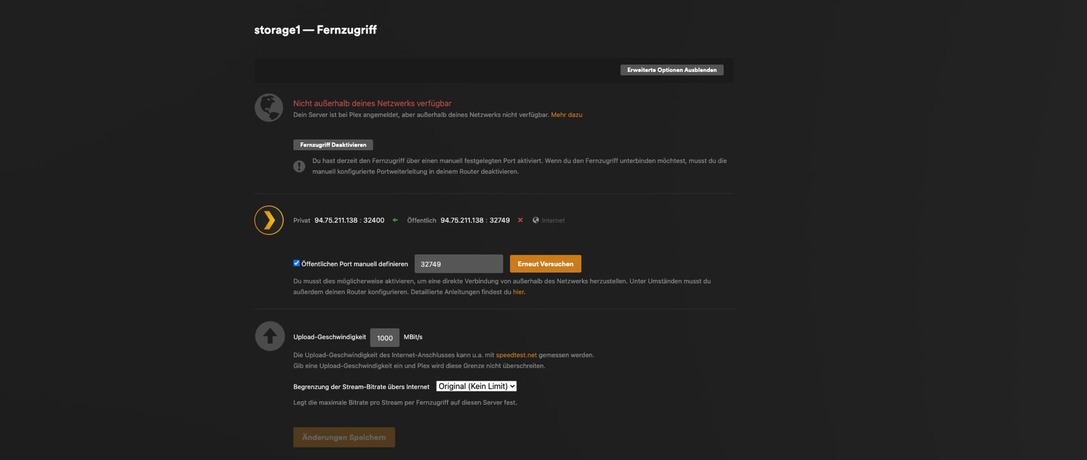
So I had just installed an available update and then had to manually define remote access and port 32400 again and now it is online, see screenshot. I will keep an eye on it over the next few days

Hello

I have unfortunately after an update from you that I downloaded about 1 hour ago again the same problem plex has problems with the remote connection partially see screen shot.

Furthermore, the server was completely unusable error message plex Failed to load preferences.xml although I have not changed anything there.

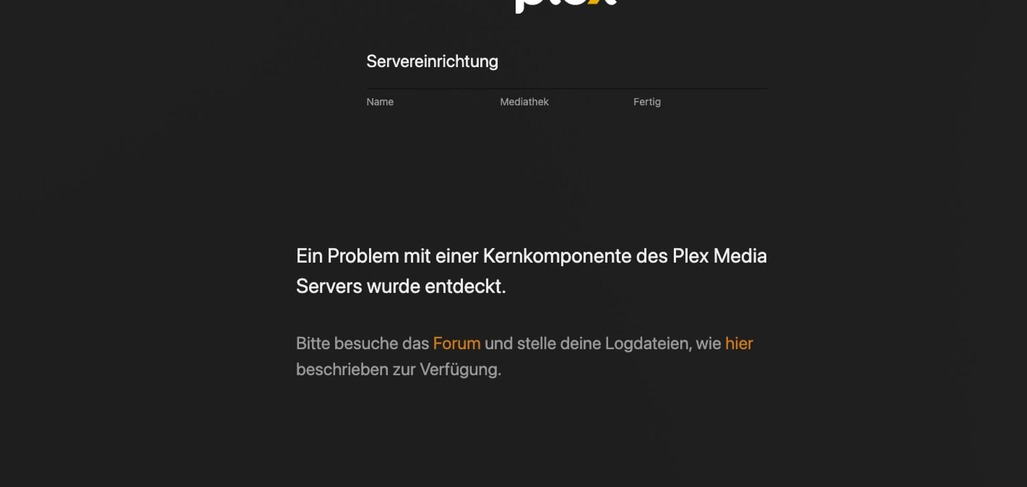
I have completely removed plex according to your instructions and it is accessible again, but the A problem with a core component of the Plex Media Server was discovered.
I would like to know how I can get the Plex media server running perfectly again without any problems

Translated with DeepL Translate: The world's most accurate translator (free version)


PLex Server Logs.zip (3.5 MB)