Server Version#: Synology 7.1.1-42962
Player Version#: 1.29.2.6364
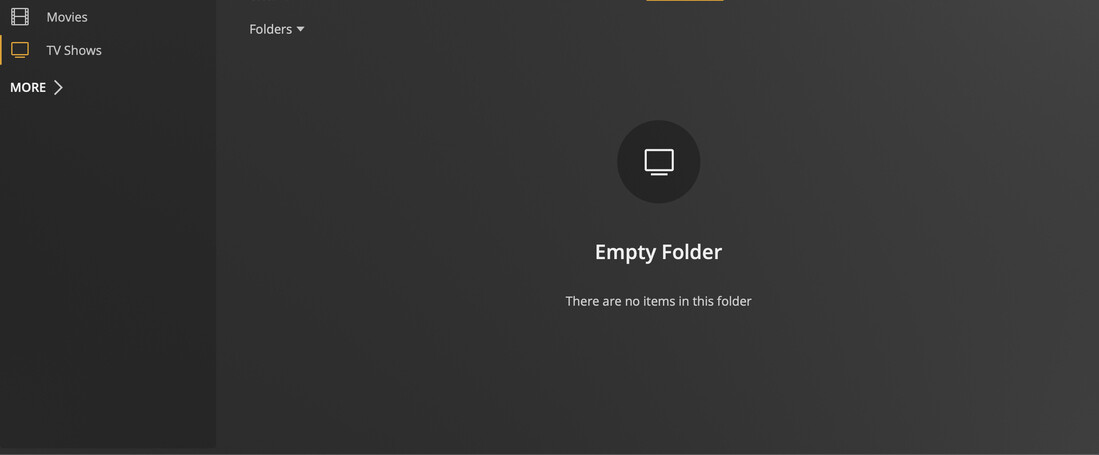
Ran into a wall trying to figure this out. I’ve uploaded content into my NAS before and have it show up with no issues on my Plex. However, I’ve recently uploaded content in the same directory as my previously uploaded content > added the tv series name > added the season > went to Plex to scan to update the library and nothing shows. When I go to tv shows > the tv show isn’t appearing. When I sort by folder they appear but the folders are empty (screenshot attached). Why isn’t the content showing? I made sure the names of the show and episodes were correct along with the format but nothing still shows. Please help!
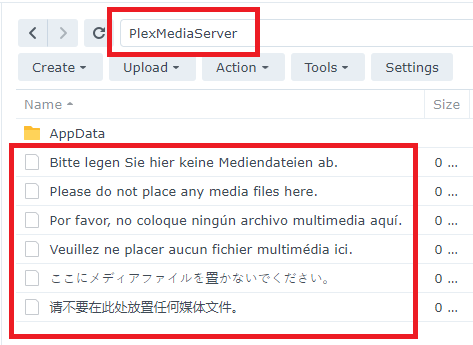
Synology Directory
/PlexMediaServer/TV Shows/It’s Always Sunny In Philadelphia/Season 1/ It’s Always Sunny in Philadelphia S01xE01 The Gang Gets Racist.mp4
Your media is in a reserved location and must be relocated.
Review the Installation & Setup document linked above.
Your media is incorrectly named. It must be renamed per Plex requirements.
Review the Plex Naming & Organization documents linked above.
Move all media out of the /PlexMediaServer shared directory, including movies or other media. That location is reserved for use by Plex Media Server. That is why there are messages in multiple languages saying “Do not put your media files here.”
Name your files according to Plex requirements (s01e01, not s01xe01).
/TV Shows <-- folder added to TV show library
../It's Always Sunny in Philadelphia (2005) <-- ShowName (year)
..../Season 01 <-- "Season" in English, two digits for number
....../It's Always Sunny in Philadelphia (2005) s01e01 The Gang Gets Racist.mp4 <-- sXXeYY mandatory
..../Season 02
......It's Always Sunny in Philadelphia (2005) s02e01.ext <-- Always use year show started; ext=mp4/mkv/etc.
Thank you for clarifying everything. So sorry for the link, I’ve looked but I watched so many videos that it’s hard to find it. If I run across it I’ll be sure to add it so it’s corrected.