Synology FAQ - Questions, Answers, and How-To's

FAQ 19: Setting permissions to allow Plex access to media files

Before beginning, it’s important to remember one key point; Plex doesn’t have any special privileges on Synology except for being able to access the Video Transcoding acceleration hardware. It cannot read any of your files unless you expressly grant permission. This is a fundamental principle of Linux (which Synology uses for DSM)

Because of how Synology grants permission, access to files is broken into two different elements and, as the direct result, may take 3 forms

  1. The file(s) were copied onto the NAS from external media
  2. The file(s) were copied onto the NAS using a SMB/NFS user account
  3. The file(s) were copied onto the NAS using a third party utility/program.

In almost all cases, granting access to user Plex in the Control Panel - Shared Folders (app) is all that’s needed. However, sometimes, because of the different ways media files might have been copied, they need permission adjustments to work in the Synology/Plex environment.

This FAQ shows the different steps you might have to take to change permissions for Plex to see the media.

For DSM 7 - Grant permissions for “PlexMediaServer”
For DSM 6 - Grant permissions for “Plex”

  • The most common, which is also a required step, and easiest to do, is grant access to the Shared Folder where the media is being stored. Always do this step first.
    a. Control Panel
    b. Shared Folders
    c. EDIT the share containing the media
    d. Permissions tab
    e. Check the box (Read only or R/W) to grant Plex access.

  • The second most common, but also most confusing, is when permissions are mixed due to where the media files originated. Only do this step as needed and only to the degree it’s needed.

(DSM 6 shown here. Use PlexMediaServer for DSM 7)

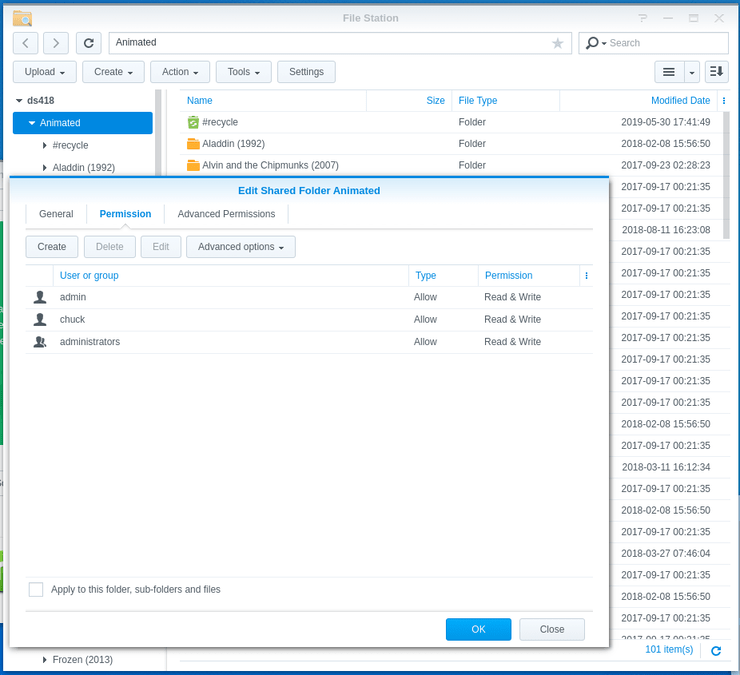
  1. Check the share’s (or movie/tv series’) Properties

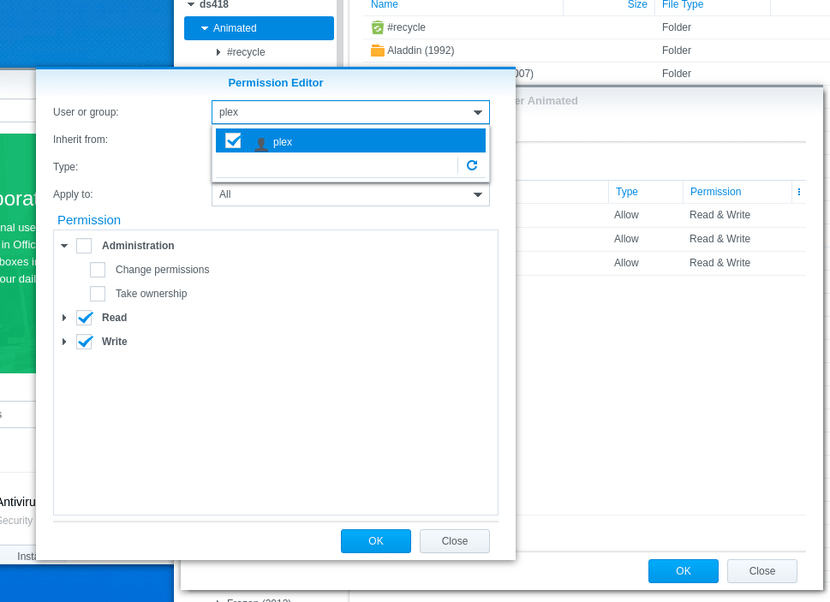
  2. If user “Plex”/“PlexMediaServer” isn’t listed, we will need to add it to the list of username (top box), and then check the access permission boxes (Read permissions block & Write permissions block)

  3. After adding user Plex to the list, to complete the operation, “Apply to this folder, sub-folders, and files” then click OK.
Final note:

It is possible, as you add media, you will again encounter individual files which aren’t seen. By applying the last part of this procedure surgically on those folders/files, you can open up their permissions and allow Plex to see them.

Ref: PlexMediaServer - DSM 7 permissions

Go to Index

2 Likes
Unable to locate media on Synology NAS
Plex library not updating automatically synology ds218+
There are no items in Library ¦ DS918+
Need help with subfolders in movie library
Plex cannot see multiple USB drives connected to SYNOLOGY NAS
After migration to DSM 7 DVR has Problems with permissions
DS918+ and plex
Library issue and input on them
Unable to add media folders
Plex does not see the folders content
TV shows folder noot shhowing titles in plex
Libraries no longer found, server installed on same NAS as Library
Plex not seeing episodes in HEVC
Problem with album artwork showing as band image (and more)
Certain Folders Not Being Detected
Synology: DSM 7 Installation Archive -- Archived from main thread
"Music" is empty
Plex will not scan library
Pre-roll won't work
Library moves move
MP4 File Won't Transfer To Plex Media Library
Libraries don't automatically update when adding new content
Visibility to Library Details
Plex doesn't recognize new movies anymore
So confused .. Why isn't plex indexing my files?
Problems with folder hierarchy
Please upload 3.3.4 version app for Samsung Tizen tv
Plex Playback Error "Please check that the file exists and the necessary drive is mounted"
Update auf PlexMediaServer-1.21.1.3830-6c22540d5-x86_64
How to configure library with heirarchial shared file structure
Synology NAS Plex not finding any files
Plex not finding a few movies in my movies folder
Plex shows running but inaccessible
Plex on the synology dx517 (solved)
Please check that the file exists and the necessary drive is mounted
Plex does not see Synology NAS folder structure
No matter how I name them, not a single part of a tv serie, from dvd, is shown in Plex
Add Library on Plex Media Server on Synology DS720+ only shows Volume1
Music and videos are empty, photos is only showing videos
New Libraries showing has empty
Plex neu aufgresetzt ... es werden aber keine Filme gefunden
Libraries not visible
Synology Moments and PMS reading library pad
Improper Library Labelling & Metadata in Music
Plex Media Server - Synology DSM 7 Preview - Issues ( Archive )
Issues with Synology Permissions
Cant see subfolders when adding media to Synology Plex server
Plex library not seeing folders or files Synology DSM7
Viewing films on Synology thru PLEX a problem here
As minhas alterações não puderam ser salvas
Zwei Synology Folder lassen sich nicht zur Mediathek hinzufügen
Plex can't see media folders when I try to add library
PMS can't delete video from Synology server
Share naming on Synology NAS
Plex Not Finding (Some) Files from Library
Server only runs for a few minutes
Plex not finding newly added media - only after manually copy/pasting into media folder
Problem: Plex Server Installed on Synology NAS (DSM 7) Unable to add any library files
Synology DSM7 - Plex No Longer Finding New Files
Additional Optimize Version storage locations
Not all my files appear in my library despite proper naming
Videos Not Loading in New Folder
Plex not seeing folders on new Volume & new expansion unit
Missing TV Shows
A Nightmare on Elm Street - cannot get it to add to my library
Media/Nas folders not available in Add Library step (PMS set permission for read/write)
Unable to load movies from my Synology NAS
Plex adding media then randomly removing from Library
Plex Server Not Indexing Video Library on Synology
Unable to connect to securely & Can't authenticate user
Zugriff verweigert
20% of my movies are not being recognized
Plex can no longer play my music or add new files (Synology)
Plex only sees 193 songs of a 16000 song library on Synology NAS
Plex can't find some films/series
PMS routinely crashing on DSM
Can't upload new photos
Plex adding media then randomly removing from Library
Can't find my folder in PMS when browsing for it to add in library
Updated to DSM7, Plex Re-Installed, Transcode Errors
Plex System Name
Plex cannot access the media on Synology server
(DSM 7) Plex Media Server wont find new movies
Plex on Synology server stopped working
Somethings Wrong
Filenames changed on NAS but not reflected on Plex; now points to unavailable file
HELP! I can't live without Plex
Filenames changed on NAS but not reflected on Plex; now points to unavailable file
Plex not adding items to library
Plex won't display all my videos
DMS 7.1: Delete not working when Plex is running in a Docker container
Access to server denied in PLEX
Synology running Plex will not even recognize .mkv files in my TV directory
Folders not visible to import music. First setup. Need help!
Folder with content not available
Allowing plex to access another folder on separate hdd (same NAS)
Changing my Plex setup, help needed please
Library does not detect home video files
Plex server not scanning music in Itunes folder
Synology Plex not finding all files
Photos not shown
Can't find a specific whole folder
Plus d'accès à mes films via Plex
Plex scans and detects new videos in one folder but not the other
Synology package is stopping every day
Not all my files appear in my library despite proper naming
[SOLVED] Since updating plex to 1.28.0.5999, all lib are not available