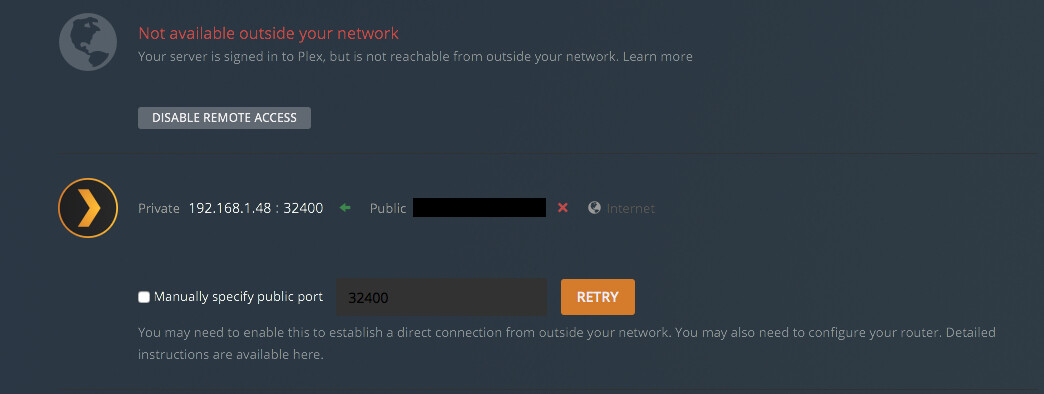
DS1618+ DSM 7
All players outside
I must have done something because both of my Synology Servers are no longer accessible from outside the network.
Nothing has change on my router, but I have been doing quite a few things with the DS servers. Adding Libraries, but I didn’t think that I touch anything on the Remote Services. Attached is the screen from Settings - Server - Remote Access. I have tried to disable it and then re-enable it with no results. I have never chosen to use the manual port and everything has worked up to now.
I am running a Ubiquiti UDM Pro and have NOT done anything to it for quite some time. And Plex has worked just fine for remote access until yesterday. Now, I can’t get in remotely.
Also, I have two Plex servers running. Both of them on are Synology NAS devices and both of them have been accessible until yesterday.
Also a question about this Manual public port setting. If I need to now do this and I have two Plex servers running they can’t both have the same port. Right? So does one have to be 32400 and the other one be 32401?
Correct. If you’re using manual port forwards, each server needs its own public port .
There’s quite a number of players when it comes to messing up your remote access and you don’t have control over all of them. If your issue persists, there’s some extended write-up on how to troubleshoot things.
Good point – though the support article you have linked is about accessibility inside your home network. You shouldn’t open those on your router!!
From the article:
Warning! : For security, we very strongly recommend that you do not allow any of these “additional” ports through the firewall or to be forwarded in your router, in cases specifically where your Plex Media Server is running on a machine with a public/WAN IP address. This includes those hosted in a data center as well as machines on a “local network” that have been put into the “DMZ” (the “de-militarized zone”) of the network router. This is not a setup that applies to most users.
I am not sure about your statement to “NOT open those on your router”. Here is what I have done so far. reading the articles that everyone has provide, I decided to activate the manual port and on my router, created a new port forwarding rule so that the outside connection can be routed to my DS. Since I have two DS devices, I created two port forwarding rules and on each DS’s Plex, created two manual ports 32400 and 32401. In the router, each rule pointed to each device’s “x.x.x.x:32400”.
So, is this what I am NOT supposed to do? AND BTW - once I created the rules, I was able to remotely access both of me DS Plex Server.
The last part of my post was in response to AmazingRando24. The support article they posted referred to certain ports that should be opened for Plex to work properly. However that support article is specifically about firewall openings you might need inside your home network – this is not related to remote access.
Remote access just needs 1 port to be opened per server.
Am getting abit pissed off with this issue now, ports forwarded, manually set and it still every so often, refuses to remotely work… Also another issue is plex signing the user out, which can also cause remote access to stop working… 100 odd quid for software thats not operating as it should.
Not sure if you’re looking for help or if this is a rant.
If you want to fix this (or at least identify what’s causing your issue), I suggest you provide some more details based on the troubleshooting guide.
If it’s sometimes working and then stops… make sure your Plex Media Server has a static local IP address / IP reservation in your router configuration.
Am well aware of all the trouble shooting steps there Tom, and have done all but issue still remains.
You’re dead right this is a rant, £100 paid for software that continually disappoints.
I think I have possibly found the culprit for all this Tom… on iOS anyway, and I think it’s to do with Limit IP Address Tracking and iCloud Private Relay.
By chance I visited (through my homes network) canyouseeme and tested the port 32400, couldn’t see it open, turned off Limit IP, visited can you see me an sure enough the port was open.
Now being on my homes wifi I can test this, Limit IP is also an option in Mobile data, 3G etc, but I currently can’t test this because there is zero mobile reception where i live.
So upon trialing my founding on the way to Dublin this morning it didn’t matter a jot if limit ip was enabled.
However, I fired up the web browser and sure enough I was able to access media, but neither PlexAmp or the Plex App on iOS will connect nor see my server… tell me now my settings are incorrect Plex people….
I get how frustrating it can be to buy something, and it doesn’t work as intended.
There are thousands of us that have setups that work totally fine… until they don’t. I just recently swapped out servers and was having intermittent remote access issues such as yourself, but my solution was different. You’ve got a willing Plex Rep on the line who is incredibly knowledgeable and willing to help you if you let him.
It definitely sounds like there’s something unique happening with your setup that doesn’t happen to everyone. Give these guys a chance to help. I also know it’s frustrating to hear suggestions that you already tried, or that seem too simple to be the case, but roll through them anyway. I’m pretty sure they’ll lead to the “AHA!” moment that solves the issue.
Am not dissing the rep at all Rando, and I know they meant well by posting the support link, am well versed in configuring the router, forward ports, home networking etc… but this has frustrated me, after configuring everything, being able to log in remotely through the phones browser, seeing my server, navigating it, playing media back but yet I couldn’t do any of that through the phones dedicated apps.
Dismantled everything, turned off network switch, reset router to default then left it off for 15 mins.
Booted everything back up and went through router settings like a fine tooth comb. Created service, then added it to inbound, booted up the nas, set its usual ip, opened plex, manually set port config, and viola, all is operating as it should of been…
I cannot fathom, why, after going through all the settings again and doing exactly as i did before. its now working through the iOS apps.
Could be just turning the router off solved it… but if it was already working through iOS browser… i dunno… thank the lord its finally working an i can enjoy my music on the go again.