Server Version#:
Player Version#:
<If providing server logs please do NOT turn on verbose logging, only debug logging should be enabled>
I need your help regarding opening port 32400 on my Verizon router. This is what I did but the server is unreachable (app or web) outside of my home network.
How long ago did you port forward on the Verizon network? For Comcast, it often takes at least a day for such changes to route through the system before they actually start working.
Thank you. I didn’t know the changes wouldn’t be effective immediately. The port forwarding was done yesterday. I’ll wait a bit longer then but, outside my network, I am getting the message the server is unavailable. Shouldn’t it be accessed through an indirect connection at least?
Changes to the router should actually be effective immediately after applying them.
Did you configure the public port you specified in your router as the port to be used for remote access (Settings > [Server Name] > Remote Access > Manually specify public port)?
Can you verify the port forward is working (e.g. using a service like canyouseeme.org)?
Side note: you don’t need Both protocols for your port forward… just TCP.
There’s tons of possible caveats when it comes to remote access… your server seems to believe it’s fully accessible outside your home network (see the green text on your 2nd screenshot).
Did you already have a look at the related troubleshooting support article?
Thank you, Tom. I am not sure what needs to be done to specify in the router the port to be used for remote access. I just went to Port Forwarding and opened 32400 as in the snapshot in my original post…or thought I did: the port is not seen as opened when I check using yougetsignal.com. Is there anything else which needs to be done?
I looked at the troubleshooting guides but didn’t find them really helpful. Probably me not understanding them enough.
Could be as simple as your ISP blocking certain ports (in which case you might be successful trying a different one) or they’re not giving your router a routable public IPv4 address.
Do the public IP addresses reported in your router, the Plex remote access settings and yougetsignal match?
Thank you (again). Yes, the public IP addresses are the all the same. I will try with a different port.
I just checked again connecting to Plex directly from the Synology NAS and now it shows the remote access isn’t available anymore. I didn’t change anything since this morning though. So confused.
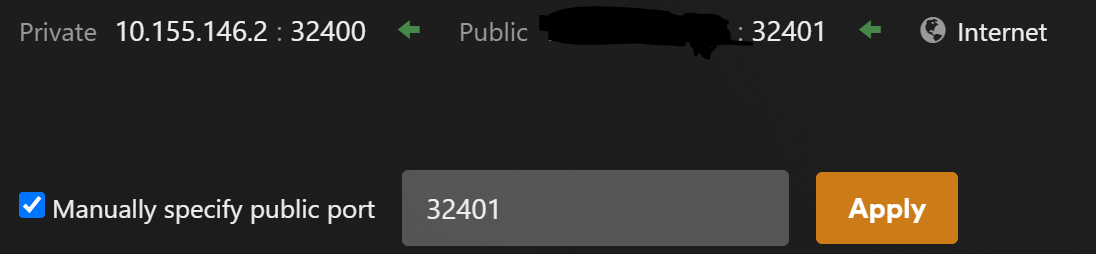
Notice that my INTERNAL port is 32400 for both, it only changes outside my network to keep the traffic for each separated.
So referring to my 1st screen capture, the Manual Public Port for the sever that ends w/ .3 is set to 32400, but the Manual Public port for the one that ends w/ .2 is 32401 as shown below.