55GZ1000. I only bought this TV in February.
I have a 55GZ1000. I only bought this TV in February. Apart from the picture quality, I bought this to use with PLEX.
When I launch PLEX it looks like a web interface with a pointer. Says server not reachable.
This started Sept 1, 2020
Nothing changed with the app itself. What changed was back end security due to us not supporting old security protocols anymore which mean that old app won’t work for most devices. The reason the Panasonic app is different without getting into detail is how the app was configured to behave when loading in a secure environment, not TLS 1.0 specifically. We did not think would affect the Panasonic app which is why it was not added to the announcement initially.
We are making a change to only the Panasonic app so it can load properly. This will hopefully be done today when we reach a deploy window that won’t affect too many folks. We are doing this is because it was our mistake to not recognize that the changes would affect the Panasonic app.
To be clear the app that is currently on other brands such as Hisense models that stopped working will still not work. The old app on Panasonic is not going to get any other updates and if it breaks in some other way in the future that won’t be fixed.
9 Likes
That’s great news BigWheel, I appreciate all your efforts and support you have provided thus far and am sure I speak for all current Panasonic consumers.
Fingers crossed you guy’s decide that Panasonic is worthy and will be included again at some stage in updates.
Colour me impressed.
I was not expecting this.
Thank you very much for your efforts.
Really great news, thank you very much.
Great news. Thank you very much.
Hi Plex - you mention that OLDER hisense models will also stop working. My brand new HIsense 85S8 (2020 model) also has stopped working.
Why is this? What can be done?
I think that it’s just language - it affects TVs using the “older” Hisense-specific operating system, or “older” Plex apps running on those systems. It might just be imperfect language.
Some Hisense TVs run Roku or Android instead. Those aren’t affected.
It also might be somewhat US-centric language. I think Hisense (and Panasonic, and the other affected “older” TVs from the announcement) stopped selling those models in the US longer ago.
Fundamentally though it means TVs running those apps on those not-supported-by-Plex TVs are affected, not “when you bought it”.
Yep… understood.
Frustrating but as a techie, i do understand and get it.
Trying to think of options here…
- Could i set up an NGINX proxy that upgrades TLS 1.0 to 1.2?
Also, i have a 7 year old Samsung smart box… it still works fine for Plex! Why? The difference here is that on the Samsung box, i don’t have to sign in to plex - i can just add my internal server IP manually and it works. On the hisense app, i have to sign in…
Even then though i can manually add the server IP - but then it fails to connect. Not sure why this is as this is a ‘local’ server, and not going via https://plex.tv
Just adding myself in here for numbers. Same issue. Tried everything. I get that it’s no longer supported, but my tv is not old. Not happy.
Hi from France (so, sorry for my bad english level) I’ve got same problem on my PANASONIC TX-65EX700E… (bought in june 2018).
Disappointed with the lack of responsiveness of PLEX. But wait and see. but not too long I hope
Another thank you here
Yes this is the frustration. A colleague complained a couple of years ago that when his internet was down and couldn’t see Netflix etc. he thought “that’s OK I’ll watch the stuff on my Plex box” but couldn’t because the client demanded to speak to Plex.tv first.
If the Panasonic app was updated to work completely locally, this issue would go away
Thanks for the reply BigWheel!
You say “Nothing changed with the app itself” but we have all noticed differences; different text size, boxes displayed in different places and more prominently, there is now a giant mouse pointer on the screen which definitely was not there before! 
Anyway, if you can roll out a work around then I and I’m sure many others will be very grateful. I’m not bothered about whizzy new features on the TV app, I just want a clean and easy way to stream my media from my server. 
Gav.
1 Like
I have no idea what screen you are looking at, maybe some error screen, but nothing changed with the app. The Panasonic app has not been worked on in years except for today.
Thanks, I think is a good and clever decision for customer satisfaction and keep people happy with Plex, maybe in future they can join the plex pass…
Hi,
There is a problem with navigation in the app now. It shows giant mouse pointer instead of using remote to navigate, the scaling of the app is very tiny (small text and thumbnail)
When a movie is launched it plays in the top left corner of the screen
1 Like
Hello Bro
APP restarted to work but something goes wrong. Screen resolution is wrong and there is a big pointer always active
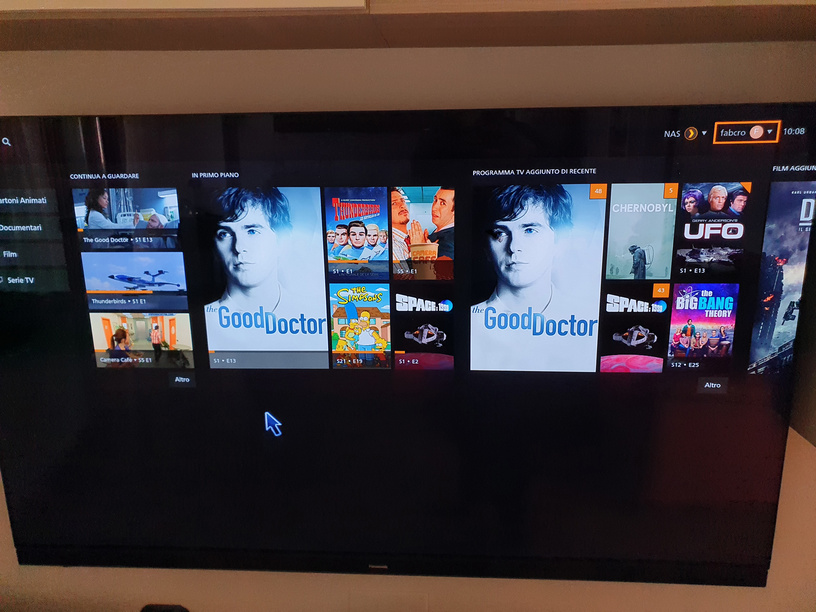
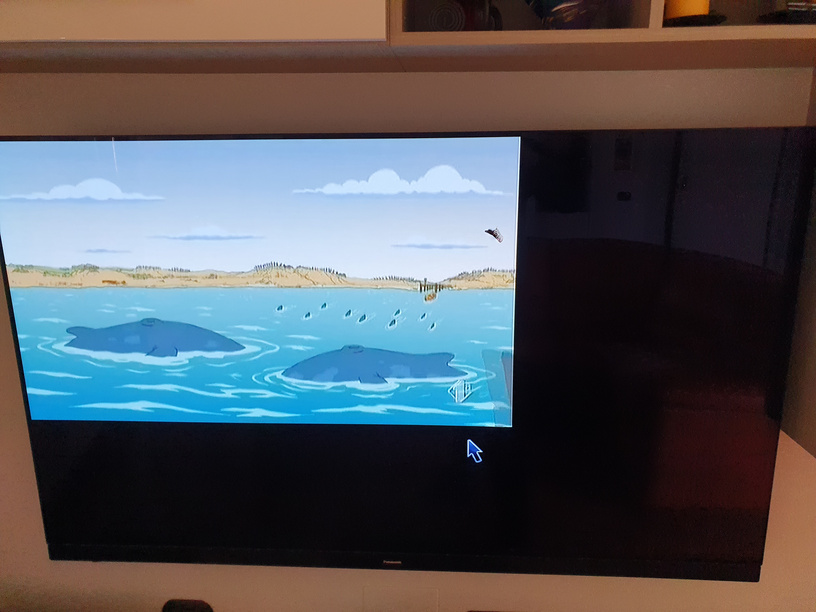
Unfortunately nothing has really changed apart from the scaling size which is small but I still have a big blue error box up saying
“The server is temporarily unable to service your request due to maintenance downtime or capacity problems.
Please try again later.”
then with a ok button which i can’t select.
As well as the oversize cursor which moves with my remote but selects nothing.
