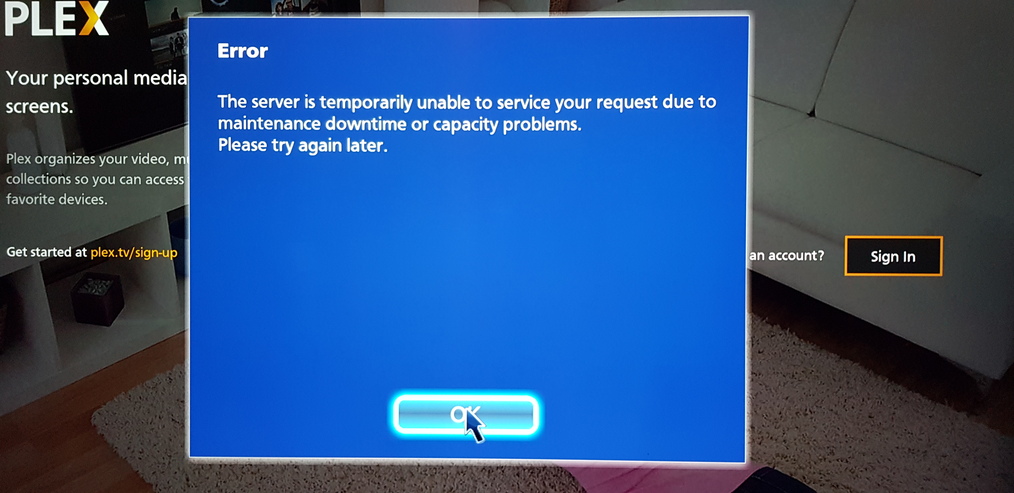
Appreciate plex technical getting Panasonic patch to allow plex to connect to app.
My TV / plex connection came up an hour ago. GUI navigation changed to pointer only,
so navigation by remote control arrows no longer works and screen navigation
windows and text are reduced in size.
((My assumptions: Recap))
So in review TLS Security 1.0 is no longer supported in the Plex back end effective October 1st.
Plex technical set back end to TLS 1.2 and greater only. This is for security (understandable).
This impacted the unsupported Panasonic plex app (unsupported) which Plex technical is modifying to work with TLS 1.2.
(my setup)
Panasonic Viera TH-50CX700 (5 yrs old)
Server Version#:1.20.2.3370 (current oct 2020)
Player Version#:3.13.21 (current Plex for Smart TVs)
Good that see users providing helpful feedback to technical to resolve issue.
Good to see Plex technical is working the problem.
If you go to the above URL (which is your own site!), it no longer lets you connect to plex servers.
The good news, i think, is that you at Plex can fix this - and hisense don’t have to do anything.
If you are able to fix the above URL so that it once again works, i suspect you will make a lot of people very happy.
I have just removed the TV from authorised devices and now i can’t log in.
Hope this helps in your efforts BigWheel.
I just realized return on the remote takes the box away and allows me to select the plex app, hopelly the fix will arrive soon.
I have the same issue on my Panasonic TV … first it would not connect to the server then when it did eventually it has this big blue mouse pointer and screen res is well off
Another one here. In Australia this time. 4k TV less than 12 months old. Very frustrating and literally happened the day I finished putting all our DVDs onto the NAS, boxed them up and put them under the house. Unbelievable timing!
All the screenshots above match mine (I also managed to sign out and back in to get access but with a ‘web/cursor’ interface and the display only filling 1/4 of the screen).
What I find weird is that I haven’t updated the Plex server on my NAS (still on 1.19.5.3112) and as I understand it the Plex app on the Panasonic is old and hasn’t updated. So how has something changed?
It’s not changed, it’s falling back to some sort of web interface. If you log out and back in (as, like me, I assume you have done; manually with the stupid cursor) you are getting that same web interface and that’s why it displays terribly.
Like most of you this update has caused my Panasonic $K TV to have the same issues you all seem to be having
Today however I can once again see my Plex content but playback of any film/TV show is only half the size of the screen.
There is no fix for this it is down to Plex who have messed up big time it would seem.
Im getting a similar problem but different message: “the server is temporarily unavailable due to maintenance” Plex seems to work everywhere else in my house except for the panasonic TV with veira.
Hasn’t yet been fixed properly for Panasonic, but it might. Hisense uses a different app that was announced a month ago that it would stop working on Sept 30. There is nothing you can do about it. The unsupported Panasonic client was thought to survive this so there was no warning, but it was also affected.
I installed Plex on a FireTV stick, but playback on simple x264 seems a bit choppy at times and the colors are weird (like a reduced color palette?). No idea why, but the Panasonic app at least had flawless quality playback…
Same here. I dug out my old Fire TV stick. The overall Amazon interface was now much slower, sluggish and slow to respond than I remember. I installed Plex and it too was slow. Playback was choppy and occasionally glitched.
I just wanted to jump in to confirm I am seeing the same issue with interface on both my 49" and 65" 4K Panasonic Smart TVs. While the app at least now connects to my Plex server (hosted on Synology NAS), instead of the usual pre-crash navigation where you jump from sections and buttons naturally, there is a big clumsy pointer and any media played is scaled down to a bit over half size.
Heya All, Australia calling … I have been battling this for a number of hours before it became apparent to most of you. I now find myself in an even more difficult position, whatever they have done … all of my free to air recordings are not only compromised, they are now deleted, and I now have no access to the OTR facilities of which, my Plex Pass has payed for! Oh, this is on top of my Panasonic TV issues