I am a novice to Plex and have a life pass that I got about a year ago. I am using a Windows 10 pro (32 bit) for my server and only use on my own network in my home. Until a few days ago everything worked as it should, but than I notice one of my (3) Samsung TV’s will display the “Playback Error Multimedia file format not supported” message. The problem seems to be with this specific TV since the other (2) TV’s work good with PLEX. (My iPhone 7 is also working good with PLEX) The problem TV is Samsung UN43NU6290, Software Version T-KTMAKUC-1300.3 I notice all my music files work just as they should and PLEX movies and Live TV also works as it should. Now here is where it gets dicey, some of my video files play just as they should but others will not and than I get the error message. I have some of my formats as MP4, AVI and MKV and some of these will play and some display the error message, doesn’t seem to have a pattern…some MP4’s play and some get the error same with the AVI’s and MKV’s. I have tried some of the suggestions I found in the PLEX forums that gave sucess to some but not for me…your thoughts or ideas would be greatly appreciated. Thanks for your time. Gary
Hi,
The format might not be related to the file extension but the codecs or streams inside. A video file is made of of multiple streams inside a container. The container is basically read by the file extension like MKV, MP4, AVI.
Then the streams inside video, audio and subtitles are usually described by their “codec”. Some different types of video streams codecs are shown as h264 or HEVC. Audio streams may be things like DTS or AC3 ( AC3 is Dolby Audio).
to make things more complicated each of those streams can be a bit different even though they are the same codec. Like an AC3 stream could be stereo audio or surround sound, but here are lots of variations besides that.
If you can turn on logging to server in the settings of the app on your TV. Then after you play something and it fails get the server logs. we may be able to see what about the file it does not think is supported.
I will try to do as you suggest. I may have not been clear but up to a few days ago this problem did not exist…thanks
I understand and I did not mean to suggest there is not some bug in the app. But there are a million possible reasons for this and hopefully the logs will help narrow it down.
First a formost let me say a huge “Thank You” for your assistance…as I was prepairing to follow your instructions I thought I would do a reboot of the TV and reinstall PLEX, than I noticed another issue with my server that had me install some Windows updates…that seemed to go not well…so I had to do about 6 restarts of the server and than all issues have miraculously disappeared. Of course at this point I have no idea of what particular step fixed the issue but at this point I am just happy all is well. Again thanks for being there for me…hope you have a great day.
Hi,
I am having the same issue ““Playback Error: Multimedia file format not supported””
I have tried to play about 6 x movies and all the same error.
Logs attached.
Plex Media Server Logs_2021-12-21_21-38-08.zip (4.8 MB)
TV = Samsung UA65MU8000, running version 1300.3. Latest update.
Plex = Client version 5.29.1. Platform Version 3.
Hello , i have same error on my Samsung Tv ue55ku6000kxxc with last firmware , last plex app installed client version 5.29.1 Plataforme versio 2.4
Server is on Terramaster Version 1.24.1.4931
I try many setting on client, but not work, on other plataforms , not problem , i sure is client for samsung tv
any sugestion please?
@Karl_Reed & @mil_house23 can you both plex turn on Logging to server in the Plex app on your TV, then reproduce the issue, then get your server logs. The TV app will write it’s logs to the server logs.
Reproduced the same issue…
- issue = ““Playback Error: Multimedia file format not supported””
- Tried to play ±5 x movies and all the same error.
TV = Samsung UA65MU8000, running version 1300.3. Which seems to be the Latest update available.
Plex = Client version 5.29.1. Platform Version 3. Which seems to be the Latest update available.
Logging Level = Verbose
Logs I attached earlier…
Please advise.
@Karl_Reed Please do not ever turn on verbose unless specifically asked. Only debug level should be enabled in app and on server.
Your server logs earlier did not include the player logs which is why need new one. On the TV is it in Settings > Advanced > Log to Server > Enabled. Then reproduce issue and get the server logs again.
Hello, tomorow morning i do it and upload the logs!thanks!
I have tried to open up 6 x Movies of various types and file formats. See New logs attached.
All other details are as per the above message I sent a few hours ago.
Hello
I got the same playback error, I did what was asked and here are the logs.
Hi Guys,
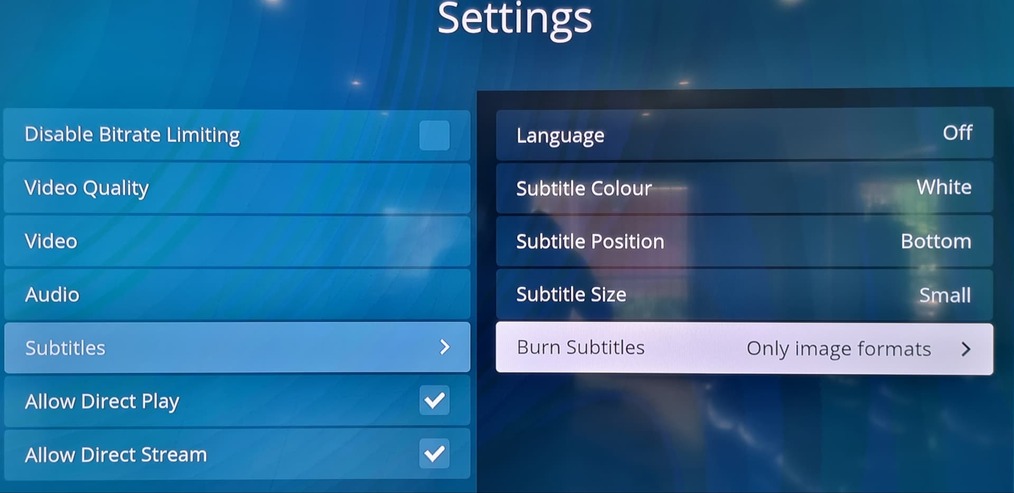
Just to let you all know that changing the Burn Subtitles configuration to only image format worked for me, now am able to play videos normally.
Any feedback as yet on all the uploaded Logs?
Try to change it to Always
Forgot to mention that I set my tv app on Advance > Allow insecure connections> same network
And on plex server Network > secured connection > preferible.
No sure if that also help me with my problem.
I’ve got the same problem. I did notice that when I go from my TV to the NAS via some other route than Plex, the files all play 100% smooth. (And I am not using subtitles or whatever.) Everything is up-to-date.
Which log should I be looking at? I’ve got some series in an ignore list (.plexignore, I am just saving them as backups from my dvds) and this clutters up many of the logs…
Any feedback as yet on all the uploaded Logs, etc, etc, etc?
