Restoring to weeks-old database backups still doesn’t fix this issue; I restored and then tried to fix an existing match before it scanned any new files in and still has issues so it doesn’t seem like it’s a database issue.
Seems to be working again.
I have the same issue. Plex Movie and Plex TV Series agents stopped working about 2025MAR29. At least that was the first movie that didn’t match. I suspect my server auto updated the docker to the latest Plex Pass version of that week ( 1.41.6.9606) on OS unRAID 7.0.1 on the 26th as that is when the server does it’s automated reboot.
On the 4th while investigating I rebooted the server and it worked for 3 days then stopped working again and nothing could fix the new agent.
I tried everything on the forums. I finally had to switch back to the old Plex Movie Scanner & Plex Movie (Legacy) and Plex Series Scanner & The TVDB and my meta data is working again. (As a side note: I noticed Old Movies were disappearing from my collection that had been there years after updating to the new Movie Scanner. That I can only explain as it’s no longer able to read the format…I ripped those disks back in 2004 - 2012 my self using divx and targeting 350 - 700 MB and when I switch back to the old agent some movies I hadn’t upgraded yet came back.) Here are 2 Log Zips.
Plex Media Server Logs_2025-04-04_22-56-57.zip (884.7 KB)
Plex Media Server Logs_2025-04-07_21-17-35.zip (1.0 MB)
I think they are both before I made the switch back.
Thank you for looking in to fixing this.
1 Like
Cannot tell exactly as you don’t have debug logging enabled.
Lots of slow database errors which might be the culprit.
2025 08:34:29.778 [22864229919544] ERROR - Waited over 10 seconds for a busy database; giving up.
Might also be that the server is unable to resolve plex.tv. Try and run a command line check from the host to see if DNS is working properly.
e.g.
host metadata.provider.plex.tv
This should return a list of IPs.
I’m having the same issue so I verified DNS, and Indeed it does.
metadata.provider.plex.tv has address 104.18.36.51
metadata.provider.plex.tv has address 172.64.151.205
metadata.provider.plex.tv has IPv6 address 2606:4700:4400::ac40:97cd
metadata.provider.plex.tv has IPv6 address 2606:4700:4400::6812:2433
I have a list of IP’s on the host.
Server:~# host metadata.provider.plex.tv
metadata.provider.plex.tv has address 172.64.151.205
metadata.provider.plex.tv has address 104.18.36.51
metadata.provider.plex.tv has IPv6 address 2606:4700:4400::ac40:97cd
metadata.provider.plex.tv has IPv6 address 2606:4700:4400::6812:2433
I will turn on Debug, as I haven’t upgraded all my Libraries so I would know if it is fixed in an update, and upload another logs zip in a couple days. Should I reply or edit my post?
I figured the DNS was fine.
I wish there was away to upgrade to a faster database. My database is on a Samsung NVMe jacked in to a dual Xeon server so I know there is plenty of disk speed…Last test ~1700MB/s if I remember right and I’ve been plagued with slow database errors for years but it never seamed to mess with the operation of the Plex Server before. Maybe I should open a topic on this.
They have adamantly refused to allow us to change DB types, because it’s currently “adequate.”
Dealing with excruciating slow queries with a massive cache, 5.0 nvme SSD, and even a RAM disk should be proof enough that it’s not adequate for sufficiently large libraries… but nope, it’s not happening.
2 Likes
100% agree. Its insane how horrible sqlite performs for this use case. Even running the db clean up scripts have almost no impact on performance. For reference, I’ve had the slow query warnings for years, across multiple systems. It seems like its just a fundamentally bad choice for the database architecture. Let us move it to Postgres and run it on proper hardware PLEASE!
2 Likes
im also having the same issue, i do not use unraid, movies started not matching around the same time frame as above
1 Like
Same issue. My server was fine a couple of hours ago though. I’m running server version 1.41.6.9685-d301f511a on Windows 11. I can’t match via any agent for any new or existing content.
1 Like
The same thing happens to me, I had to stop and start the service again to get the refresh metadata button to work. Another thing is that it looks for what it should and that it finds it in the language it should, with how well tmdb is used. The plex agent sucks
1 Like
what worked for me was going into the the movies library and adjusting the agent from plex movie to the moviei database, when i did this it prompted me that my library was still on the plex movie legacy and needed to be upgrade. i told it do that and it started scanning, and still is but im starting see movies that werent matched start to get matched, hopefully itll be all good when done.
3 Likes
Huh interesting, I just did that and its also telling me to update my libraries. Is there no easy way to update all of the libraries or do I have to manually go into all 30 libraries I have to trigger this?
I am also experiencing this issue on newly added movies (not TV shows yet). Additionally those movies have the Refresh Metadata item grayed out on the … menu for the movie.
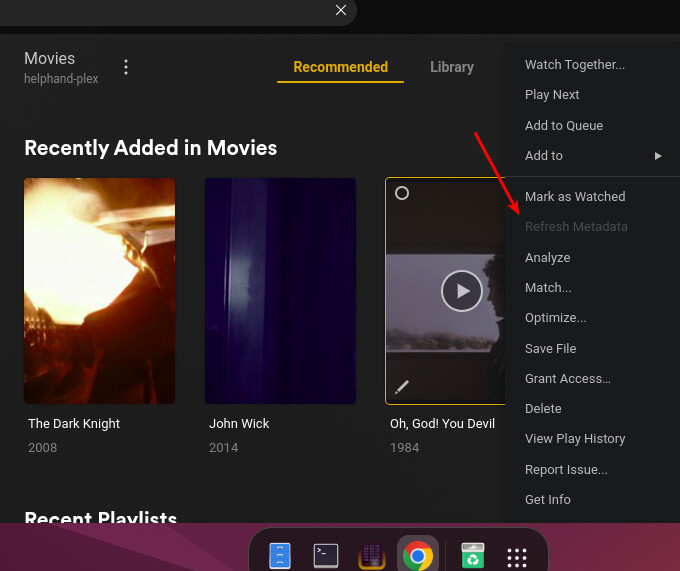
The only thing that’s resolved the issue for me is to roll back to the TVDB and the MovieDB scanners, then restart plexmediaserver. Once that’s done, yes I get the warning to upgrade the libraries (which I’ve done a few times since testing this) but metadata refreshing works and matching works. If I allow it to upgrade the libraries (either 1 by 1, or all of them at once) the issue happens again and matching fails.
2 Likes
Mine has now stopped working, again. Checked and the host is being resolved fine. I’m also running 1.41.6.9685 which I apparently have in common with another user in this thread experiencing the same issue, though they’re on Windows and I’m in Docker/Unraid.
Things seems to be working again. I’m able to match and find metadata with the Plex Movie agent for my content now. There was no change on my end so i’m guessing a backend issue was resolved?
I guess I lied, back to the same behavior with no change on my end. Just getting “No matches found.”
Same. I hope the Plex dev’s are paying attention to this thread. This is definitely a legit issue!
2 Likes
I just ran Chuck’s DBRepair script on my database followed by a scan of my Movie library and the newly added movies got matched by the scan and the metadata showed up. The grayed out ‘refresh metadata’ menu item was also un grayed out.
My guess is that something is corrupting the database. A datapoint, I run two plex servers that both point to the same libraries, both had this issue happen at the same time so this isn’t an odd one off.
1 Like
