Ping Matt in the forum discussion and see what happens. @
Look in announcements
Ping Matt in the forum discussion and see what happens. @
Look in announcements
Sorry, not really clear to me what you are suggesting me to do.
asking for help
Who is Matt?
Do you get any logs in these locations?
Or perhaps the “Plex” version of the same thing.
In my quest for a clean install I have deleted everything Plex related, including the logs unfortunately.
Sorry, I mean after you try again. Are any of those recreated when it’s bouncing & (failing to) launch?
Seems like they are not… I am out of home for a few days, always travel with my old macbook pro. It just updated plex… Exactly the same issue on this device as well. And haven’t deleted anything yet. Please let me know where to look and what to post to look into this.
Sorry for the bump… But I need my plex guys!!! HELP ME PLEASE 
I think @SE56 suggested it - have you tried the OTHER player app, Plex Media Player? It’s also available on the download page.
The fact Plex.app isn’t getting far enough to create any of the Plex logs makes me think there’s something else going on with your system, but I don’t have good guesses. One semi-easy thing you could try would be creating another user and launching it as that user.
Oh, and there’s always Console.app. You could open it, search for Plex. Or launch it and look at logs. I don’t have good guesses for you - but nobody else has come along with bad guesses yet, either.
Ok big thanks for this, I missed that suggestion earlier. Immediately installed Plex Media Player, installs without any issues. So at least I can watch stuff again. I hoped that somehow magically fixed whatever is broken, so I then tried to open Plex again. But the magic did not go that far.
I also thought there must be an issue with my system… But then when it happened on my Macbook as well. They are not mirrored or copies of each-other as I got 1tb in my iMac and only a 128gb in my Macbook Pro, so it’s only got the bare necessities on it.
I honestly don’t know how to work with the Console app to figure out what is going wrong. I looked at it before trying to find out whats happening related to ‘Plex’ but got nowhere (due to lack of knowledge)
I’m glad that worked.
Hrm. Insufficient magic is a common problem. But it sounds like the common factor is you! Heh.
Have you added extra fonts? (to both systems … I’m reaching.)
Do you use any antivirus or system protection software on both systems?
(Bare necessities, you say? https://www.youtube.com/watch?v=5dhSdnDb3tk)
Indeed, I am to a very high extend the reason stuff does not work hehe.
I did not add extra fonts, I did install an app to remap keys a while back, tested it on iMac, when confirmed working, installed it on macbook where the spacebar key is broken as a temp work around. Deleted it from iMac again.
Only ‘system protection’ kind of software would be Clean My Mac. Ironically I had to delete it from my Macbook recently cause I did not have enough space to upgrade MacOs. I’ve used this software for years without issues though.
Lol on the link, made my morning
Sorry to bump again. But I still cannot install Plex. Downloaded the latest release : Plex-1.16.0.1364-da192ff7-x86_64.zip
But it changes to the previous versions. Meanwhile Plex Media Player works fine. Please let me know what else I could try.
Last bump. Hoping there is ANYONE who can help me out. Issues still persist on both my MacOS systems.
Lets start by getting some logs
~/Library/Logs/Plex/
See https://support.plex.tv/articles/windows-mac-app-logs/
and can you look for logs here
and please look for any plex crash reports here
~/Library/Logs/CrashReporter/
~/Library/Logs/DiagnosticReports/
Thanks first of all for the response. I checked and found the following.
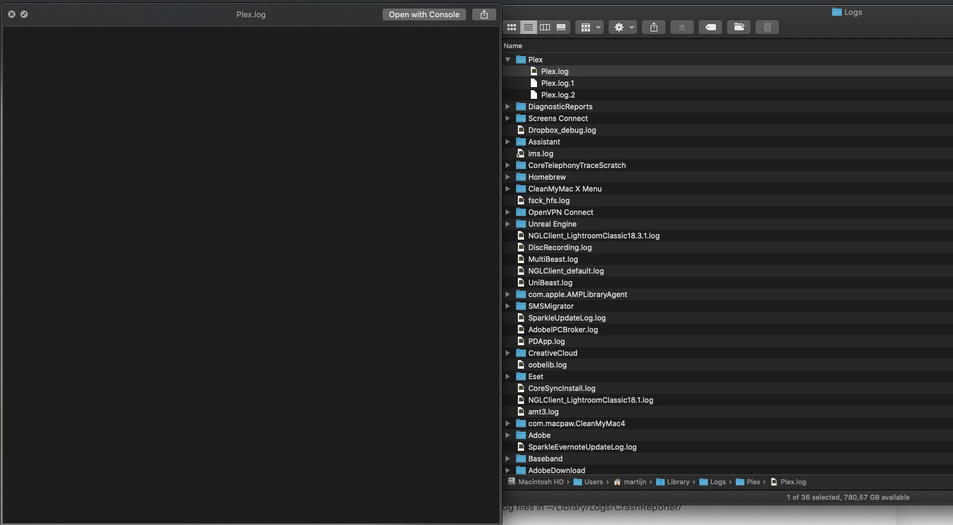
Inside ~/Library/Logs/Plex
There are 3 log files
However, the log files (all three of them) seem empty
~/Library/Logs/CrashReporter/ has nothing related to Plex
~/Library/Logs/DiagnosticReports/ has nothing related to Plex
Sorry for yet another bump, but since Plex has no actual support, bumping here is the only thing I can do to get a solution.
can you copy out and zip the copy and attach
Also look for
/Users/xxxxxx/Library/Application Support/Plex/Plex Media Server/Logs and copy directory out and zip the copy and attach
There is no folder named Plex in ~/Application Support/
There is a folder called Plex Media Player in ~/Application Support but that does not seem to have any log files. (As previously mentioned, this software works fine, even its outdated)
There is no folder called Plex Media Server on this computer, as it’s not my server (runs on linux)
The zipped log files (there are now 4 of them) are attached
Plex Logs.zip (1.3 KB)