Plex has updated the Plex Roku Preview featuring new and improved navigation

i will reference things as old ui (pre sept update) and old ui (left nav we all loved)

Point 1. left menu (old way and same as web ui) click back once. see all library and go to it. second click & browse.

new ui. even this one. browsing thru section. click back brings you to top. click again maybe get the top bar to load. then click and find your library then click into the library then browse.

previous to the new ui updates the side bar even if you didnt click back was just click to the left. we have kids scrolllllllllling to the top to get to the nav because they cant find it or dont understand the back button. where as to the left its maybe 5 posters over at all times at max? many remotes have been thrown by kids because they cant find whats on the app anymore.

Point 2. New ui takes 30 -120 seconds for the main home page to populate with home server stuff. or not at all. Old ui was instant and saved the view whether it was library or recommended or genre or categories. new one does not do that.

Point 3. seems when you change to a library in the new ui it doesnt remember where you were.

Example: in the old ui if you changed library #1 and you were half way down a list lets say in M and go into a different library #2 from the sidebar but then change your mind and scroll but dont find it you could in the old ui go back to #1 library and keep scrolling from the place you left off. obviously this was session dependant and doesnt work anymore.

Point 4. why do we still have the first tile in tv shows the season or whatnot showing? shouldnt it just be episode 1 not a season tile?ill refer to another users post on this. First Episode showing as "Season 1" realistically this makes no logical sense as to why it is here. not one of the other streaming platforms have this that i see and serves no purpose to the end user. remove it as its clutter and unnecessary

8 Likes

True. I have other, lesser used libraries that I needed to go into that submenu to access. Aside from those, the main libraries that I pinned to the left menu could be accessed at the top level of that menu without fiddling in any submenu nonsense.

1 Like

Most streaming services suck. Why do you think we’re here?? The left side navigation is intuitive, made sense, and was easily customizable. This new version is not. Some of the graphical layout is nice, but it’s so much more confusing to set up your home screen now. I gave up trying to explain it to others and now have to manually update everything on all my devices where I am not stuck with this new thing. My poor iPhone is my only casualty now
 but I just sign into plex.tv in Safari, and while its not perfect, it’s much better than the new app unfortunately.

7 Likes

Are you talking about the preview or the current public release?

I think I said earlier that Plex needs to make Collections easier to get to then. Yes you can pin them to Home but the issue I have is that many of my collections are large and scrolling a large collection horizontally is crap.

Allow me to pin/favorite/display a collection just like a library (since that’s all they are is filtered views on a library).

2 Likes

Asking for Collections to be Pinned items on the Left menu has been requested numerous times since at the very least since they unveiled the Collections tab for us. I don’t understand why it’s taken so long to give us that option, let alone everything else this community has asked for, for more than a decade now. :roll_eyes: This is what is very frustrating about current employees asking us SPECIFIC use cases when there’s a plethora of ideas, plethora of POSITIVE critique that would help Plex, but THEY up above CHOOSE to neglect our feedback. Pinning Collections to the left menu would have EXPANDED our use. Plex has prevented their own evolution and WE here in the community did not partake in that, they did.

2 Likes

Just another user here to say that the new Roku UI is a hot steaming pile of garbage. I’ll bet a paycheck that this was implemented by some “user experience engineer” trying to justify their paycheck. These are the same types of people who screwed up the Android Play Store. I have an idea
 let’s remove the search bar from the top of the screen. We can put a search button at the bottom of the screen. When you click it, it will reinstate the search bar at the top of the screen. You are completely out of touch with your user base. User’s don’t want better, they want sufficient and consistent. They don’t want to spend their entire lives learning a new UI every other week.

7 Likes

Plex has absolutely no reason to mirror every single major streaming outlet, THAT was what set them apart from the competition. Now, they look and feel like Netflix, Apple, and many others, which actually shows Plex being BLAND and uncreative. Anyone remember how the Exec team came up with the idea of mimicking the Plex logo jingle when you opened the app, similar to Netflix’s Tah-dum? Not one single Plex subscriber / individual asked for that, it was forced upon us and there was no way to turn it off. Did we get pinned Collections like we asked? No. Did we get a proper Audiobook library like we asked? No. :man_facepalming: Classical Music metadata properly displayed in a Music library? No. Many expansive ideas that would help make Plex better have gone on to be dismissed.

7 Likes

I’m all for this.

Yes, we can sort of “pin” collections to our home screens by setting them as hubs/rows but I do agree it would be nice to pin them too.

However, I’ve even been asking to go a couple steps forward on this and allow our entire Collection screen to be displayed as a hub/row (made visible).

And better yet, we really need subsets of collections for Awards Winners, Genres (though Categories does this, just poorly), Studios, Actors, Directors, Franchises, Holidays, Decades, Age Rated, Custom and finally HIDDEN. Why hidden? Because you can’t currently restrict collections using Exclude labels and have them not appears in Related hubs/rows. The Hidden collections are needed for building out non-hidden collections

For example:

I have Kometa gathering up all my Walt Disney Studio films in year sorted order in a Hidden collection. Then, I create Smart Collections based on that Hidden collection:

Walt Disney Full Length Movies - year sorted

Walt Disney Shorts - year sorted

Walt Disney Full Length Movies (again Hidden) - random sorted and only displayed on Home screens.

So, 3 smart collections are generated from one hidden collection.

I must have over 100 hidden collections for this type of behind-the-scenes type of Plex “programming.” I’m not complaining about them, I actually love them because they allow me to create sudo custom databases.

@Chattykinson, this would be great to share with team.

It’s the only way I’ve found to attempt to recreate a similar home screen experience to match Netflix and Amazon and the like.

Btw, I have about 350 collections just for movies.

2 Likes

I don’t ever under any circumstances want to see any of your suggestions
 ever.

I don’t want to see “Rentals”
I don’t want to see “On Demand”
I don’t want to see “Live TV”.
I don’t want to see “Recommended For You”.
I don’t want to see “Categories”
I don’t want to see “Trending”
I don’t want to see “Find Friends”
I don’t want to see “Brands”
I don’t want to see “My Profile” (stats)
I don’t want to see “Trending Trailers”.
I don’t want to see “Plex Picks”.
I don’t want to see “Binge-worthy Shows”.
I don’t want to see “What’s On Now”.
I don’t want to see “Most Popular in the US”
I don’t want to see “Fuel Your Wanderlust”
I don’t want to see “Blast From Your Sitcom Past”
I don’t want to see any other stupid random categorization that you think Netflix might present to it’s users.

(By the way, Netflix is the WORST model that you could study to design an interface. They can’t even come to the stark realization that the very first thing that the user should see when they open the interface is “My List”.)

I don’t want to see any other garbage polluting my interface and eyesight.

I want to see my entire movie library.
I want to see my entire TV show library.
I want to see every one of the other libraries that I’ve created for locally stored media (documentaries, concerts, sporting events, training videos, etc.).
I want to see all of the collections (tags) that I’ve created for all of my libraries.

I want the Home Page to show 3 things and 3 things only


  • Continue watching
  • Recently added Movies
  • Recently added TV Shows

That’s it and that’s all.

2 Likes

I know there is alot of hate on this right now and I think some is warranted others are just people angry at the change. I will say there are some things that the new UI makes annoying.
in the old UI with the left bar it was persistent. no matter where I went in the UI it was always there so if I was 5 layer deep and just wanted to get back to a library or home it was easy to do. with the new UI on the top that is not the case because in several places such as when an episode finishes or details on an episode the top bar disappears and now I have to do a back on the remote to get to the state where I can go up to select things.
another odd thing that is annoying is the removal of the clock on the header (again not everywhere but the top nav doesnt always show up)
most websites that have some sort of nav usually make it persist no matter where you go and I know swapping the side to the top is the thing alot of streaming people are doing but most of the time its always there providing an easy way to navigate back to the top layer.
I think it would also be nice to be able to pin libraries to the top bar not have to go to libraries then find them. I have 1 or 2 libraries I use all the time I would prefer for them to be in the top nav then for everything else I can go to libraries and navigate through it all.

I think the biggest thing is alot of people use plex differently and have things organized differently to suit there needs. Thats why we love plex is because we can make it the way we want it. the new nav removes options for people which is frustrating, I dont think there is a single way people are going to use this I think you need more customization so that all the unique ways people use the system can be embraced

8 Likes

You’ve been able to disable all of those things for ages. It was possible even before the ‘new experience’ was released.

4 Likes
  • It allowed listing a large number of items because it spanned the entire left edge of the screen.
  • It allowed easy view of both personal server libraries and Plex-supplied items together, along with Discover and Watchlist. No separation and “to get to this stuff
* instructions needed.
  • It essentially disappeared when not in use. On the edge where it was hinted at, but not hovering over things and cutting the short vertical space on pre-play screens
12 Likes

Thank you! Appreciate you taking the time to write out the differences in versions for your feedback. I’ve logged your feedback to look into further.

That is
 a lot of collections. :sweat_smile:But, you know I’ve got it written down to ferry back for investigation. No promises that I’ll have more information to share, but it’s not sitting in a black hole.

Since I just created this image of my Collections, it might be helpful:

So I do like the right side additional menus. It makes way more sense for them to be there than where they were. If you were truly looking for a “best of both worlds” solution, that would have been interesting to see in a left nav world. I believe those extra options were top nav in the past.

I’ve also come to realize that click count was irrelevant in the old world. If we didn’t like the amount of clicks it took to get somewhere we could fix it on our own.

Also I got to thinking about how we get places in the new world. Before all we had to do to get where we wanted to go was to click up and down. Now, I have to put in the Konami code to get to certain things. Its a varying series of up, right, down, and left. Finger slip while pulling off ninja moves and you can forget muscle memory.

3 Likes

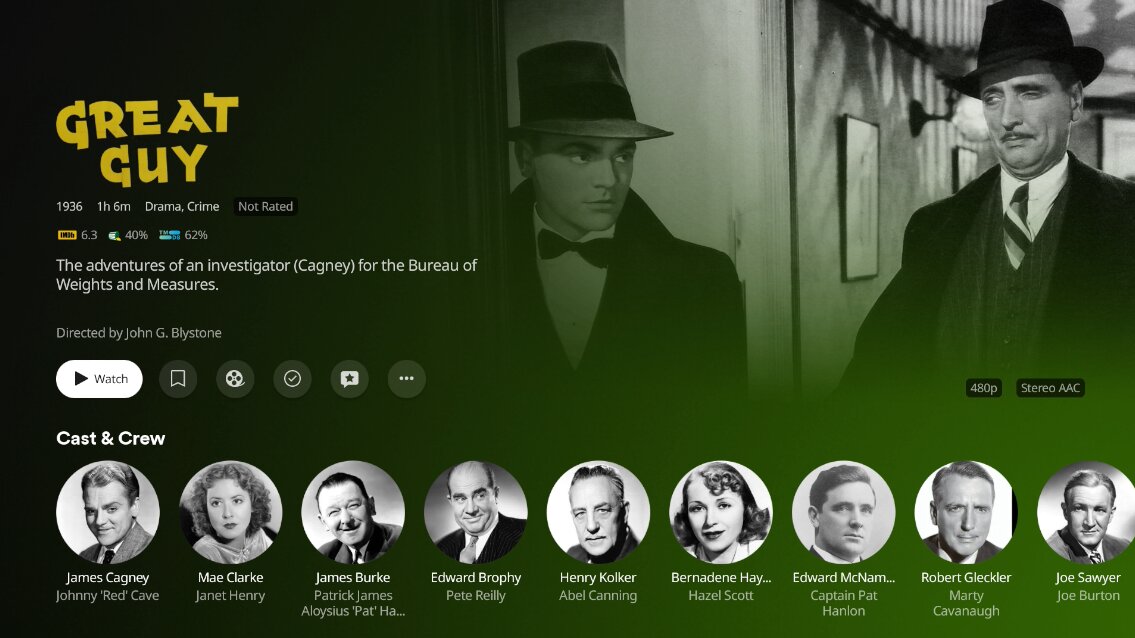
Likely minority opinion, but I liked this about the New Experience. Honestly it’s not a hill I’d die on to request back, but I thought it was a nice touch. A little something to let you know that you moved from one place to another. If it smooth zoomed, that would have rocked.

2 Likes

Continuing the discussion from Plex for Roku:

I’ve been requesting something similar for a while now and glad to see progress. My request was to only cut back on the dimming, not the zooming, however, when comparing new and old, I see the readability issue


Having had a chance to see the new changes, I LOVE the non-dimming, but the non-zooming takes away the feeling of moving deeper into the subject matter (title) and takes away from some of the “splash” effect. BUT, I do see how not dimming would impact the readability, if still zooming.

Here is a side-by-side:

“old”

“new”

My hope is for a compromise of sorts, some middle amount of zooming, but using a needed gradient of dimming about where the title summary begins on the right side of the text. Currently, the cast feels detached and the image feels like it isn’t as incorporated into the screen.

However, if I had to chose between the two, “new” is better. Just hoping for “newer.” :slightly_smiling_face:

Another side-by-side:

old

new

Don’t care for the bottom cut off of the background image in the “new.” It shows up too much near the cast “line.”
