I have replied to that thread now to explain why it is slow. Basically it is slow when “Enhanced Guide” option is enabled and that is enabled by default for xmltv
Bummer @sa2000… even after all the changes (and rebooting server, just in case), the date is still being saved as 1900. 
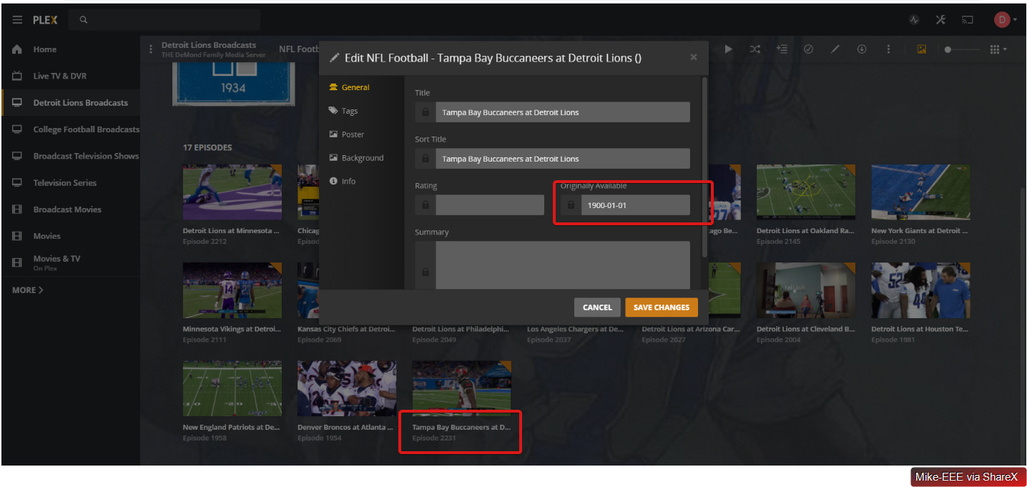
Any further suggestions/diagnosis on your side would be much appreciated.


Good that it is resolved but there was no change between 1.18.4.2164 and 1.18.4.2171 that would relate to this.
The only thing I can think off is some invalid metadata when the Enhanced Guide option was in use. When the Enhanced Guide option is used, the fix we did for Sport and News is not applied. The other possibility is something coming from MCEBuddy.
Oh wow interesting @sa2000… not sure either, just that it is working. The version of MCEBuddy is the same (it has a non-trivial upgrade process so I don’t try to touch it unless absolutely necessary). Since the information is being pulled from a resource, perhaps the date did finally get assigned and/or processed in some way by Plex. I also did of course reboot the server, so there’s always that magic. 
Ahhh bummer @sa2000 you were right. Recording this past weekend’s game resulted in another 1900 capture.

So this appears to be working sometimes, but mostly not. Strange that the information provided from the guide seems to be intact as shown earlier in the XML snippet above.
Is there any other way to diagnose this on my end? Do you think you will be able to fix this on your side?
Interesting that the date is captured on other shows… so perhaps a channel or show-type issue?

All of my recordings from this past weekend have the correct dates. I have also been following this thread and testing this behind the scenes with chats with @sa2000. I also use mcebuddy, can you post your profile configurations? I can install mcebuddy and copy your settings to a test machine I have and see if I can replicate this after mcebuddy finishes it’s processing on one of my recordings.

Cool! Thank you for your assistance, @johnm_ColaSC … the thought did strike me that this might be another MCEBuddy issue, but I am not sure how as the date is certainly not set on the files, and since they are all being processed by MCEBuddy, then it would seem if it was the culprit that there would never be a non-1900 value as we’re seeing.
But who knows.  There might be something weird going on that I am not aware of.
One thing I did notice is that my Default conversion task profile Force show type is Default and the Football conversion task profile is Sports… not sure how that could impact this, but again, who knows.
Please find the requested materials attached. profiles.zip (12.5 KB)
Thanks for the files. I will look at setting up mcebuddy on my other server over the next couple of days but definitely before the games this weekend. One thing I did notice in the mcebuddy.conf file were the below lines in the NFL Profile settings:
DownloadSeriesDetails=True
WriteMetadata=True
In my config these settings are both False.
Ah those properties are also set as True for the Default profile which is responsible for processing non-Football shows like Hawaii Five O above, which resulted in a correct, non-1900 date.
I will nonetheless set these to False on the Football profile and see how it does. 
Bummer @johnm_ColaSC not off to a good start here on this side. 

A thought … Is the “1900-01-01” only seen in the edit screen? Just wondering if that is displayed when it is absent
Could I have a fresh xmltv file
There is still a possibility that it is MCEBuddy related as in my last test of the xmltv file you provided, I did not have 1900 dates
Is there another location that it is displayed? I am not seeing it on the page nor in any of the menus that I see.

Attached. 
xmltv.zip (2.1 MB)
Are there any additional logs that would show what might be going on here? It would seem that the date being stored would be captured/emitted somehow in the logs.
Let me have the EPG database files . They are in the same Darabases directory as the main database . The filenames start with tv. Copy them out and zip the copy
Here you are. 
tv.plex.providers.epg.xmltv-3a702d7c-7fcf-48b8-ba18-3703cf23c6a2.zip (4.8 MB)

There is a “date” field in the xmltv data
<programme start="20200112150000 -0500" stop="20200112183000 -0500" channel="I3.1.34884.zap2it.com">
<title lang="en">NFL Football</title>
<sub-title lang="en">Houston Texans at Kansas City Chiefs</sub-title>
<desc lang="en">The Texans and Chiefs meet in an AFC divisional round tilt. Deshaun Watson accounted for three TDs to lead Houston past Kansas City 31-24 in Week 6 of the regular season. The Texans took down the Bills 22-19 in overtime in their wild-card round game.</desc>
<date>20200112</date>
<category lang="en">Sports</category>
<length units="minutes">210</length>
<icon src="https://zap2it.tmsimg.com/assets/p17514336_tb2_v9_ac.jpg" />
<url>https://tvlistings.zap2it.com//overview.html?programSeriesId=SH00003128&tmsId=EP000031282360</url>
<episode-num system="dd_progid">EP00003128.2360</episode-num>
<new />
<subtitles type="teletext" />
</programme>
For movies we are picking the year from that date and setting the date as 1st Jan.
For series we seem to be ignoring it
I will follow this up
Could you tell me what date / year you see for this movie
Godzilla vs. Megalon which airs on 15th at 17:00 UTC
I need to check if the date is localized from UTC
