Hello!
1.5 months ago I followed this tutorial to install OMV5 and PMS on my Raspberry Pi 4B. Everything worked fine.
Three days ago I wanted/needed to redo everything for reasons. Since then I’ve been trying to fix the following issue (which I know has often been posted about but I didn’t manage to fix it):
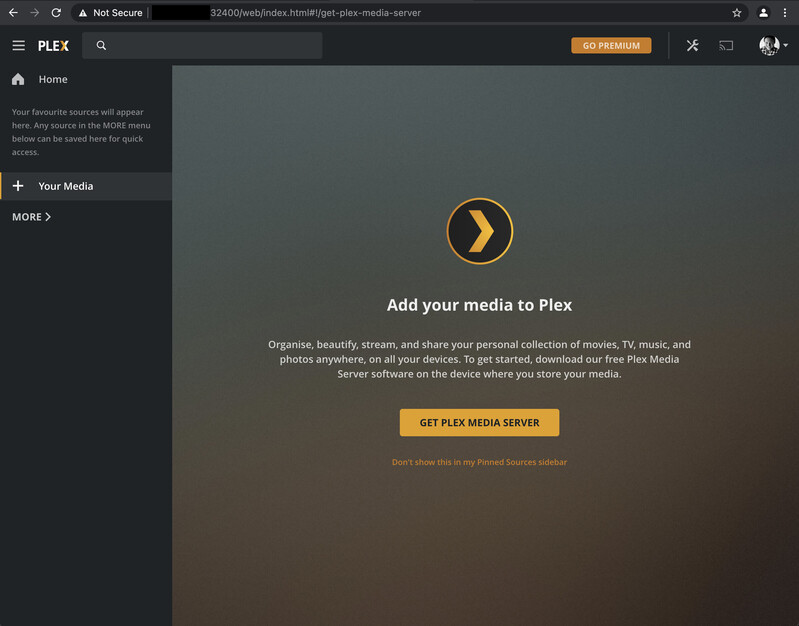
I open [hostname.local]:32400 to get to the Basic Setup Wizard but this never happens. All it says is: “Your homesscreen is empty.” and when I click on “+ Your Media” it says: “Add your media to Plex […] Get Plex Media Server”.
I have tried:
Updating and Upgrading everything
Uninstalling (and deleting the registry in /var/lib/plexmediaserver/Libary/‘Application Support’) and reinstalling everything
Trying different versions of PMS (most recent and the one it used to work with)
Opening [hostname.local]:32400 in an incognito window - this tells me: “This application is at hostname.local and is not hosted by Plex. Continue only if you recognise this server and wish to grant access.” When I login, I am where I always get (see image below).
So from the URL I can tell I am accessing my own server, but for some reason the web app doesn’t recognize it as that?
Using ps aux in the terminal shows that the following processes/commands are run by user plex:
/usr/lib/plexmediaserver/Plex Media Server
Plex Plug-in [com.plexapp.system]
/usr/lib/plexmediaserver/Plex Tuner Service /usr/lib/plexmediaserver/Resources/Tuner/Private /usr/lib/plexmediaserver/Resources/Tuner/[…]
Plex Plug-in [tv.plex.agents.movie]
Plex Plug-in [org.musicbrainz.agents.music]
Plex Plug-in [tv.plex.agents.series]
Plex Plug-in [tv.plex.agents.music]
Plex Plug-in [com.plexapp.agents.thetvdb]
Any help would be greatly appreciated. Let me know if you need more information! Thank you!
Thank you for your reply!
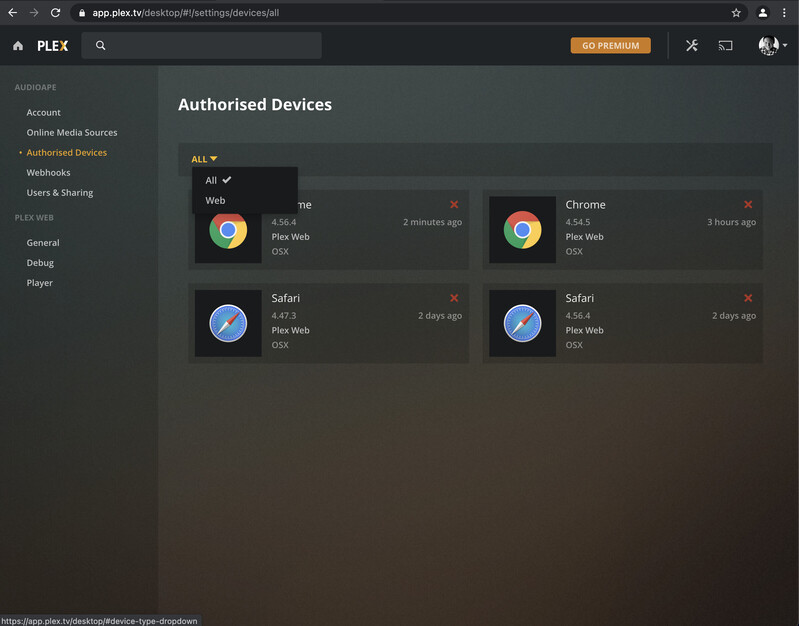
I had already removed all old entries from there. Now, when I go to “Authorized Devices”, there’s only entries from Safari and Chrome (which were added within the last 3 days when trying to set everything up again).
I can’t find anything related to the server; also in the dropdown (please see image attached).
I had a similar problem once on a Synology DS415+.
The server was not logged into the account and only allowed local access on localhost.
I used a SSH tunnel to use the Browser on the PC as if it were running on the NAS / localhost to assign the server to the plex account. After that it was showing up correctly again.
Shell (user probably needs admin/root access)
ssh -L 9000:127.0.0.1:32400 user@plex-server
Browser at PC to localhost:9000
Okay, I managed to get that working now.
When I connect to localhost:9000, now I get an XML file, I think. And at the top it says: This XML file does not appear to have any style information associated with it. The document tree is shown below.
Then the file starts with
[…]
That’s it. Do I need to access and edit that file or should I be seeing something else? Thanks already!!!
Right! Thank you! That’s better. Unfortunately, it still doesn’t fix my problem. The loading circle is spinning infinitely. Feel like we’re getting closer though.
When connecting to hostname.local, everything works just fine, so the connection is there. No idea why it would show the loading circle for so long.
When I wanted to replicate the problem just now, it suddenly worked.
I can’t believe it. The struggle is over.
Thank you very much @ChuckPa and @Saxfusion !!