Server Version#:Plex App 10.24.1.2319(d613f885)
Player Version#:
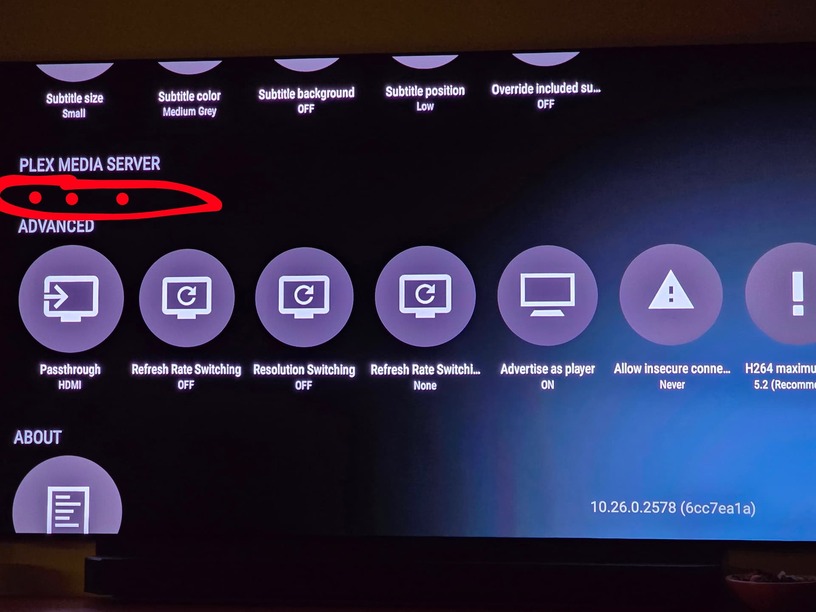
I have the Shield TV Pro, Model P2897, Version 11, running SHIELD Android TV 9.1.1(33.2.0.157). My Plex Media Server has been working on this device until today. I have rebooted the Shield several times, but when I try to access my media that is stored on the Plex Server, it won’t connect. I have gone to the settings under the Plex app running on the Shield TV and there is a Plex Media Server section; however, there are no settings under this section. I cannot start or stop the server, like I have in the past. The Plex App is 10.24.1.2319 (d613f885)
The files are on a USB drive attached to the Shield. I dont know the server version. How can I check for that. The Plex App and the Plex Server App used to be two different apps. They merged into one some time ago. Once they merged, I could go to the Settings section in the Plex App which is running on the NVidia Shield TV Pro and see the Plex Media Server. As of yesterday, I could stop and start the server and I believe it listed the Server version. But today when I go to the settings in the Plex App, the Plex Media Server is listed, but no settings can be accessed. It just says “Plex Media Server” and nothing else. I didn’t run any updates on the app or the NVidia Shield TV Pro. Maybe it was some sort of automatic update to the app or to the Shield.
The USB drive look mounted just fine - checked via Settings and also via File Manager
The permissions for PMS remains intact after upgrade - all files.
My PMS version: 1.41.3.9314(smb)
Any clues guys???
In Startup Crash.log I found:
Feb 08, 2025 19:28:49: Failed to initialize logging: Error parsing file at “/storage/01D3ACDE15EB3690/Android/data/com.plexapp.mediaserver.smb/Plex Media Server/Preferences.xml”
The Preferences.xml file was on file system but “empty”, full of NULs, even no XLM structure
I tried to recreate proper PMS Preferences.xml file - with no/same result.
If I have to reinstall PMS and lose all the settings, which hasn’t happened to me for many years, (but then again I had to do it a few times a few years ago) I’ll probably have to stop using Plex for good…;-(
I created it according to the XML structure that I have found on the Internet.
The error in Startup Crash.log does not appear anymore, but PMS is still not started and so the local USB storage media is not available for Player
So guys, my problem was solved.
All it needs was to wait a few weeks for updated PMS v1.41.3.9292 (smb)
After logging out and again in - works again like a charm!
I just started having this problem yesterday. Funny enough this happened before about three months ago and I was able to roll back my plex media server to a different version to fix it.
Problem is I never allowed updates after I fixed it but still got this issue. I updated last night to all the latest but did not fix my issue. This problem is not solved yet. I am in a he new 9.2 version of Android
Just to add my tuppence worth. I had endless problem with PMS stopped working and wasted so much time fannying around trying to get it working.
The updated PMS app seems to have helped, and whereas I previously had the HDD connected to router’s USB port, I changed my config so the HDD is now connected directly to the USB port of my Nvidia Shield, and so far it’s worked flawlessly.