The correct name should be /volume1/Plex
you have /volume1/PLEX
You renamed it from standard which the DSM 6 installer created. Linux is case sensitive.
Rename it and start again.
The correct name should be /volume1/Plex
you have /volume1/PLEX
You renamed it from standard which the DSM 6 installer created. Linux is case sensitive.
Rename it and start again.
Hello,
I’ve installed this forum preview package everything looks ok.
There is a notification for a new 1.24.0.4930 package. Can I download the file and install it with manual install from dsm package center ?
Here is the update that my server wants me to install
Thanks for the information about the update I had missed the information.
So I can make hyper backup save the /volume1/PlexMediaServer/AppData folder ? no need to close PMS before launching the backup task ?
I recently updated my Synology DS918+ to DSM 7 and have completely messed up my Plex access. I have now attempted reinstalling in various ways following this thread and am nowhere. I have uninstalled PLEX from both my NAS and my MAC Mini M1. Is there a particular post on this thread that is the current process to get things up and running again? I have had PLEX Media Server up and running on the NAS but cannot add any libraries from my NAS. I thought I was quite adept at this sort of thing but this one has me completely overwhelmed at this point…
Fresh New NAS 920+ and have DSM 7.0 - I downloaded the latest (8/11 build) x64 and manually installed. It said it was successful, and it tried to open via the quickconnect link which failed. I opened the app by the IP address:32400 and it opened up, but is stuck with a spinning circle.
There is no plexmediaserver under shared folder to modify permissions…
What may be going wrong?
Is it possible to upgrade with this package and then use the PlexMediaServer share that it creates to migrate over to a plex container server. Im on DSM 7 and couldn’t find another way to migrate to docker from bare metal.
If I am understanding correct,
If this is what you want to do, YES, this is one of the other features it supports easily.
I will gladly share the info when you’re ready.
Yes this is exactly what I’m trying to do, I couldn’t SSH into my Synology because I’m remotely accessing it for the time being, which is why I’ve gone down this route.
Here you will find everything I’ve written about the new packaging.
I’ve included the known limitations.
I also show the new structure. (help avoid confusion where folks put media in with the APPlication DATA  )
)
The binaries are a little further down.
This will be default production shortly (possibly the next full release from Engineering).
Ok thanks for the help, I’m going to try and implement it, hopefully it goes smoothly.
One thing you might want to be careful of –
Not sure about docker –
/config , IIRC, resolves to Library/Application Support/Plex Media Server by default.-v /volume1/PlexMediaServer/AppData:/config \
-e PLEX_MEDIA_SERVER_APPLICATION_SUPPORT_DIR=/config
If I understand everything correctly, this will map the new structure to /config
then set the manual APP_SUPP_DIR to it as well.
What should result is $PLEX_MEDIA_SERVER_APPLICATION_SUPPORT_DIR/Plex Media Server being your exitsting server .
Overlaying a generalized mechanism (the default docker) with a NAS-specific is problematic but this looks right.
Ok I will keep that in mind, I’m still waiting for my users to fall asleep before shutting the server down and trying this migration.
Are you running on the 2.0 packaging now?
If not, I first suggest make that move. Confirm all is still OK before continuing.
Yes the bare metal install is updated to the 2.0, working fine.
Seems to have worked perfectly, thanks so much for your helpful and timely responses!
To confirm please?
You are now running PMS through Docker using the Synology packaging 2.0 configuration ?
May I see how you did the configuration? (see how close I was )
I spoke too soon, all metadata seems to be intact but when trying to play any movie it runs into a playback error.
Ok things are working correctly now, yes I’m running PMS through docker using the Synology packaging 2.0 configuration.
What is your configuration please?
How did you account for system internal user PlexMediaServer ?
(this is the real magic of overlaying) 
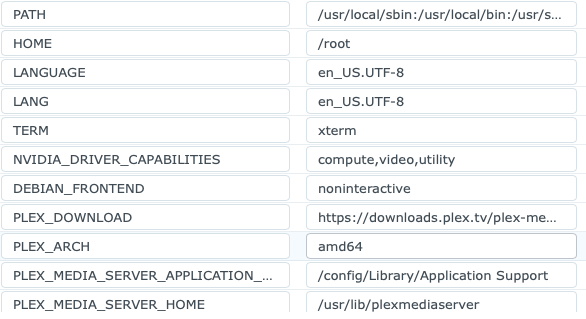

Sorry if this isn’t exactly what you want, I’m not the most tech savvy.
