Thanks. Where am I looking for that? In Ubuntu, Synology, or Plex?
Are you talking about firewall rules? Firewall is not enabled.
Plex is running on 10.0.0.218 internally. The synology shows an active NFS connection from that IP for the last 18 hours (when Ubuntu was last rebooted).
If PMS on Ubuntu cannot SEE the files:
-
The Synology exported shared folders are either
a. Not mounted
b. Suffering from Stale Mount status (cured by a reboot) -
If Not mounted, either
a. The file system is no longer shared
b. The export (sharing) rules changed.
I ask a very simple question - Have you restarted the Ubuntu host (not just PMS) since DSM upgraded? network mounts are at the OS level, not the application level.
Finding the right place to post this is just as tough as getting it running! 
I dont mean to hijack a thread so my apologies. Today I upgraded to DSM 7 and of course plex broke. I uninstalled PMS for DSM 6 AFTER I did the DSM 7 upgrade. Heres what I did…
-Uninstall PMS for DSM 6
-reboot NAS
-install PSM 1.24.3.5033-7000
-went through all the gyrations of going through control panel giving plexmediaserver all access to my shares.
-uninstall 1.24.3.5033-7000 like the directions say
-reinstall 1.24.3.5033-7000
Package manager shows it as running but i cant connect to it.
I launch plex and log in, and it shows my stuff on the left hand side but they arent really there. I dont think the server is actually running. Any tips appreciated!
Thank you, I will try that! I wonder if that is the issue, I am remote and installing it remotely. was that bad? Ill definitely do it while local tomorrow, thank you
Hi there,
I adjusted all share permissions to full control and uninstalled the failed packed but both re-installing and repairing has me run into this issue:

with that fantastic help of trumpy81 (thank you so much by the way!) I upgraded succesfully! Everything seems to be working great now, but it took a little work. I had to rename it etc etc but its all good.
I was able to find and configure my HD Home run for live tv/dvr and it works great…for me. However the other user I used to share it with (who is also a home user), doesnt show up. when I go to edit the share libraries with them, Live TV & DVR isnt an option to share. How can I get that back? Thank you!
Update! when I log in as the user I share with, live tv and dvr is actually there as an option and works. Its just not an option when I go into their profile and select what libraries I can share with them. Is it just there by default now because they are a home user?
hiya,
so i might have messed up a bit…
got a new nas and transferred my drives to it. did migration and everything seemed fine except plex media server now said ‘repair’ since my old nas had dsm 6 and this new one has dsm 7. i assumed i just click repair. no access to server so search web and find this post (DSM 7 - Plex Media Server - Release Info & Migration instructions) saying not to use repair…oops. but i didn’t know to search before trying as i didn’t know there would be a problem. haha.
anyway… at the top it mentions the beta is incompatible. so i also manually downloaded the latest plex install file from the net. following the steps in the post i got to this point:
- Uninstall the failed PMS package…and Install again.
a. If you attempted Repair, and PMS shows installed, use Remove all data option.
since i had done ‘repair’ i did the remove data option. but going back to ‘and Install again’ and remembering the beta was incompatible, i did the manual install option and chose the latest plex media server build (1.24.4.5081) i had downloaded. i think this is where i messed up, cuz i didn’t get a migration message like in step 5.
so at the moment i have a plex media server running 1.24.4.5081 and i can see the server in plex but no libraries associated. i did see an article in my searches that said you might have to repoint to your libraries, but before i did that i wanted to check because i didn’t have that ‘migration’ and when i look at the file structures in dsm i see the new PlexMediaServer directory doesn’t have a ‘metadata’ folder.

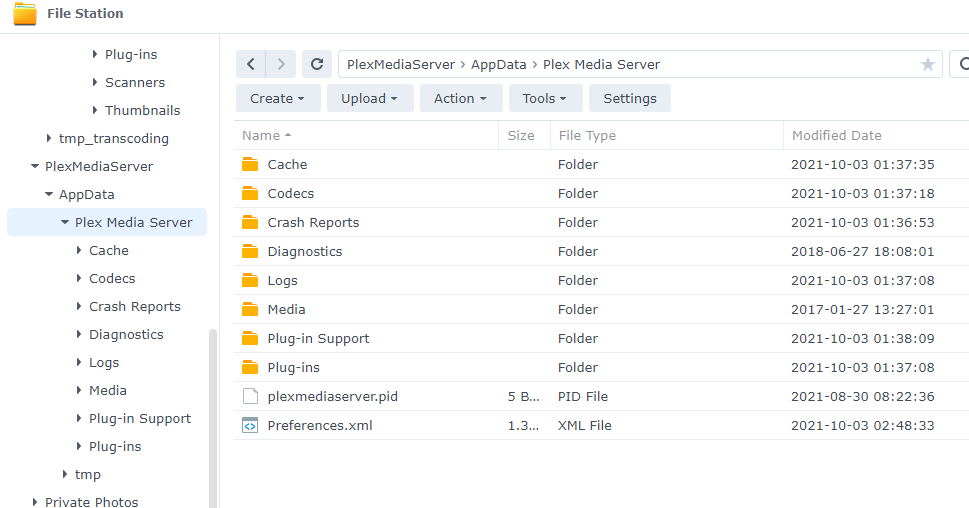
should i uninstall plex again and and remove all data option, then install from the package center the beta version so it will do a migration before then upgrading to 1.24.4.5.81?
That was the mistake - which I detailed here:
Since you still have all your metadata in the Plex shared folder, you are correct to
Uninstall + ERASE
You may need to do this twice – but be careful not to do too many time else you’ll erase your actual data.
You will know all is well again when:
- All your metadata has been removed from the Plex shared folder.
- The new “PlexMediaServer” shared folder has “AppData/Plex Media Server”
–and– - Your server is again operating normally.
EDIT: Apologies for the double-post with Trumpy.
yeah after reading your post i knew it was a mistake to repair, but at the time i hadn’t searched forums and had no idea it was wrong. i was just being thorough with my timeline of what i did.
after uninstall i was freaking out a bit cuz i couldn’t find the plex app in package center. then i remembered i read something on a webpage about the beta center and found plex in there. installing now…
uninstall and erase - may need to do this twice. as in install the beta and then uninstall and erase again? when i did the first uninstall it removed it from my installed package list…does it stay for some and that is why a second uninstall?
thanks!
Which are you installing?
1.24.2.4973 or higher ?
i’m currently installing the beta from package center. 1.21.0-3744. hoping i get the migration from that install
If it’s already installing then don’t interrupt it. (it will make a huge mess)
BEFORE you really get into USING the server gain, Please install 1.24.4.5081 as soon as you can.
-
BETA packing issues which aren’t compatible with DSM 7.0-41890 (final release) have been corrected. (I had to play catch-up as DSM 7 changed underneath me)
-
You have a significantly better PMS (New scanner and agents)
-
You’ll have a “PlexMediaServer” shared folder (I was able to update the package structure one final time) which gives us most of what we had in DSM 6. Details here
yes, i was planning on upgrading after the beta install/migration and before i tried to use the server at all. will take awhile i’m sure cuz my metadata folder is over 8gb.
thanks
Go for lunch, grab a few beers, you know the drill with Synology 
(about 3 minutes per 1000 media items indexed)
1 Like
just checked on if it was still going and see this:
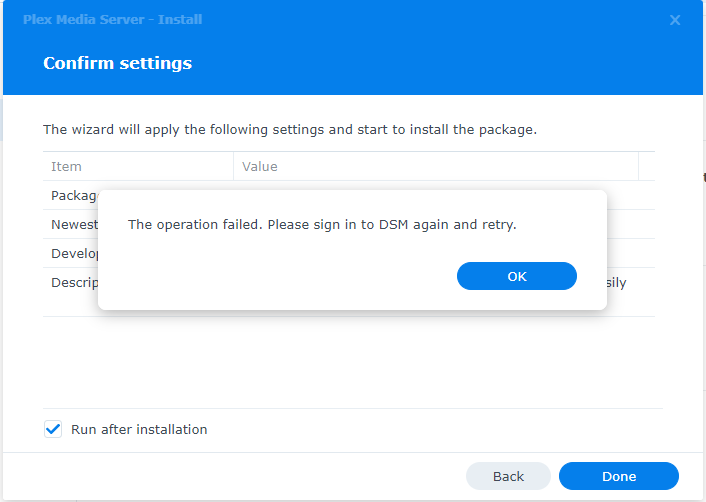
is there a timeout setting i need to change or something? i’m still logged into dsm, don’t know why it is asking me to log in again…
Don’t panic.
DSM is probably still set for the 5 minute Logout timer.
The installer will keep running in the background (from the GUI)
Open a fresh tab to DSM and look at Resource Monitor (task manager / processes)
See which Plex processes are running: mv, find, realpath
These are the ‘migration’ commands.
so should i have not clicked the ‘ok’ button then? cuz it went back to the window behind it with ‘back’ and ‘done’ that you can see in the pic.
when i look at the processes i don’t see any of those 3 you mentioned running:

(none of them were in the sleeping list either)
It must be there somewhere.
Look in the Plex shared folder for ‘Migration.log’
Open it with the Syno Text Editor app.
You’ll see the migration progress.
When you see that “Completed: Clean /volume1/Plex” , the migration is done. The Plex shared folder should also be empty of PMS.
Anything you have there will remain.
