Yep, really strange… just after clicking “Next” to process the package

DSM ERROR !!! 
- DSM 7.0-41890 installed
- Restart 1 time
- Download Synology (dsm7) package from Plex.tv/downloads.

DSM 6 packages cannot be used on DSM 7
oh crap, sorry, didn’t notice the DSM6 on the file name 
 I try to be informative
Many thanks! All fine now
Today (2021-07-08) i have updated my DS916+ to DSM 7.0-41890.
Then i haved deinstall the plex application from NAS
I donwloaded the newes version of plex from plex.tv.
When i will install Plex, so i get the message, "Das Paket erfordert DSM7.0-40000(update0) oder älter.

Download Synology (dsm7) package… not DSM 6
There are two Synology downloads available: DSM 6 and DSM 7
Look at the file name
1 Like
Hello @ChuckPa ,
Fear when going through these stages. I was not reassured now it’s OK I have the impression.
Small question the name of utalisator “Plex” is no longer used now? I am wrong ?
Thank you again for your help on this topic
Great @trumpy81 ,
So if I understood the Red boxes after Migration we can delete
!
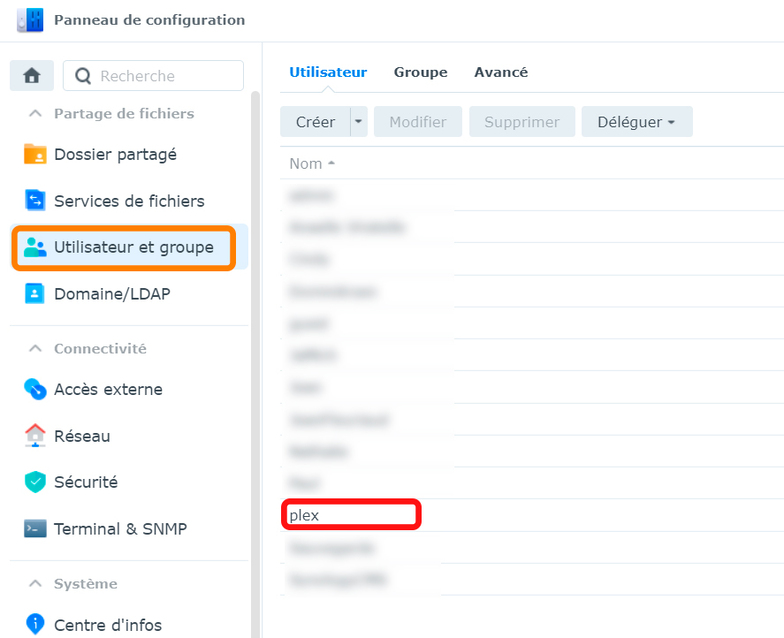

PS: I am French, translation levels I prefer the images I leave you the right to use them to help others;)
@ChuckPa Thanks for your very fast reply.
PMS runs (also shown in resource monitor).
But unfortunately the plex clients (web and windows) show “Not authorized You do not have access to this server”.
Now, after quite some time, it appears to work and I can continue!
@ChuckPa Unfortunately it appears re-installation did not solve my original problem:
No DVR recordings are stored and videos cannot not be deleted (“There was a problem deleting this item”) through Plex clients despite RW permissions for PlexMediaServer on the Video share.
Finally it works with custom, full access permissions for PlexMediaServer on the Video share.
previously forgot to select: apply to subfolders and files.
You are probably being restricted by the new changes in DSM 7.
Audio, Video, and Photo shared folders seem to be again reserved exclusively to Synology.
Try creating a new location and see if you now get proper results.
( On DSM 6, we could work around it but it seems DSM 7 no longer allows it )
It now works fine an I am happy so it’s time to wach a movie using Plex.
Thanks a lot @ChuckPa !
I upgraded today (wish I saw this first) to final release DSM 7.0-41890. Had a few errors loading the built in version but after changing permissions it worked then upgraded to PSM Version 1.23.3.4707. It’s working except I can’t add any new content. It’s setup for automatic scanning but even a manual scan doesn’t work. I made sure PlexMediaServer user has full admin rights. Then tried uninstalling and reinstalling PSM Version 1.23.3.4707. No change. What am I doing wrong?
PlexMediaServer does not need full rights.
It does, at minimum, need Read, “Apply to this folder, sub-folders, and files” after you grant permission to the shared folder.
(This is new information being reported above by some users)
ALL READING HERE:
You want to use PMS as downloaded from
The version offered in Package Center is very old and EARLY beta.
There are flaws in the beta installer.
Yes, full admin rights applied to folder. Took awhile for that to finish.
Just upgraded to 1.23.4.4775. No change.
Actually even my existing content doesn’t work. I get “Please check that the file exists and the necessary drive is mounted.”
You’re “holding it wrong” somehow. Let’s find out and fix it.
Can you show me the permissions (screenshot) for one of the shared folders which doesn’t work AND the permissions for one of the subfolders ?
