Havent even transfered media to NAS yet. So i shouldnt run into many problems eh?
I’m actually on dsm6 but sounds like updating to dsm7 then installing plex to avoid the migration issues that many are having sounds like the way to go.
Havent even transfered media to NAS yet. So i shouldnt run into many problems eh?
I’m actually on dsm6 but sounds like updating to dsm7 then installing plex to avoid the migration issues that many are having sounds like the way to go.
Are you all migrated and stable now?
If Plex has never been on the machine – Smooth sailing.
2. Install
3. Remember to follow the instructions given in the summary after DSM 7 installs
This message, with exception of the Migration text, will appear.
This is how you give PlexMediaServer permission to access your media.
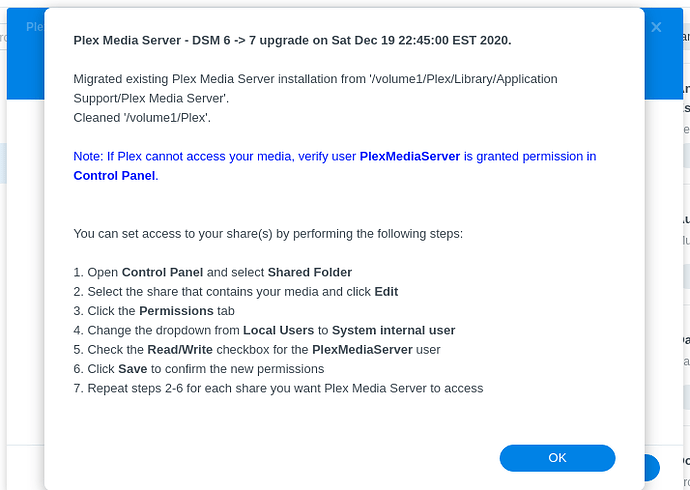
So far so good, thank you again for your help today!
Thank you very much, worked like a charm!
Hello Chuck,
First timer here, trying to trigger the PMS migration. So far without any success.
1- My RS819 was upgraded to DMS 7.0, using the upgrade installation package DSM_RS819_41890.pat
2- I rebooted the server and set the system internal permission to “Full Control” for “PlexMediaServer” for my Plex and Media shared folders. The “CUSTOM” option shows up. The new permissions were also set for files and sub-directories.
3- I stopped, and uninstalled my old PMS package and installed the DMS7 compatible one: PlexMediaServer-1.23.3.4707-ebb5fe9f3-aarch64_DSM7.spk
That’s where I’m stuck. I can’t get PMS to migrate…
I chose “Normal Installation” and “Use PMS internal storage”. After few sec, I get:

I’m no sure on what I’m doing wrong. I’d love to get your help.
Thanks in advance.
Sam
What you’re seeing is PMS refusing to migrate because there already exists an installation ( even if uninitialized ) in the DSM 7 area.
Uninstall w/ Erase removes that data so it can migrate.
The EXTREMELY SUBTLE point you likely missed (maybe I need emphasize more), is
Once Migration does occur, Erase is fatal to the metadata so use with extreme caution.
Here is what to expect as you update PMS on DSM 7
Please be advised, we were generous with our messaging and adjust it if the community wishes.
https://forums.plex.tv/t/dsm-7-plex-media-server-release-info-migration-instructions/653717/7
Hi All,
I’m trying to install via the newest intel 64 file from the plex website. Went through the manual install, used token, and when I tried clicking Plex Media Server icon, it chrome shows " This site can’t be reached
XYZ.synology.me refused to connect.
Try:
Plex Media Server (1).log (490.4 KB)
If you’re getting Connection Refused, that’s the networking not being correct somewhere. The existence of the log file demonstrates it’s running.
As for starting and configuring Plex on DSM 7 ( or DSM 6 ), you must be
-or-
First off, thank you so much for all of your patience and hard work on this. I am getting very frustrated with my DSM 7 Plex installation. I have followed all of your instructions and get the can’t access this server screen. I’m worried I may have messed something up. Sorry if this has been asked before, but can I delete everything with my Plex installation and just start over with a fresh install? I upgraded to DSM 7 beta from 6 before I realized there were issue with Synology changing how Plex works. Everything is current and up to date now but I still get the can’t access this server screen.
I have a relatively small library and don’t mind rebuilding meta data if I have too, but I have other contents on my NAS I don’t want to or can’t move so I can’t do a factory reset to the NAS. I could put the media in a docker container to work, but I want to try to avoid that if I can.
Sorry if this is not the right place to put this but I am relatively new to this and am a little over my head. Thank you for any help you can give.
Can you show me (screenshot) what you’re seeing?
This is the right place. We treat all issues equally (even the PEBKAC ones  )
)
Hi ChuckPa. I’ve got the same issue where exactly in line with the DSM7 change over my library has stopped auto updating and detecting changes.
All the permission changes etc seem to have gone smoothly. ie I can play files, and a manual library scan picks up new ones. However it no longer does automatically.
I don’t use Plex for audio or photos, so don’t think i have more than the number of folders to be an issue (especially at the exact same timing as the upgrade). Any ideas?
It is easy to check whether the kernel table is full or not.
Since this is a Linux issue, we customize (tweak) the default linux table size, 8192 folders maximum by default, to be bigger
If this was OK on DSM 6 but now fails under DSM 7, this is expected because DSM 7 is a ‘new OS load’ (reformatted the OS partition).
FAQ Procedure here.
Also for me, the CUSTOM column is not showing up on the old shared folder. If I create a new one, it will. How can I get this setting to show on the old share, please?
Yesterday I successfully upgraded my DS415Play from DSM 6.2.4-25556 to 7.0-41890.
No errors had been shown during installation.
After Reboot of the DS the Packet manager shows me a message that the (old) PMS could not be started, due to incompatibility.
Therefore I decided to deinstall old package PMS1.18.5.2309 and than I tried to reinstall a new PMS package for DSM 7, downloaded from Media Server Downloads | Plex Media Server for Windows, Mac, Linux, FreeBSD and More, but everything I’d tried so far unfortunately results with the same frustating message “This package is not supported on the platform of DiskStation or is incompatible with the current DSM Version”.
DSM version installed is shown as 7.0-41890 and I tried to install the following PMS packages, but none of them is installable.
PlexMediaServer-1.23.4.4805-186bae04e-armv7neon_DSM7.spk
PlexMediaServer-1.23.4.4712-1f0ed4aea-armv7neon_DSM7.spk
PlexMediaServer-1.23.3.4707-ebb5fe9f3-armv7neon_DSM7.spk
Any hint is appreciated to get PMS installed and runnnig again.
We’re discovering that those whose Plex shared folders are extremely old ( DSM 4, 5, and early 6.0) sometimes have this problem. EXT3 formatting has this problem where EXT4 volumes do not.
If you can create a shared folder, and the custom button exists,
(This might take a long time --depending on HDDs and amount of data)
With Plex uninstalled.
Rename the Plex share to be “Plex-old”
Create a new “Plex” shared folder
Confirm it has the Custom button
Move “Library” from Plex-old to the new shared folder
–now be patient while it moves everything–
You can now set the permissions before you start the install
Remember to click the “Apply to this folder, sub-folders, and files” box under “Custom” as you grant “Administrative” privileges to PlexMediaServer.
when done, with DSM 6 Plex removed (Required), start DSM 7 install…
Thank you. I’m doing this now, and setting the permissions is taking a long time now, so I guess something is different than before. Let’s see if the installation of PMS will work now.
GOOD. It should take a long time. This is the vital step.
We need to do this because, in DSM 7, we are no longer an administrative (root) user with unlimited authority.
It’s one of the many changes with DSM 7 and now required of all applications.
I’m used to using plex on windows laptop and wondering if I use plex on the NAS to check fix match of media or do I configure the plex installed on laptop to communicate with NAS?
Also, can I move Metadata from laptop to NAS?
