Many thanks @ChuckPa.
Sincere apologies I’ve clearly fallen into a true rookie error with my original set up of PMS. Thanks for clarifying. I’ve set up new Shared Folders with the requisite permissions. Apologies for what will now no doubt be another basic question, but is there a proper way to move my media out of the /var/packages/PlexMediaServer/home/Plex Media Server/Media blackhole into the new /volume1/movies, etc Shared Folders?
The only way to move your media from the black hole is by using the shell commands manually.
Here is an example sequence. I will assume you’ve placed random movie or tv items into media. Please adjust for your situation
- Control Panel - Terminal & SNMP - Enable SSH
- Control Panel - Users - Enable the “admin” user and set a password you know.
- Install Putty SSH if using windows
- Using putty, SSH , signing in as user
adminand get to the command line -
sudo bash
a. retype the admin password when prompted cd "/var/packages/PlexMediaServer/home/Plex Media Server/Media"cd localhost
These next steps are iterative until you get ALL your actual media files out of the internal “Media” directory (and likely into the Movies and “TV Shows” subdirectories
-
ls(this is to obtain a directory listing of everything in there) -
mv Movie1 Movie2 Movie3 Movie4 /volume1/Movies(move to the appropriate volume and shared folder name you use) - – repeat for television series as appropriate until done–
When done, the Media directory should look like this – with NO MEDIA anywhere :
bash-4.4# cd /var/packages/PlexMediaServer/home/Plex\ Media\ Server/Media
bash-4.4# ls
localhost
bash-4.4# cd localhost/
bash-4.4# ls -la
total 1024
drwx------+  18 PlexMediaServer PlexMediaServer  4096 Jul 13 09:50 .
drwx------+   3 PlexMediaServer PlexMediaServer  4096 Jul 13 09:49 ..
drwx------+ 648 PlexMediaServer PlexMediaServer 61440 Jul 14 02:05 0
drwx------+ 830 PlexMediaServer PlexMediaServer 69632 Jul 14 02:05 1
drwx------+ 704 PlexMediaServer PlexMediaServer 61440 Jul 13 11:02 2
drwx------+ 692 PlexMediaServer PlexMediaServer 61440 Jul 14 02:05 3
drwx------+ 653 PlexMediaServer PlexMediaServer 61440 Jul 13 10:57 4
drwx------+ 654 PlexMediaServer PlexMediaServer 61440 Jul 13 11:02 5
drwx------+ 658 PlexMediaServer PlexMediaServer 61440 Jul 14 01:00 6
drwx------+ 666 PlexMediaServer PlexMediaServer 53248 Jul 14 01:00 7
drwx------+ 674 PlexMediaServer PlexMediaServer 61440 Jul 13 11:02 8
drwx------+ 651 PlexMediaServer PlexMediaServer 61440 Jul 14 01:00 9
drwx------+ 645 PlexMediaServer PlexMediaServer 53248 Jul 13 11:02 a
drwx------+ 691 PlexMediaServer PlexMediaServer 61440 Jul 14 02:05 b
drwx------+ 668 PlexMediaServer PlexMediaServer 57344 Jul 13 11:02 c
drwx------+ 688 PlexMediaServer PlexMediaServer 65536 Jul 14 02:05 d
drwx------+ 647 PlexMediaServer PlexMediaServer 61440 Jul 14 01:00 e
drwx------+ 678 PlexMediaServer PlexMediaServer 61440 Jul 14 01:00 f
bash-4.4# ```
- Now exit the shell
- Disable the admin user
- Go into File Station → the share(s) containing your media
- Give your username Control / permissions for the media again. (
PlexMediaServerwill have taken full control)
I wanted to let you know that this last suggestion worked. I had to install the Beta version of PMS, but everything is working fine now. I appreciate all your help.
@ChuckPa Thanks for the guide, but I cannot get it to migrate. I still have all metadata in the plex shared folder with correct permissions for PlexMediaServer. I have uninstalled latest PMS for DSM 7 with erase all data multiple times, restarted my Synology, installed again, but migrations does not happen. Plex is started with setup guide, as if clean installation. Using latest DSM and PMS as of today.
Any ideas anyone?
Hi everyone. I successfully upgraded my DS918+ to DSM7 and to PMS 1.23.5.4801, except for two issues:
-
I have my media folders (Movies in /volume1/Film, TV Show in /volume1/Serie TV, Music). The only media missing are my photos… I can’t see my pictures, stored in “/volume1/photo” . How can I solve this problem?
-
my second server, running on a Linux NUC (media stored on the above mentioned NAS) is “empty” and is not able to find any media.
Any help, please?
Thank you so much.
There is a post somewhere.
This applies ONLY for photo shared folder
“Convert to Windows ACL” and then Plex will work for photo
We do not know why this is true.
So with my number of folders being well under the 8192, and only auto update library not working (but a manual one picks up new files). Is my best bet just uninstalling plex and starting again?
Thanks. I have the same except partial scan also ticked (which either fine on dsm6)
Hi, thanks but Synology says: The following shared folders cannot use the Windows ACL permission management system: photo , satashare , sdshare , surveillance , and usbshare .
How can I do? My photo folder is the system one.
Ask synology how you are expected to share your photos with other apps ?
It seems there is confusion or something broken in DSM.
I cannot get migrations to run, even though my plex folder is still there with metadata and permissions according to guide has been set. Also erasing all data for PMS before installing again.
@ChuckPa or @trumpy81 any ideas for how to force migrations to run?
After you Uninstall + Erase the DSM 7 application,
On your next installation of the DSM 7 application, what do you see when it completes / which error message do you get?
Would you show me please ?
No error message at all, it just completes and I can select open Plex from the package center. It does not seem to even try to migrate the data, can I do something to give me and you more insights into what’s going on?
Do you get a popup at the end ?
This is the last dialog I see before it is installed and I can select open.

As far as I understand it my plex folder still has all the metadata in it.


And this is how I uninstall the DSM 7 version of PMS.
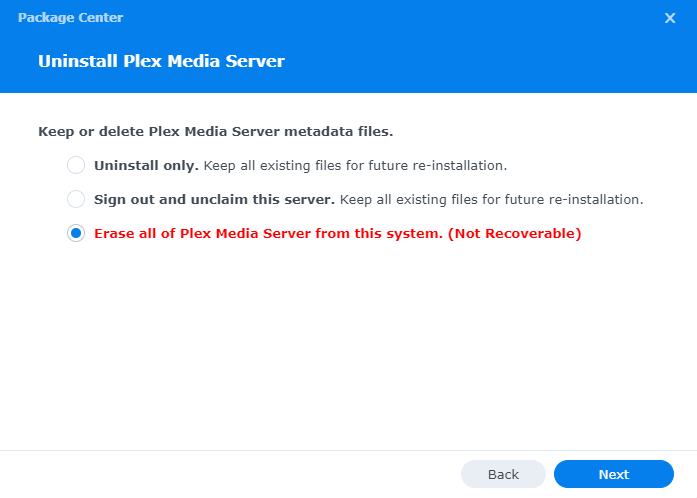
I need you to ssh (using putty or ssh itself) into the synology.
Once signed in as ‘admin’ (enable and give it a temporary password if needed)
sudo bash
now, with this privilege level,
cd "/var/packages/PlexMediaServer/home"
ls -la
cd "Plex Media Server"
ls -la
Show me this console output text please.
I think you have a PMS installation still sitting there.
No such package is unfortunately installed…
admin@Server:/var/packages$ ls /var/packages/
ActiveInsight Docker Node.js_v12 SecureSignIn SynologyPhotos
CloudSync dsm6-ui-compatible OAuthService SMBService
CodecPack FileStation Python2 SynoFinder
DhcpServer HybridShare ScsiTarget SynologyApplicationService
I am looking to upgrade my Synology to DSM 7.
Being that this thread is ~600 messages in and a month and a half old, is there anyway to simply sticky the steps one should do to upgrade (or change the opening message in the thread to highlight said steps)?
I recall seeing the steps roughly 100-200 messages in, but now they are lost in the sauce.
I apologize if there is an easier way to find them or if they are already stickied somewhere else.
Thanks!
1 Like
- presenting me with this listing
and
- this image
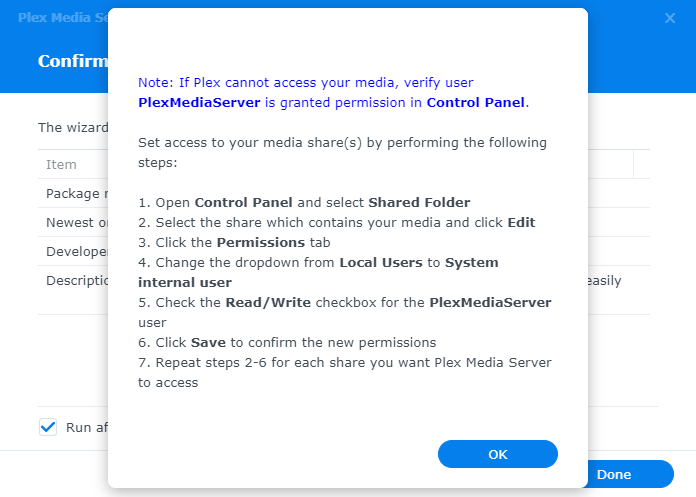
Are mutually exclusive.
The package cannot be installed on the host without it being present in /var/packages
Are you certain this is the same NAS ?
Unable to get the “Custom” button to appear after several reboots of DSM7, any suggestions?
