Yes I am totally sure I am SSH:ing into the same NAS. No Plex Media Server package in /var/packages, but I still get that dialog when trying to install the package. I never uninstalled PMS first before upgrading to DSM 7. Can it still linger somewhere else since the DSM 6 time causing this behavior?
Responding to @drez143 's post:
I hope this will be possible in future when @ChuckPA has the time. In the meantime I’m waiting a few more weeks before I upgrade/migrate in the hopes that as time goes by and edge cases show up it will be possible to refine the steps needed into the most accurate and simple ones. I’m willing to wait patiently until some of the chaos quiets down and @ChuckPA has the time to do a new writeup.
In the meantime, thank you to @ChuckPa and @trumpy81 for the excellent help you’re providing everyone on this journey!
TO ALL FOLLOWING HERE:
-
I have again repinned the instructions.
-
For your enjoyment, today’s in-flight movie is “DSM 7 - The Crash Course”

(Cliff’s Notes version)
- Uninstall Plex for DSM 6
- Upgrade to DSM 7
- Reboot DSM 7 - it fixes itself at next reboot – NO clue why.
- NOW we can start the installation process for Plex on DSM 7
== PMS installation
-
Plex for DSM 6 has been previously uninstalled.
-
Install the DSM 7 package
-
It’s going to fail the first time because the new user “PlexMediasServer” (which DSM creates – not us) doesn’t have access
-
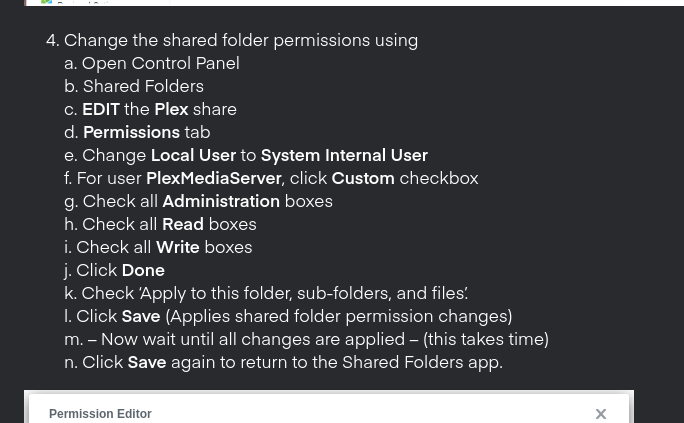
NOW we go through the steps of giving this new username “PlexMediaServer” Full Control of the Plex shared folder (Media doesn’t matter yet).
-
When we give the Full Control to
PlexMediaServer, there is a specific sequence which DSM 7 allows (this is the detailed pain part – I am sorry) -
This sequence.
-
With all the permissions now set,
a. Uninstall the failed Plex package – ERASE option . (ONLY IF DATA IN PLEX SHARE)
b. Manual Install the Plex package again. -
If everything is good, it will sit at “Installing” while it does all the work.
-
If not, it will show you the error and steps needed in the Popup.
(( ALL popup messages at end of installation tell you success or failure and how to make any changes ))
If all is sucessful, you’ll get the message at the end.
You will find a Migration.log file in the Plex shared folder containing details.
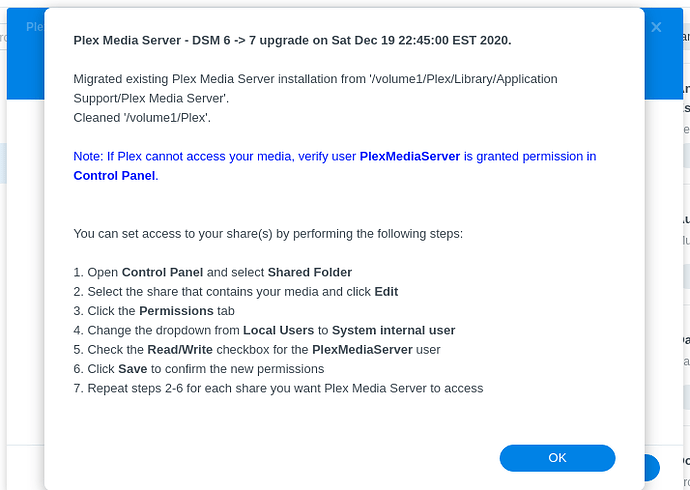
ALL this is detailed – with screenshots in the DSM 6 Migration Process thread at the top here.
2 Likes
@ChuckPa, this looks like just what I was hoping for to inspire me to start my migration process. Thank you!
is anyone having problems accessing the Photo folder (system folder)? My PMS is not able to show any photo, after the upgrade. I have all my photos there, on the nas 
But the reason for listing the packages was to see if PMS was still there after an uninstall, since that could be the only reason, mentioned, for not migrating the metadata in the plex share. But it is not there, and still it does not migrate, read and followed the instructions multiple times. It never gives any information about migration, it just finishes without any errors or success messages. Starting plex shows me a getting started wizard.
If I may augment here?
I have two requirements to begin migration.
- There is nothing in the DSM 7 area
- There appears to be something in a Plex shared folder SOMEWHERE on the NAS (this might be your issue? You have a “Plex” directory on multiple drives?)
My specific code:
# If there is no DSM 7 installation existing
if [ ! -e "$SYNOPKG_PKGHOME/Plex Media Server" ] || [ "$(ls "$SYNOPKG_PKGHOME/Plex Media Server")" = "" ]; then

  # And there appears to be a DSM 6-based Plex installation
  if [ "$(echo /volume*/Plex/Library)" != "/volume*/Plex/Library" ]; then
Now, to address whether directory Plex exists on multiple volumes –
- SSH into the Syno
- type:
echo /volume*/Plex - If there is only ONE ansswer, we’re good to go.
- If there are multiple locations, it will take manual inspection to figure out which is valid.
- If there are NONE, there is no existing Plex share to migrate (new installation),
Special test:
echo /volume*/plex
Show me all results please
@ChuckPa is there any other way to manually backup plex metadata folder now other than CLI?
I’m working on finishing what I started before DSM changed (changes after 41222).
For now, as trumpy said, CLI (which you can make a User-Script in Task Scheduler) is the best method.
1 Like
So have played with it a bit. My Movies library detects changes in both removing and adding a file fine and scans the library automatically. If i remove a file then empty the trash then the item is removed.
My TV show library doesn’t do any of this.
If I add an episode no automatic scan happens.
If i remove an episode it does pick up that the file is unavailable, but a emptying the trash does not remove it.
Any further ideas?
Hi @ChuckPa I have been reading through a lot of your posts and I thank you for all your hard work!
I logged on as admin and uninstalled the PMS DSM6 package, then rebooted, changed the privileges, then rebooted, but I also do not see the custom permissions option for plexmediaserver under the Plex share. Finally tried to install the PMS DSM7 package, but it gives me the below error (see screenshot). Any ideas on what to try next?

Hi guys,
I saw that plex has released a new version of PMS :

After migrating on DSM 7, with lot of troubles, i would like to know if i can upgrade wihtout fear another troubles with PLEX ?
What do you think of this upgrade ?
Thks
Skelton.
Hi @ChuckPa this is the answer I received from Synology:
“Dear Customer,
Thanks for contacting Synology Technical Support.
Unfortunately Plex app is not relased by Synology and we cannot provide full support for 3rd party app on our server. For your question we recommend to contact Plex developer directly or his community (you can create a thread on official developer forum → https://forums.plex.tv/).
Please don’t hesitate to contact us if you have further questions.”
So, no help for my Photo folder with Plex and DSM7.
F…ing DSM7!
-
I am currently running Plex 1.20.xxxxxx.
Is it worth going to the latest version of plex, then following the various steps to move from DSM 6 - 7 and uninstalling/reinstalling Plex?
-
I have one NAS (DS2413+) with 2 volumes on it. I assume that will cause no problem, since the volumes haven’t been moved around. The NAS volumes were rebuilt have I moved from having 1 single volume of 10 disks to two volumes of 4 disks each.
BTW if migration document at the very top is the master that you want people to follow. May I suggest that when you use the work package, put plex in front of it, and make sure it stipulates that the user downloads the package from Plex.tv.
It is worth that little bit of extra clarity. Since it is important to separate the plex package and it’s download location from the actual DSM upgrade firmware/package.
-
Thank you for the point about clarifying where to download Plex from. The version of PMS in Package Center, which Synology offers, is no longer compatible with DSM 7.0-41890 and above. I have amended the documentation to reflect this and your suggestion. Thank you,
-
You have a 2413+ , my recommendation is to stay on DSM 6 for now. That CPU is 8+ years old. As FYI: The D2700 is nearing EOL as a Plex server. It is already below the 700 Passmark recommended minimum. IMHO, I would start planning for a new solution which keeps the NAS as the great NAS it is but relates compute tasks (PMS) to other resources
Only one volume, volume1, and only one plex share.
admin@Server:/$ echo /volume*/Plex
/volume*/Plex
admin@Server:/$ echo /volume*/plex
/volume1/plex
admin@Server:/$ ls -la /volume1/plex
total 0
drwxrwxrwx+ 1 root root 656 Dec 7 2020 .
drwxr-xr-x 1 root root 560 Jul 15 00:13 …
-rwxrwxrwx+ 1 plex users 0 Apr 17 09:18 ‘Bitte legen Sie hier keine Mediendateien ab.’
drwxrwxrwx+ 1 plex users 8 Jul 14 23:54 @eaDir
drwxrwxrwx+ 1 plex users 38 Dec 7 2020 Library
-rwxrwxrwx+ 1 plex users 0 Apr 17 09:18 ‘Please do not place any media files here.’
-rwxrwxrwx+ 1 plex users 0 Apr 17 09:18 ‘Por favor, no coloque ningún archivo multimedia aquí.’
drwxrwxrwx+ 1 plex users 1456 Jul 14 18:59 tmp_transcoding
-rwxrwxrwx+ 1 plex users 0 Apr 17 09:18 ‘Veuillez ne placer aucun fichier multimédia ici.’
-rwxrwxrwx+ 1 plex users 0 Apr 17 09:18 ここにメディアファイルを置かないでください。
-rwxrwxrwx+ 1 plex users 0 Apr 17 09:18 请不要在此处放置任何媒体文件。
And no PSM package for DSM 7 installed
admin@Server:/$ echo /var/packages/Plex*
/var/packages/Plex*
Still, if I now do a manual installation of the latest PSM, x64, DSM_DS1520+_41890.pat, I get no dialogs about migrations, it just finishes as if the installation was completely new.
Thank you! That just found it.
Now we need find your real plex data
Can you go digging around and find where the data really is ?
Which volume is it on?
ls -la /volume*/plex
then
ls -la /volume*/Plex ?
and lastly
echo /volume?/*ex (finds anything ending in ex on all volumes)
It must be there somewhere
If your Plex share is on external ESATA or USB, you must move it back.
DSM 7 will not support the shared folder being out there nor can I migrate from the device. We need to change names to create a new “Plex” share and move data
Thank you.
I do have a DS918+, as my primary, but the DS2413+ is so useful, as you noted for it’s storage. It is a shame that the CPU is … underwhelming. It does have 4 GB in it though.
Keeping it DSM 6, as storage, will not cause you any issues for a DSM 7 machine.
Yes, having the same problem. Don’t have the same permission options with the photo folder like the media folders. On one system i have mounted from another folder and they can seen by Plex.
