Server Version#: 1.42.2.10156-720010156
Player Version#:
<If providing server logs please do NOT turn on verbose logging, only debug logging should be enabled>
Had issues with my server due to an upgrade in internet provider, have since reverted back to the original IP after going through the troubleshooting options. I have now removed PLEX fully from my Synology NAS, created a new folder and moved the media to that folder. I am trying to set up a new server but it keeps telling me to reclaim the unclaimed server and anytime I click it, nothing happens. I have tried resetting the password with no sucess either, any suggestions?
Did you delete the Plex (DSM 6) or PlexMediaServer (DSM 7) shared folder? That folder holds the Plex database, metadata, etc. If deleted, then the existing server is gone and cannot be recovered (unless you have a backup).
Changing your Plex account password unclaims the server. If you’ve already changed it in response to the security issue there is no need to do so again.
To claim your server, try this:
You must be on the same network as the NAS. If you are not, write back as there is a different procedure.
Using Synology Package Center, stop Plex Media Server.
Using Synology Package Center, start Plex Media Server.
Wait 2 - 3 minutes for Plex to fully start.
From a system on the same network as the NAS, point a private/incognito browser window at the IP address of the NAS. For example, if the IP address is 10.1.2.3, use http://10.1.2.3:32400/web (use http, don’t forget /web at the end).
You should see a Plex login screen. Login and select the wrench icon (settings).
On the left, you should see your server name below the Plex Web section. If so, select General (for the server, not Plex Web). There should be a “this server is unclaimed” message with a Claim button. Click the button to claim the server.
· Is the NAS running DSM 6 or DSM 7.x? Its running on DSM 7.2.2-72806 Update 3
· Did you delete the Plex (DSM 6) or PlexMediaServer (DSM 7) shared folder? That folder holds the Plex database, metadata, etc. If deleted, then the existing server is gone and cannot be recovered (unless you have a backup). Yes I deleted it as no other option worked for me, Ive tried to set up a completely new server but even if I try that, it keeps stating I need to reclaim the older server which I cant do.
· Changing your Plex account password unclaims the server. If you’ve already changed it in response to the security issue there is no need to do so again. Done this multiple times , hoping it would release the token so a new token / server could be set up, no success.
To claim your server, try this:
1. You must be on the same network as the NAS. If you are not, write back as there is a different procedure. It is on the same network.
2. Using Synology Package Center, stop Plex Media Server. Have done this, even fully removed it and done a fresh new reinstall
4. Using Synology Package Center, start Plex Media Server. Done.
5. Wait 2 - 3 minutes for Plex to fully start. Done.
6. From a system on the same network as the NAS, point a private/incognito browser window at the IP address of the NAS. For example, if the IP address is 10.1.2.3, use http://10.1.2.3:32400/web (use http, don’t forget /web at the end). Doesnt work for me whether its incognito or not and with my NAS’s IP address replacing the 10.1.2.3 including Web at the end. I have also tried numerous others from the online resources
7. You should see a Plex login screen. Login and select the wrench icon (settings).
8. On the left, you should see your server name below the Plex Web section. If so, select General (for the server, not Plex Web). There should be a “this server is unclaimed” message with a Claim button. Click the button to claim the server.
In Synology Control Panel → Regional Options, synchronize the NAS with a NTP server. This will make sure the NAS time is correct. It also is a basic Internet connectivity test.
In Synology Control Panel → Security, disable the Synology firewall (can re-enable afterwards).
Then follow the procedure for FAQ 31. If it works, you’ll see a “PlexMediaServer successfully claimed by…” message.
If it does not work, write back with the failure/error message.
I think the issue is internal, there is no way for me to claim the server and I think the only way it can be fixed is if a DEV can remove it from my profile and start from scratch with a new server.
I have removed it completely from my NAS and I have completely erased PLEX on my NAS and when I reinstall it, it goes through the process of setting up a new server, adding the folder, what type etc but once its scanning for media, it has an error message stating that there is an unclaimed server. When I hit the reclaim server, the loading wheel cog appears, sign in / out error occurs and nothing happens.
On an occasion or 2 it has made me re sign in but it just states I need to reclaim the server again and just the same actions on repeat.
I have a ticket raised with Synology aswell, it is connected to a network with internet access but the issues with my NAS have only occured since the issues with PLEX.
I cant do the Keep option as I have alread removed an reinstalled.
The error I get when I try to relaim is a sign in /out error message.
The 4 LAN ports were not an issue before but I’ll remove them and only have 1 connection. I’ll test this tomorrow at some point and update the thread but thanks for the suggestion.
I think your NAS is having trouble communicating with servers at plex.tv (The inability to sync the NAS with a public NTP server indicates network issues.). The error messages and/or log files will help to confirm this.
Since you’ve already completely removed Plex, there is no database, etc. to save.
Please do the following. It will help confirm what is happening.
Uninstall Plex Media Server. Choose the Erase All option.
Install Plex Media Server. Use the Plex Claim Token option (screenshots in FAQ31).
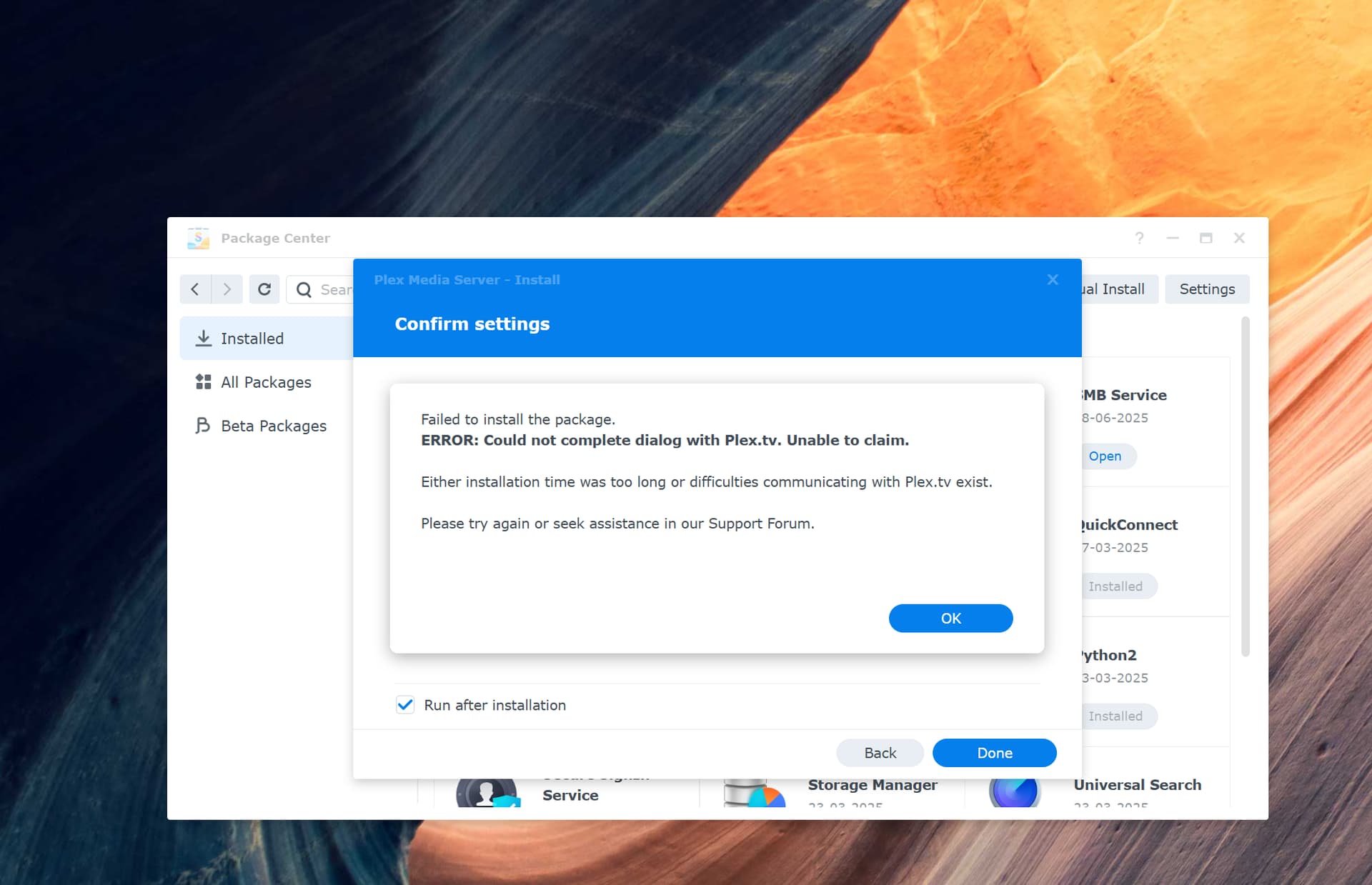
If the process fails, take a screenshot of the message and post to the thread.
Also, stop Plex Media Server. Using File Station, navigate to the Plex Data Folder. Right click on the Logs directory and choose “Compress to Logs.zip.” Download the file and attach it to the thread.
Reducing to one connection simplifies things. One less variable.
Ask them to assist syncing the NAS with a public NTP server.
I deleted the bond, connected only 1 LAN cable, it worked, connectd the rest and set up a new bond which seems to be working now so thank you for your help.
Yeah its really weird as I deleted the Bond, reset the LAN IPs and created a new Bond (which was the same as the original bond)which seems to have fix the issue but appreciate your help on it.