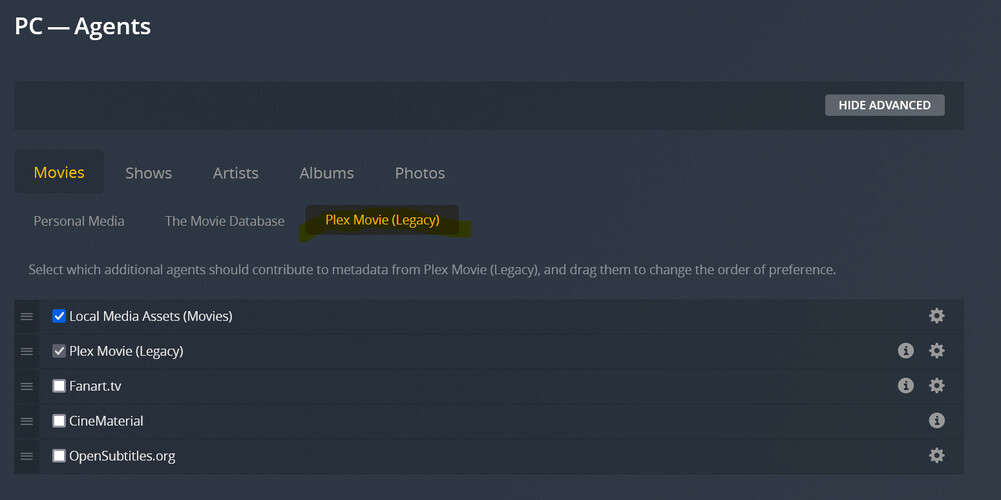
This is how I’d expect it to look and, according to e.g. this link, it is supposed to look (even though I should add that this post is about 1,5 years old):
If I change the agent to Plex Movie (Legacy) it does work as intended - but for probably comprehendable reasons that’s not what I am going for.
What I want to do is automatically download subtitles in my languages of choise.
It does not work automatically and I cannot enable the OpenSubtitles.org entry as the option to do so is missing.
I already tried uninstalling, deleting all (backed up) data and starting a new library from scratch - behaviour stays the same.
Is this a known issue with the actual version or can anyone please tell me what I’m doing wrong?
Thank you very much in advance, any help is highly appreciated!
[Edit: I found this post - which does answer my initial question - but it did not solve my problem - I still can’t find an option to enable automatic subtitle download via OpenSubtitles.org (or any replacement).
This being the “advanced library settings” tab that was being referred to, correct?:
Thank you very much for your reply and clarification!
That’s slightly upsetting news, as that was a very appreciated feature that massively helped to automate collections and their metadata.
Is there any alternative to do so?
I was thinking about stripping all my files of all subtitles using mkvbatch (by itself probably not the best idea, but I haven’t found a way to get rid of graphic based subtitles (PGS/VOB) only yet and as I have a lot of HDR files which don’t transcode properly (and using the tizen client) I haven’t found a better way to avoid having to change to a text based alternative manually every time - but if that means having to manually find, select and download a subtitles for each file that rather makes it more of a nuisance than help the situation).
I would temporarily switch forth and back the legacy agent to add subtitles, but unfortunately that removes all metadata added in the process - including subtitles (which in general makes sense and in my case is appreciated for any other part of it).
Consider a different client. Switching to a client that handles image based subtitles may be easier than stripping them from all your files and converting them to SRT.
The Plex apps for Samsung & LG have a lot of limitations, especially when it comes to subtitles. I’ve an LG OLED and I do not use the Plex LG app.
I use Android TV clients - the Nvidia Shield Pro and Amazon FireStick 4K.
They both play PGS/VOBSUB/SRT subtitles without transcoding video. Enabling SSA/ASS subtitles results in a video transcode.
The Shield will passthrough lossless audio such as TrueHD + Atmos and dts-HD/dts:X.
With the FireStick 4K, TrueHD is transcoded by the Plex server. dts audio formats direct play, but are converted by the FireStick to AC3 or EAC3.
The FireStick is an Amazon device, so they use it to push their streaming media. Once you’re in the Plex app it looks the same as the Android TV app on any other device.
The Shield is ~$200 USD, and the FireStick 4K ~$35 USD. A large price difference, but they serve different ends of the market.
The AppleTV 4K may be an option as well, especially if you’ve other Apple devices in the household.
Been thinking about buying the 4K TV stick for a while, but haven’t yet, as this issue with the graphic based subtitles is the only limitation really concerning me (I only have a stereo setup right now, running Plex server from a PC so audio conversion is, while completely unnecessary besides the Samsung’s limitations, not a big issue for me).
All the others apps I use also work well enough for my needs so far (Netflix, Prime Video etc)
NVIDIA shield is something I’m interested in for quiet a while, also and especially to run the Plex server on (especially as the only transcoding I ever need is due to audio codec limitations that would not apply anymore so really no high energy consumption device like a PC needed here (as I’m manually disabling PSG/VOB at the moment that’s on the list)).
Apple TV is a good idea as well.
It unfortunately all comes down to not a huge enough issue to solve to justify the investment, as my financial situation isn’t the best at the moment.
That being said I highly appreciate your suggestions and I will consider all of them regardless!