Recently bought a qnap TVS - h1288X and in the process of moving all my files to the NAS the tv library grouped all the tv shows under the first name it found. Moved all the files out of the folder and started adding them one by one. That worked until i was finished with one series and added another which it either did not find or put it into the first series. I am at the point of giving up as I know the files are properly coded as it worked on the windows server. HELP And I keep getting a warning from my anti virus from this site.
Not entirely certain of your issue but
- You’ve put media on the NAS
- Pointed PMS at a shared folder somewhere
- All your different series are getting globbed together as one?
If this is the case then this is a structure / where you’re pointing PMS problem
(easy to mistaken and even easier to fix)
On QNAP:
-
Do NOT use the Multimedia shared folder. It does not work with Plex.
It’s intended for use with QNAP software. -
For series , point PMS to share shared folder or subfolder you use for grouping within the shared folder,
[/share/media/tv] # ls -h
Alaska Animal Rescue/	      Ghosts (2019)/		        Science Channel/
Ancient Aliens/		          Ghosts (US)/		            SEAL Team/
Anne Rice's Mayfair Witches/  Good Omens/		            seaQuest DSV/
Baby Chimp Rescue/	          Grey's Anatomy/		        Secrets of the Earth/
Babylon 5/		              Hogan's Heroes/		        Secrets of the Universe (2022)/
BBC Documentaries/	          Hollywood (2020)/		        Sense8/
BBC Documentaries (1936)/     Hotel Secrets & Legends/	    Silo/
Black Mirror/		          Interview with the Vampire/   Star Trek Picard/
Bodies (2023)/		          Life After People/	        The Da Vinci Detective (2006) [480p]/
Childhood's End/	          List-of-avi.txt		        The Expanse/
clean-mkv		              Little House on the Prairie   The Night Shift/
Code Black/		              Lost Cities of the Bible/     The Sandman/
Dark Matter/		          Lost Cities with Albert Lin/  The Secret Life of Lighthouses/
Dr. Pimple Popper/	          Lost in Space/		        The Secret Life of the Airport/
Edge of the Universe/	      Mars - The Secret Science/    The Thorn Birds/
 In this example, I tell PMS to look at
 /share/media/tv.
( This is the ‘tv’ folder under the ‘media’ shared folder I created. )
PS: Please ignore some of my engineering/development oddball files in there.
There’re for me. PMS ignores them … they don’t look like media files.
Yes they are grouped under one folder, not seeing the other series as separate, Thanks for the quick reply. I even created another shared folder and put another series in there, plex found it with the correct meta data but put most of the files in season 1. I added 5 seasons all at once.
Also on the qnap you don’t see the shared folder name. You see ZFS19 and so on going up in number as you create the shared folders.
Can you give a specific example of your file naming / organization and which folder in that hierarchy is linked to your Plex library?
Yes, QNAP did some really unusual dataset naming with QuTS. It doesn’t make any sense (they still require the shared folder name to be unique regardless of volume it’s on).
As long as you remember that weird naming, you’ll be fine.
As for each series –
Series Name /
   Season 01/
      Series Name - S01E01 - Optional title for Episode 1.et
This is the structure.
Here’s the documentation about how to name your TV series.
I use FileBot and will share my renaming rules if you wish them.
https://support.plex.tv/articles/naming-and-organizing-your-tv-show-files/
I know the naming is correct as it worked before on my windows server. I am gonna do some screen shots I think will help you understand better. The movies are fine just the tv share is giving problems.


This is a fallacy.
Wrong namings can work – until they don’t.
Your screenshot shows that you are not using the folder structure that is required, as shown above by @ChuckPa
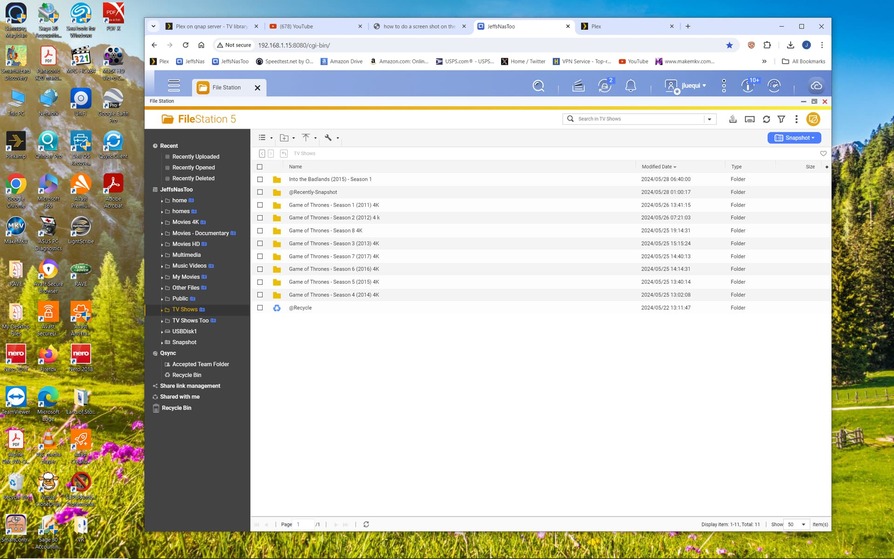
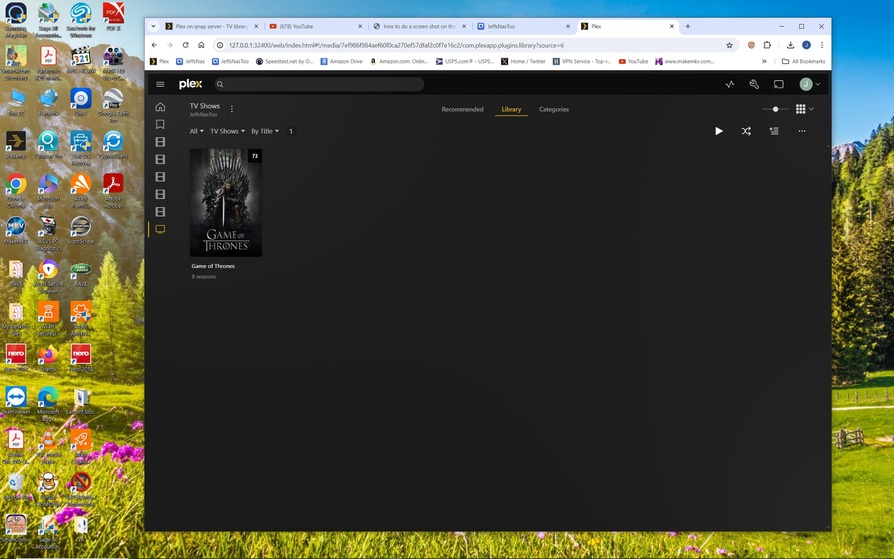

Your naming and organization is the problem.
Follow the examples and documentation in @ChuckPa’s post.

It is still wrong.
Please read the guidelines again. Note particularly how many folder levels are required (even if the show has only one season in total).
https://support.plex.tv/articles/naming-and-organizing-your-tv-show-files/
Still nothing
It worked before on a windows server and as I said if I put it into another tv shared folder plex finds it
I already told you above that this is a fallacy and means nothing.

