Plex Pulls Older Show with same name metadata

Server Version#: Version 1.22.2.4282
Player Version#: NA

I have a TV Show “Charmed (2018)” that is getting the wrong metadata for the episodes. It matches correctly, and I even have done fix match, and it has the right artwork for the show and seasons but then all the data for the episodes is wrong. Its pulling the data from the late 90’s show “Charmed” and I cant figure out why.

I have it set up like this (which works for all basically everything else, cutting out the episodes mostly for easier visibility):

Charmed (2018)/
├── Season 1
│   ├── S01E01 Pilot.mkv...
├── Season 2
│   ├── S02E01 Safe Space.mkv...
└── Season 3
    ├── S03E01 An Inconvenient Truth.mkv
...

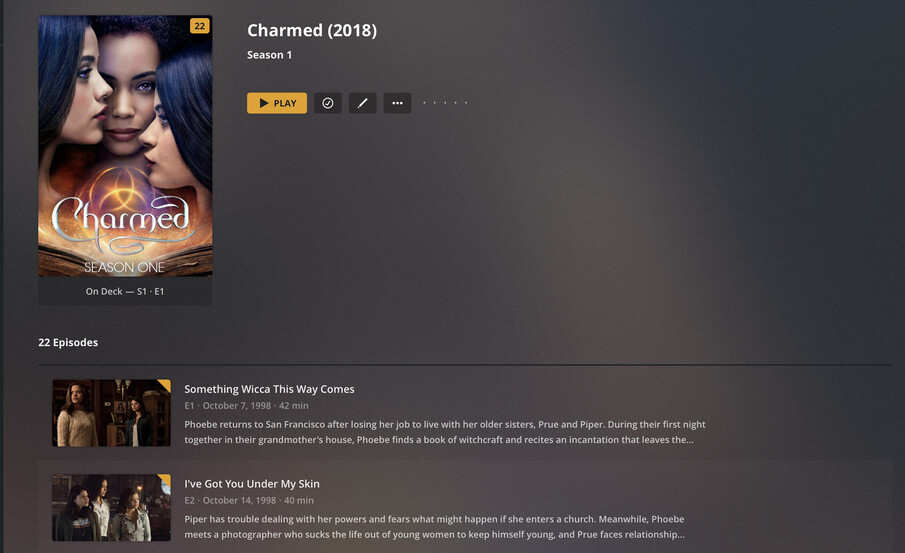
But here is what Plex has:

Which is the old show not the 2018 version. The episode names aren’t even the same.

How can I see what Plex is pulling back for the metadata? I have yet to switch over to the new TV Show beta agent.

Plex Media Server Logs_2021-04-11_02-28-31.zip (4.7 MB)

Look up the ID number of the correct show on TheTVDB.

Go to the top level of this show,
then do “Fix Match”,
and put this ID number into the “title” field.

Thanks for the suggestion, this doesn’t resolve the issue. The top level metadata is correct but its somehow pulling the wrong metadata for the episodes. I tried to remove and re-add the show and refresh the metadata, no dice.

What did you do, exactly?
Doing the Fix Match procedure should have shown you one search result, onto which you must click with your mouse to select it.

Are your video files using the mp4/m4v file container format?
If so, the incorrect descriptions could be embedded within the files themselves.

What did you do, exactly?

I went to Fix Match and used the TVDB id which showed one show, I selected it and it started refreshing. I force refreshed the metadata, and no luck.

Are your video files using the mp4/m4v file container format?
If so, the incorrect descriptions could be embedded within the files themselves.

Yes they are and no I do not see anything in the mediainfo that should be causing this.

For example:

General
Unique ID                                : 47597139379938905013870058112421491081 (0x23CEE02750A5B304EB25122BFA887189)
Complete name                            : S03E01 An Inconvenient Truth.mkv
Format                                   : Matroska
Format version                           : Version 4
File size                                : 2.18 GiB
Duration                                 : 38 min 59 s
Overall bit rate                         : 8 018 kb/s
Writing application                      : mkvmerge v49.0.0 ('Sick Of Losing Soulmates') 64-bit
Writing library                          : libebml v1.4.0 + libmatroska v1.6.1

Video
ID                                       : 1
Format                                   : AVC
Format/Info                              : Advanced Video Codec
Format profile                           : High@L4
Format settings                          : CABAC / 3 Ref Frames
Format settings, CABAC                   : Yes
Format settings, Reference frames        : 3 frames
Codec ID                                 : V_MPEG4/ISO/AVC
Duration                                 : 38 min 59 s
Bit rate mode                            : Constant
Nominal bit rate                         : 8 000 kb/s
Width                                    : 1 920 pixels
Height                                   : 1 080 pixels
Display aspect ratio                     : 16:9
Frame rate mode                          : Constant
Frame rate                               : 23.976 (24000/1001) FPS
Color space                              : YUV
Chroma subsampling                       : 4:2:0
Bit depth                                : 8 bits
Scan type                                : Progressive
Bits/(Pixel*Frame)                       : 0.161
Default                                  : Yes
Forced                                   : No

Audio
ID                                       : 2
Format                                   : AAC LC
Format/Info                              : Advanced Audio Codec Low Complexity
Codec ID                                 : A_AAC-2
Duration                                 : 38 min 59 s
Channel(s)                               : 2 channels
Channel layout                           : L R
Sampling rate                            : 44.1 kHz
Frame rate                               : 43.066 FPS (1024 SPF)
Compression mode                         : Lossy
Language                                 : English
Default                                  : Yes
Forced                                   : No

Text
ID                                       : 3
Format                                   : UTF-8
Codec ID                                 : S_TEXT/UTF8
Codec ID/Info                            : UTF-8 Plain Text
Language                                 : English
Default                                  : No
Forced                                   : No

Shows up as

It seems like when Plex is doing the Episode meta search its not sending the right info or something. I am not sure exactly how I can see the request and response that Plex would be sending / receiving to inspect that.
No, they’re not. MKV is not mp4.
So this idea is going nowhere, since Plex cannot use embedded metadata from MKV files.

Have you already tried the infamous Plex Dance?

Sorry I mistyped there.

And yes. I have already removed and re-added the entire show fully. It did the exact same thing, unfortunately.

Could you determine the content of the guid="... property from the Plex XML info from episode 1 please?

Looks to be guid="com.plexapp.agents.thetvdb://349317/3/1?lang=en"

349317 is the correct show, but it is not the same metadata, so perhaps this is a TVDB issue somehow?

Hey @ChuckPa, any idea what might be going on here? Or how I can see what might be going on?

I have tried to add the files with exactly the same organization and file names as in the first post above and I got an instant, correct match.

Can you confirm that:

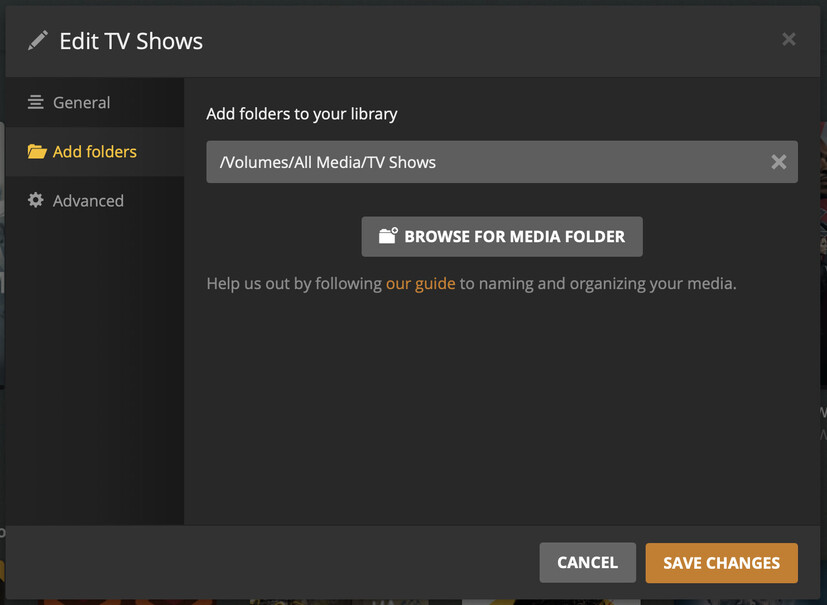
  • your tv show library is pointed exactly at the folder /Volumes/All Media/TV Shows and not one folder level above, nor below this?
  • you did the Plex Dance exactly as noted down in the link, with all steps and in the specified order

?

Sorry @OttoKerner I have been out of town.

your tv show library is pointed exactly at the folder /Volumes/All Media/TV Shows and not one folder level above, nor below this?

Yes, it is.

I did do that but I did it again for good measure and it seems to finally have matched correctly. Thank you!

This topic was automatically closed 90 days after the last reply. New replies are no longer allowed.