Not available
Location: Shanghai Municipality
ISP: CMCT (China Telecom)
log ERRORS HTTP 408
The following domains:
plex.tv
downloads.plex.tv
metadata-static.plex.tv
metadata.provider.plex.tv
meta.plex.tv
anything new? it’s been a week since I found the issue, currently the online content still out of service and the scrabing servcie only available sometime.
And it’s been 3 days since plex employee replied this topic last time. Would you at least update your daily progress? disappointing.
Feel lucky this happened just before the time I ready to buy Plex pass.
There is very little we can do at this point, we have an open ticket with Cloudflare but haven’t had any response yet.
The feasibility of adding an app-specific proxy setting was discussed with the team yesterday and it’s currently being investigated.
I’ll update this thread when more information is available.
5 Likes
Thanks, feel much better. your respons let us know we are not abandoned. 
This problem is getting worse today, and the website links cannot be logged in.
- Host metadata.provider.plex.tv:443 was resolved.
- IPv6: (none)
- IPv4: 104.18.0.127, 104.18.1.127
- Trying 104.18.0.127:443…
- Connected to metadata.provider.plex.tv (104.18.0.127) port 443
- schannel: disabled automatic use of client certificate
- ALPN: curl offers http/1.1
- Recv failure: Connection was reset
- schannel: failed to receive handshake, SSL/TLS connection failed
- Closing connection
- schannel: shutting down SSL/TLS connection with metadata.provider.plex.tv port 443
- Send failure: Connection was reset
- schannel: failed to send close msg: Failed sending data to the peer (bytes written: -1)
curl: (35) Recv failure: Connection was reset
C:\Users\sunxi>curl -vv https://metadata.provider.plex.tv
- Host metadata.provider.plex.tv:443 was resolved.
- IPv6: 2606:4700::6812:17f, 2606:4700::6812:7f
- IPv4: 104.18.1.127, 104.18.0.127
- Trying [2606:4700::6812:17f]:443…
- Trying 104.18.1.127:443…
- Connected to metadata.provider.plex.tv (2606:4700::6812:17f) port 443
- schannel: disabled automatic use of client certificate
- ALPN: curl offers http/1.1
- Recv failure: Connection was reset
- schannel: failed to receive handshake, SSL/TLS connection failed
- Closing connection
- schannel: shutting down SSL/TLS connection with metadata.provider.plex.tv port 443
- Send failure: Connection was reset
- schannel: failed to send close msg: Failed sending data to the peer (bytes written: -1)
curl: (35) Recv failure: Connection was reset
plex was completely paralyzed in Chinese mainland and could not log in to the server, which also led to the inability to access its own server. And we don’t have the right to decide on it. It is imperative that Plex officials provide an effective solution to get Pelx back to normal. If it can’t be solved, then I can only congratulate Plex for having lost a lot of users with lifetime memberships and users who are considering buying a lifetime membership. In China, more and more people are choosing other similar products. No matter how good the plex is, it won’t help if you can’t use it.
刮削服务器和登录的服务器被GFW间歇性墙了。中国大陆登录不了的话,请对相关的域名走代理。
以下是部分域名:
The scraping server and login server are intermittently blocked by the GFW. If you cannot log in from mainland China, please use a proxy for the following domains.
The following are some of the domains:
metadata.provider.plex.tv
analytics.plex.tv
plex.tv
scrobbles.plex.tv
assets.plex.tv
v4.plex.tv
mbz.plex.tv
acoustid.plex.tv
me.plexapp.com
lyricfind.plex.tv
songkick.plex.tv
lastfm.freetls.fastly.net
notifications.plex.tv
metadata-static.plex.tv
image.tmdb.org
3 Likes
Ask for a refund
Jiangsu Telecom in China is basically inaccessible. I hope the official can solve it. Thanks.
How long does it take?
How long does it take?
So far, the client and Android app cannot be logged in, and the web can occasionally be logged in, which greatly affects the use. After so many days, there is still no solution. I’m going to consider using Emby
Please add the web proxy option directly for the relevant online function.
1 Like
Server Version#:**
Player Version#:**
Mobile/TV/Desktop can’t open Plex app, Cloudflare CDN cannot be accessed
High latency and severe packet loss

1 Like
Hello, I would like to ask if it is possible to add an option to configure an HTTP or SOCKS5 proxy in the Plex suite version. Currently, it is impossible to access plex.tv for scraping in mainland China, which affects the user experience. Therefore, I hope to add a proxy configuration option to solve this problem.
1 Like
Hello, I have set up a proxy, and it is working properly for accessing and scraping. However, I am using unconventional methods.
Moreover, it’s not just the server that needs to enable the proxy; users accessing it locally also need to enable it to gain access. (I believe this is due to some pages being inaccessible. Please consider scenarios where only an internal network is used.)
Therefore, I believe that adding a proxy function can solve the problem.
The following page will pop up if local users do not enable the proxy. This is likely caused by the API being inaccessible.
I am using the Docker version from plexinc/pms-docker.


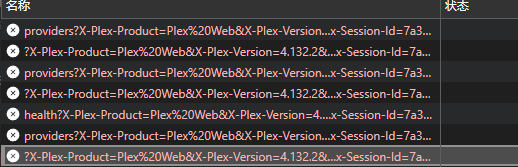
Even after adding an agent to the server, not being able to log in remotely is still a problem and cannot solve the problem fundamentally. It’s just usable, and it’s not convenient at all
Server Version#:1.40.4.8679
Player Version#:10.20.0.1175
<If providing server logs please do NOT turn on verbose logging, only debug logging should be enabled>
If the PLEX inaccessibility issue is not resolved by September, please allow me to apply for a refund. I can’t use it at all now
Purchase date 2022-9-21
