I swapped over the driver to VAAPI using your suggestion. So far the few shows that caused the server to crap out are not doing it. In fact, the shows are barely scratching my server CPU. With one person direct playing an unrelated show, and me testing via browser or android player, it barely inches up towards 20% CPU usage.
Video: 1080p (HEVC Main 10) (hw)
→ 1080p (H264) – Transcode (hw)
Audio: English (AAC Stereo)
→ Direct Stream
Subtitles: English Forced (ASS)
This happens on both android and web player (I haven’t used web for a few weeks now, but confirms it runs great). So far, minutes into the two shows I had this happen to, neither has crashed the server, but if it happens I am all set to zip up logs and send them.
Woke up to find my server offline. Probably unrelated to this particular issue, as I’ve woken up twice in the last 2 weeks to find my server offline after the daily maintenance. The first person to get up to watch morning news always reports it offline.
But I’d appreciate if you can find out why this happens anyway.
Thanks for the logs. I see a really wild address in the call backtrace.
Did your machine also get system updates overnight?
#0  0x00000000012753db in ?? ()
#1  0x00007f5ba4724150 in ?? ()
#2  0x0000000000000007 in ?? ()
#3  0x0065646f73697065 in ?? ()
#4  0x0065676175676e61 in ?? ()
#5  0x3038343637323236 in ?? ()
^^ #5 above and then #3 is where it vectored and failed.
I don’t believe it did. The Synology device is not set to update. It’s been running online for 68 days (and counting) so it did not reboot. Nothing happened other than Plex was just not running in the morn.
There have been two other times I woke to find the server offline, and it’s only been in the last 2 weeks. Never had this problem happen before in the 6+ months I’ve had the server.
Yeah, all the times it has crashed were not video-related. It may be the particular server version I’m on, which I’ve been on since 5/20. Since I used that version, it has closed down on its own in the middle of the night several times. Plex Media Server Logs_2021-05-29_17-44-35.zip (4.9 MB)
Here are logs I saved myself shortly after booting up my server after the second crash. I used the web client to download these logs using the button in server settings, so the most recent version of each log is showing a working server, and you must got back to SERVER-LOG-TYPE-1.log to find the last one before the crash. This particular crash was middle-of-the-day, and I restarted server within 10 minutes of it going down. No crash dmp, since I think it was uploaded to your servers automatically.
I feel like we’re getting off-topic here though. These crashes - while I’d love to find out what causes them - do not appear to be related to using the VAAPI driver for subtitle processing. If you wish to spin this topic off (or stop discussing my recent crash entirely), that is ok by me.
Plex does have a daily maintenance schedule, but I do not know when the server went down to see if it corresponded to this maintenance. Otherwise, the Synology does nothing else. If Plex wasn’t installed, the Synology NAS would do nothing but serve the occasional file accessed by share.
So no, nothing other than what Plex itself did should have caused Plex to close. I was hoping looking at the logs provided you might be able to tell me whether Plex reported a failure in a process itself that caused it to close.
I don’t know how to read - if I even am supposed to - that post of yours about wild addresses in the call backtrace. It’s all Hex to me.
To find out when plex shut down is pretty straight forward:
Making sure VERBOSE logging isn’t enabled – allows us maximum coverage of tasking.
When you restart Plex after a failure -
Download the logs ZIP file
Look at “Plex Media Server.1.log”
This is the most recent log file before the restart
a. “Plex Media Server.log” == current
b. “Plex Media Server.1.log” == 1st roll over
c. “Plex Media Server.2.log” == 2nd roll over
d. etc, etc.
If you prefer, you can just attach that zip and we’ll dive in
Don’t worry about the addresses but the memory address it was looking for was somewhere out in the 8000 TB memory address range – clearly a bad address meaning that data had been written where the instruction pointers (for the CPU on what to do next) had been compromised.
I had already posted my prior log - note, unrelated to VAAPI driver and subtitle/transcoding change - about 3 posts back. That crash was from a week ago and predated anything we did here related to the VAAPI driver change. Did you get a chance to look into that one?
It happened in the middle of the day with nothing I can think of that might be responsible for the crash. The “Plex Media Server.1.log” that I saw in it shows it ending at 17:30, apparently in the middle of a scan. The base non-numbered “Plex Media Server.log” starts at 17:41, which means I restarted the server (manually) 11 minutes after the crash.
I notice the “That 70’s Show” entries, which are in my DVR library. Every time I have a show recording, I notice that plex seems to love scanning and rescanning everything in my DVR library. Possibly everything in other unrelated shows too, but certainly everything in the same show. This is odd behavior to happen, as I worry it causes a lot of server activity rescanning shows that may have recorded days or months earlier.
In Settings->Settings->[Library], I already had enabled the following:
“When changes to library folders are detected, only scan the folder that changed.”
Anyway, this seems off topic enough. (I have more to add, but if I do I’ll do it elsewhere). Using this VAAPI driver seems to have helped out. I was planning on rushing moving Plex over to a new more powerful standalone PC I can scrounge up parts for, but the driver fix works. It is, of course, just a bandaid. There is no guarantee that this will not get reverted when a new Plex server version is installed and may delete that line in the preferences xml. What’d be great is to find out why using this new driver which is supposedly good for 30 mbps+ bitrate files is so bad at running 2-8 mbps files with a lowly SSA subtitle enabled. If you can fix this in the future, it’s one less bug that needs to be worked around.
Possibly related issue:
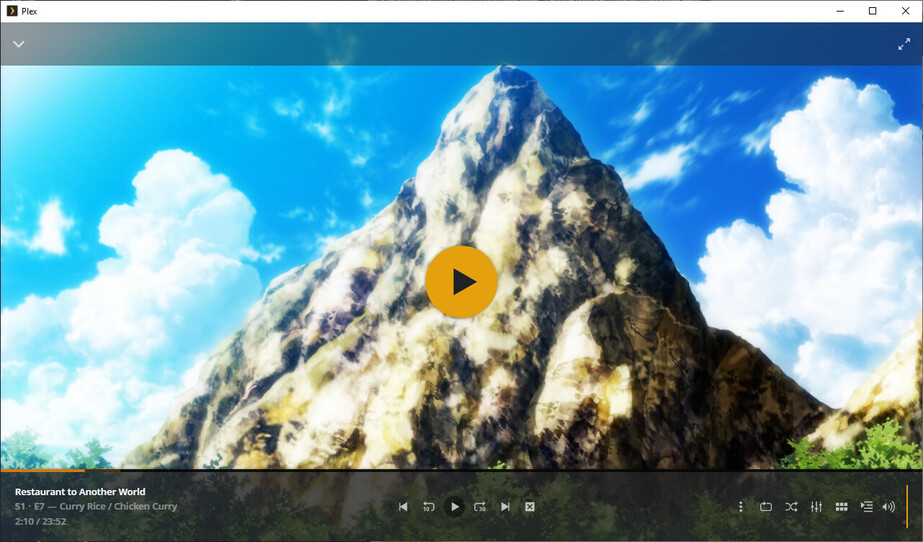
Friend started watching some of these HEVC shows I have. It’s transcoding for him to 720p (apparently all my upload of 8 mbps can support), which seems to cause “blue lines” in certain scenes. It’s not in the source video itself or when directly played. At original quality, the scene plays beautifully. Seems to be identical to this old forum post here:
I see references to the VAAPI driver, and something about a bug in it that possibly causes an offset in certain colors in certain modes? Anyway, the post near the end has one person vowing to run a script that eliminates “:format=nv12” from some Plex Transcoder file every update. The last reply at all was over a year ago in which PMS 1.18.1 supposedly fixed the issue.
Well, it’s back. I don’t know if it’s related to forcing use of this old VAAPI driver in order to transcode HEVC video with subtitles, but the timing of it seems odd.
It happens to my friend because my server is transcoding to a lower bitrate than normal, but I can reproduce it using the Plex For Windows app locally by forcing a lower bitrate for my video. Here are some images (super huge, sorry, I do not know how to reduce size, so this is original screenshot size. Top is image running at 720p transcode, bottom is original quality. Not the vertical stripes near the mountain-top and the edges of clouds:
Doesn’t seem to matter if subs are enabled or not. I think they mentioned subs in the old post as a cause because that was causing a transcode rather than a direct play?
Gladly. What XML are you referring to? I don’t see what file it is this person modified in their Plex install from years ago. I do not know what XML you are asking for.