Server Version#:1.15.3.876
Player Version#: 3.93.1
I have been a Plex user and QNAP user for the last three years, albiet a novice to a degree. Earlier this week I updated both to the most recent plex server update and also to the QNAP 4.4.0.0883 update that was originally pushed out on 3/23. All systems were up and running fine for approximately 2 days. After adding a couple of movie files last night I noticed that the new files were not showing up on my plex server and it appeared that the server was in a constant flux of refreshing metadata. The server was still able to play movies last night even though new media could not be added. I tried a restart of my Qnap NAS and after the restart all the sudden my server was no longer discoverable.
This morning I have done pretty much everything I could think of to troubleshoot the problem (albeit I am still limited in server based knowledge), but I have gone as far as rolling back to a previous plex release (stable / non-beta version), I tried also updating to this newest release that came out today, I tried rolling back my QNAP firmware, tried factory reset of the Qnap settings and multiple restarts of the system as a whole and nothing seems to have worked. I can click on the Plex app right in my app center and it can’t reach plex. I can type in my QNAP’s IP address direct and cant reach plex. No matter what method I try I can’t reach plex. When I try and reach from the plex.tv launch it says no server found. No changes were made on my internet / router side over these days that I can think of would trigger this reaction. I have no clue if this is a QNAP or Plex issue but all I want is my server back. Please if anyone could help it would be much appreciated.
Did you happen to run Windows Update as well? I just did the latest April 2019 Windows Update and then Plex updated to the latest version right after. It messed with the libraries and is not accessible outside of my LAN. I can’t roll back the Windows patch at this point, and am stuck. I have been loyal to Plex for a VERY VERY long time now. This one is perPLEXing me… if anyone has a fix, please post. I know it’s not my router port forwarding or anything like that. It has to do with what the windows update did and/or the recent Plex updates.
Looking at the QNAP log there is nothing out of the ordinary; it has me updating the program on 4/1, worked fine for 3 days and then on 4/4 it just stopped working, where it shows start and stopping on the night of 4/4 that was by my command because I was hoping starting and stopping it would make it work.
Severity Level Date Time Users Source IP Application Category Content
Information 2019/04/04 09:39:30 PM System 127.0.0.1 — --- Stopping Plex Media Server…
Information 2019/04/04 09:28:38 PM System 127.0.0.1 — --- Starting Plex Media Server…
Information 2019/04/04 09:20:10 PM System 127.0.0.1 — --- Stopping Plex Media Server…
Information 2019/04/01 06:03:10 PM System 127.0.0.1 App Center App Installation [App Center] PlexMediaServer enabled.
When I tried to access it I used http://192.168.1.164:32400/web/index.html since that is the local IP address of the server on my network when accessing from my computer. This was the IP I was able to access it for the 3 years that it had been working prior to. I also tried my myqloud IP address for non-local access which had allowed me to connect when I was away from my network and that also did not access the server. I did not do a windows update on top of all that.
some additional info; I just attempted to see if it could be a windows issue or a firewall issue so to bypass I hooked up a monitor directly to my QNAP Nas and a keyboard and tried to access the server directly from my machine. I opened up both Chrome and Firefox directly on my NAS and tried to access the server from every possible manor to no avail. I tried http://localhost:32400/web direct from the machine, I tried http://127.0.0.1:32400/web and I tried http://192.168.1.164:32400/web and none of the above worked. One thing I noticed when I go into my QNAP processes it tells me that plex media servers status is “sleeping”. I never looked in there before, and that seemed odd. As stupid as this might sound I tried everything I could think of to “wake it up” and nothing would change that status. Is that normal that its sleeping? Anyone know how to get it out of that state?
I attempted this and it still shows in my processes that the plex media server is sleeping and is still non-accessible. Now though I see two different plex media server processes showing up in my system status but both still show it as sleeping with two different “PID”'s for the two processes (though to be honest i have no idea what a PID is).I hard shut the my QNAP down, unplugged it, plugged it back in and restarted the system, still was unable to access it. I then stopped the app in my app center, used Putty and typed in what you told me to put in and I got this is as a response:
5446 admin 1084 S grep plex
Dont know what that means but maybe it means something to you. This is where I kind of lose understanding of whats going on. Even after this still inaccessible and when I open up the system status I still see plex media server showing up as sleeping, and when I click on it or try and access it from any of my ip addresses I still get
This site can’t be reached
192.168.1.164 refused to connect.
And when I try and access it from the plex.tv web launch I get no server found…
I stopped it and restarted it again, still no avail. Also restarted my whole QNAP again and nothing.
This may sound stupid but how do I get access to the log if when I try and open my Plex no server is connected so that when I go into settings I have no ability to get to any server information or logs?
I sent my logs to you dane22 in a zip file as a direct message;
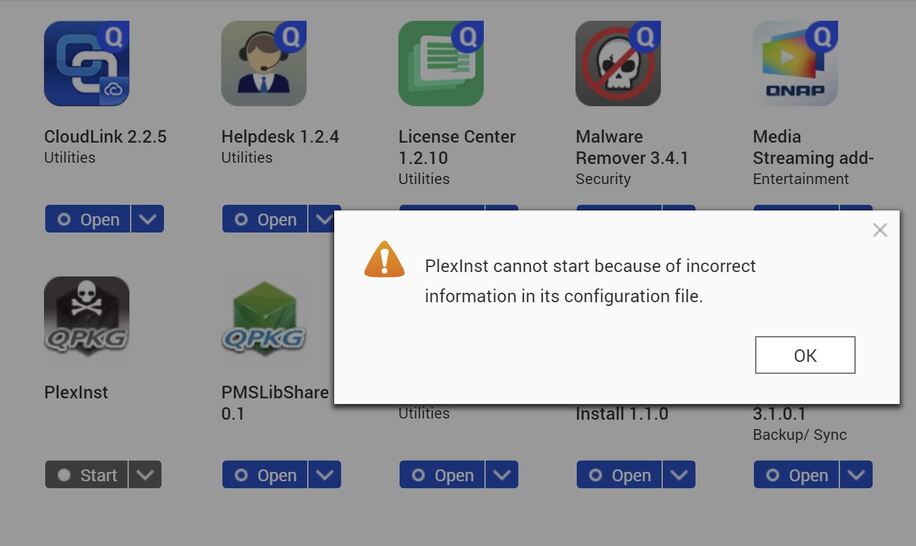
I just restarted my entire QNAP system once again just to see if somehow today would act differently and I noticed something new in my app central; a skull and crossbone app named PlexInst and when I click on it it says PlexInst cannot start because of incorrect information in its configuration file. The plex app is still availible to be clicked on from this screen (its slightly out of the frame from the screenshot, but still when I click on the app to open it it just leads me to an unable to connect screen. Attached is a snapshot of it. Maybe this means something?
I do now have a folder called plex. I just resent a DM with a zip file of all of the logs. The last log generated is from the night the server went down and it does definitely show some errors but unfortunately I do not know enough of how to fix what it is saying.
How many network interfaces have you connected to your QNAP?
And see in the logs, that you are having issues with network changes randomly, so suspect you connected more than one interface, and tried some teaming of those, but doesn’t have an intelligent switch behind it.
If so, make sure only one interface is connected, and restart your QNAP, and if not, bad network connectivity, either QNAP HW, bad cabling or bad switch
I only have one ethernet cable running from my QNAP system to my modem; when I look back at my qnap log it does appear there are multiple times where the interface switch changes; this is from three days prior to crashing, but nothing shows up in my log from that night.
Severity Level Date Time Users Source IP Application Category Content
Information 2019/04/01 05:44:42 PM System 127.0.0.1 Network & Virtual Switch Infrastructure [Network & Virtual Switch] Interface “Adapter 3” connected.
Information 2019/04/01 05:44:06 PM System 127.0.0.1 Network & Virtual Switch — [Network & Virtual Switch] Initialized Network & Virtual Switch.
Information 2019/04/01 05:38:29 PM System 127.0.0.1 Network & Virtual Switch — [Network & Virtual Switch] Stopped Network & Virtual Switch.
Information 2019/04/01 05:28:19 PM System 127.0.0.1 Network & Virtual Switch — [Network & Virtual Switch] Initialized Network & Virtual Switch.
Information 2019/04/01 05:28:55 PM System 127.0.0.1 Network & Virtual Switch Infrastructure [Network & Virtual Switch] Interface “Adapter 3” connected.
Information 2019/04/01 05:13:43 PM System 127.0.0.1 Network & Virtual Switch — [Network & Virtual Switch] Stopped Network & Virtual Switch.
Following up, I forced my network switch to a single adapter, changed out the cables, I restarted numerous times after each step of the process and nothing would fix the issue. I finally bit the bullet and did a full deletion of Plex and re-install and now back up and running. Lost my metadata but rather have the program up and running than the metadata. Just happy to have it back. Thanks everyone for the help.